HOW TO INSTALL THE PHONE
CONNECTION MODE INDICATOR DESCRIPTION
Solid green The gamepad is ready to use
Blinking blue Connecting
CHARGING STATUS INDICATOR DESCRIPTION
Solid white Charging
Off Not charging
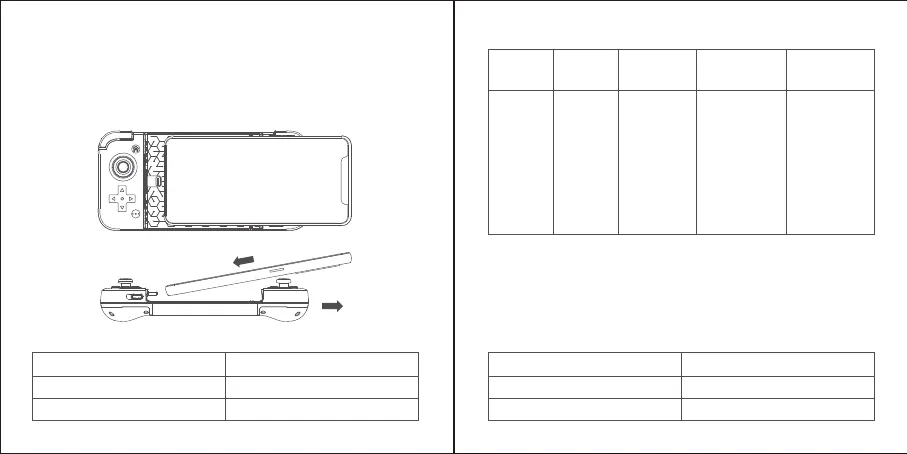
1.Align the Lightning port on the bottom of the phone with the Lightning
connector on the left side of the gamepad and plug it in.
2.Pull the right side of the gamepad away and install the phone into the fixed
position of the gamepad. After succesful connection, the connection mode
indicator will stay solid green, indicating that the gamepad is ready to use.
HOW TO DETACH THE PHONE
Grip the right side of the gamepad, then gently pull the left side of the gamepad
to detach the phone from it.
HOW TO CHARGE YOUR PHONE THROUGH THE GAMEPAD
Using a Lightning charge cable (not included) to connect the Lightning charging
port on the bottom of the gamepad and the power adapter (not included).
TURBO COMBO FUNCTION
2
1
COMBO
SETUP
COMBO
CANCEL
COMBO
FREQUENCY
GEAR
CONNECTION
MODE
INDICATOR
PROGRAMMABLE
BUTTONS
Press and
hold the
TURBO
button, then
press the
button that
needs a
combo set.
Double-click
the TURBO
button to
cancel all the
combo
buttons that
have been
set.
Press and hold
the TURBO
butto, then
press the
D-Pad’s left
button
(downshift)or
right (upshift)
button.
3 gears,
Slow/Middle/Fast
Slow Turbo,
flicker 1 time
Middle Turbo,
flicker 2 times
Fast Turbo,
flicker 3 times
A,B,X,Y,L1,L2,L
3,R1,R2,R3



 To Next Page