Compass Calibration Process
Compass Calibration is performed with the drone outdoors and away from any sources of
magnetic interference such as metal structures, radio masts or mobile phones.
1. Place the drone on a horizontal surface. Remove propellers and accessories. Power on
the controller then the drone. Close the top GPS hatch cover.
2. Watch the Drone Status Indicator through the top GPS hatch cover of the drone.
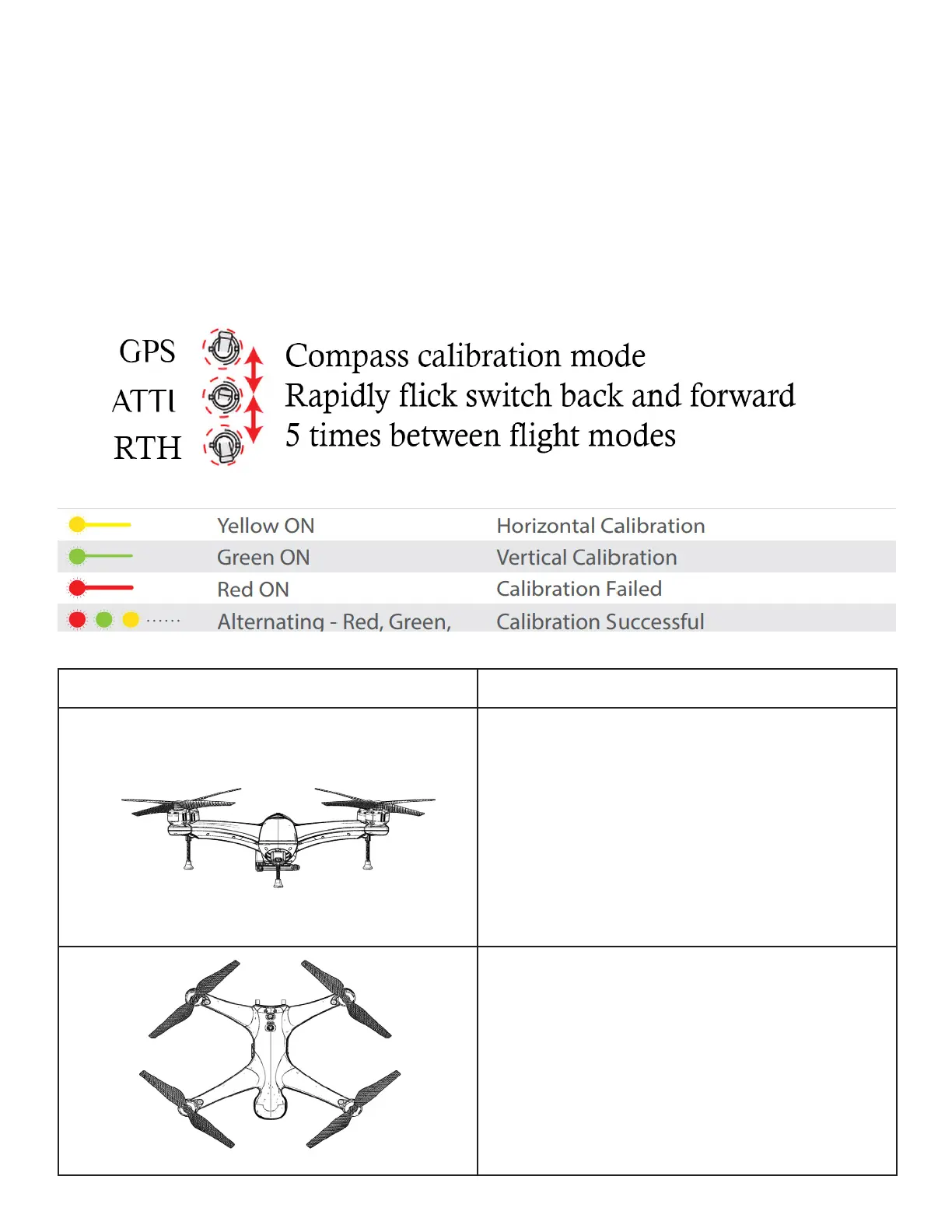
2. Aer hearing a drone power up tone, rapidly switch the Flight Mode switch backwards
and forwards between the three modes until the Drone Status Indicator turns YELLOW
Calibration Step Description
1. Holding the drone horizontally, rotate the drone
around you in a clockwise direction until the Drone
Status Indicator changes from YELLOW to GREEN.
2. Hold the drone nose-down, facing away from you.
Rotate the drone clockwise until the Status Lights
start blinking green.
en the calibration is complete.
If the calibration procedure was not successful, the
Drone Status Lights will glow RED for 3 seconds.


 To Next Page