13
GB
Always replace blades in pairs and only use the
A original GARDENA Blade Set.
The GARDENA Blade Set can be ordered indicating
the type of device from GARDENA Service.
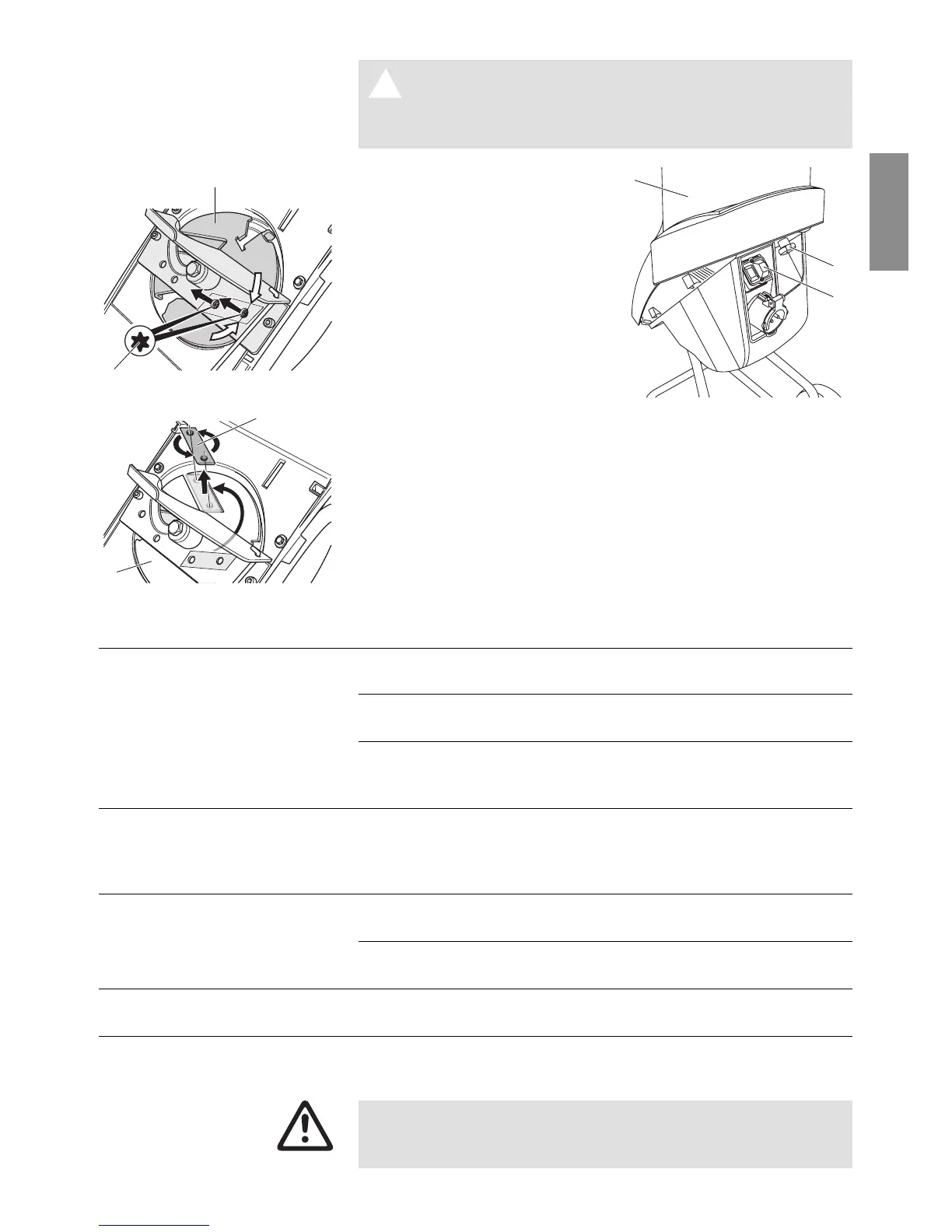
1. Press the red OFF switch
C
and unplug the mains plug.
2. Turn the knob
D
anticlockwise
until the housing cover
E
is
released.
3. Lift the housing cover
E
.
The housing cover is help
up by a rod.
4. Turn the blade disk
G
until
both flat-head bolts
H
can
be seen through the holes.
5. Loosen both flat-head bolts
H
one after the other using a Torx insert T30.
Loosening the bolts through the two holes prevents the blade
disk from turning.
6. Turn the blade disk
G
and remove the blades
I
.
7. Turn the blades
I
180° or replace the worn blades on both
sides.
8. Reinstall the blades
I
in the opposite order.
Problem Possible cause Remedy
Motor does not start No mains voltage because v Install new fuse.
fuse is defective.
Power cable defective. v Check power cable /
replace power cable.
Housing cover not mounted Close housing cover
E
properly. Circuit breaker is and tighten knob
D
.
active (off).
Motor switches off Blockage protection activated to v After the removing blockage
constant overload or blockage and waiting until the cooling-
at the blades. down time has elapsed, the
motor can be restarted.
Shredder does not draw Blockage due to too soft v Add harder branches.
shredding material in shredding material.
Collection container is over-full v Empty the collection
(cutting tool blocked). container.
Insufficient cutting power, Blades are blunt. v Rotate blades or install new
blockage increasing blades.
If any other faults occur, please contact GARDENA Service.
Repairs to the electrical component must only be carried
out by GARDENA Service or an authorised specialist
dealer.
Replacing the Blades:
H
G
I
G
D
C
E


 To Next Page