EasyManua.ls Logo

Gateway 4535GZ - Page 36

Gateway 4535GZ
158 pages
Print Icon
To Next Page IconTo Next Page
To Previous Page IconTo Previous Page
Loading...
CHAPTER3: Setting Up and Getting Started
30
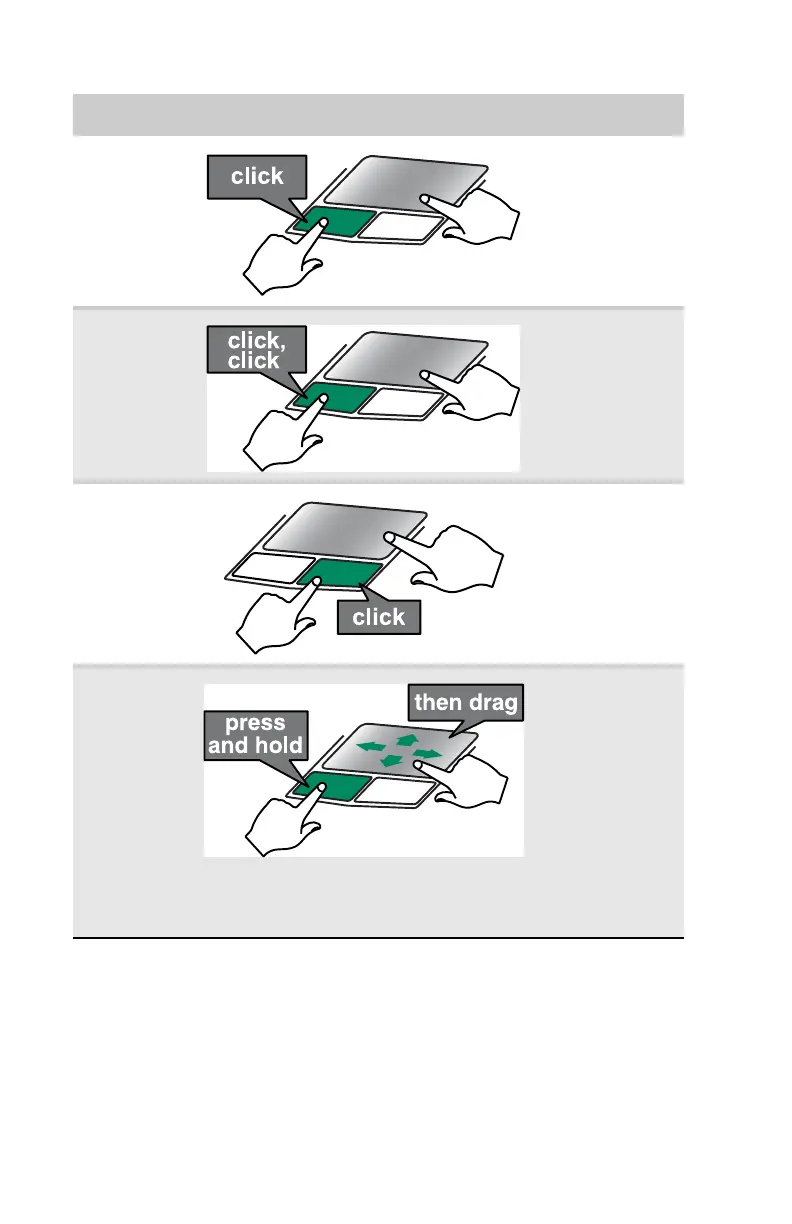
Select an
object on the
screen.
Position the
pointer over the
object. Quickly
press and release
the left button
once. This action
is called clicking.
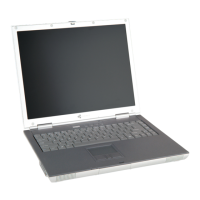
Start a
program or
open a file or
folder.
Position the
pointer over the
object. Press the
left button twice
in rapid
succession. This
action is called
double-clicking.
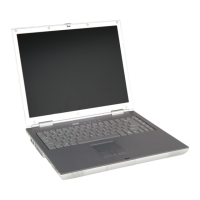
Access a
shortcut
menu or find
more
information
about an
object on the
screen.
Position the
pointer over the
object. Quickly
press and release
the right button
once. This action
is called
right-clicking.
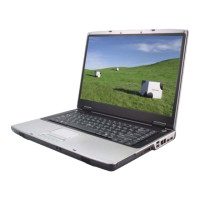
Move an
object on the
screen.
Position the
pointer over the
object. Press the
left button and
hold it down, then
use the touchpad
to move (drag) the
object to the
appropriate part
of the screen.
Release the
button to drop the
object where you
want it.
To... Do this...

Table of Contents