ge.com
INSTALLINGTHESTACKBRACKETKIT
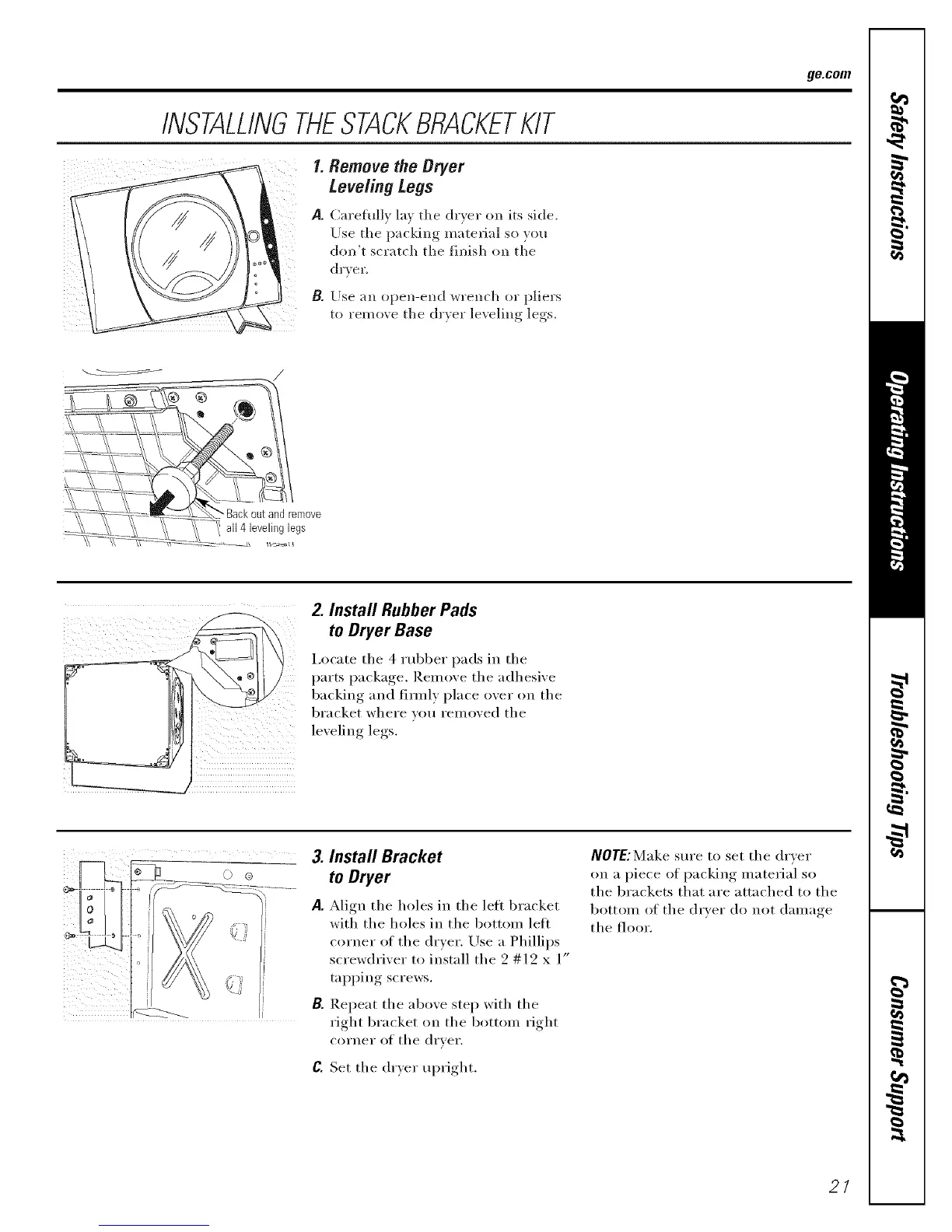
I. Remove the Dryer
Leveling Legs
P. Carehdlx la_ the (h'xer on its side.
Use the packing matel-ial so }ou
don't scratch the finish (m the
dY_ ell
B.
Use an open-end ",_rench or pliel's
to remo_e the dr*er levelino legs.
Z Install Rubber Pads
to Dryer Base
i,ocate the 4 xubber pads in the
parts package. Remove the adhesive
backing and firefly place over on the
bracket where wm removed the
leveling legs.
0 @
3. Install Bracket
to Dryer
A. Align the holes in the left bracket
with the holes in the bottom lett
corner of the dryer. Use a Phillips
screwdriver to install the 2 #12 x 1"
tapping screws.
B. Repeat the above step with the
right bracket on the bottom right
corner of the drver.
C. Set the drxer, Ul)right, .
NOTE:Make sm'e to set the dryer
on a piece of packing material so
the brackets that are attached to the
bottom of the dryer do not damage
the floor.
21


 To Next Page