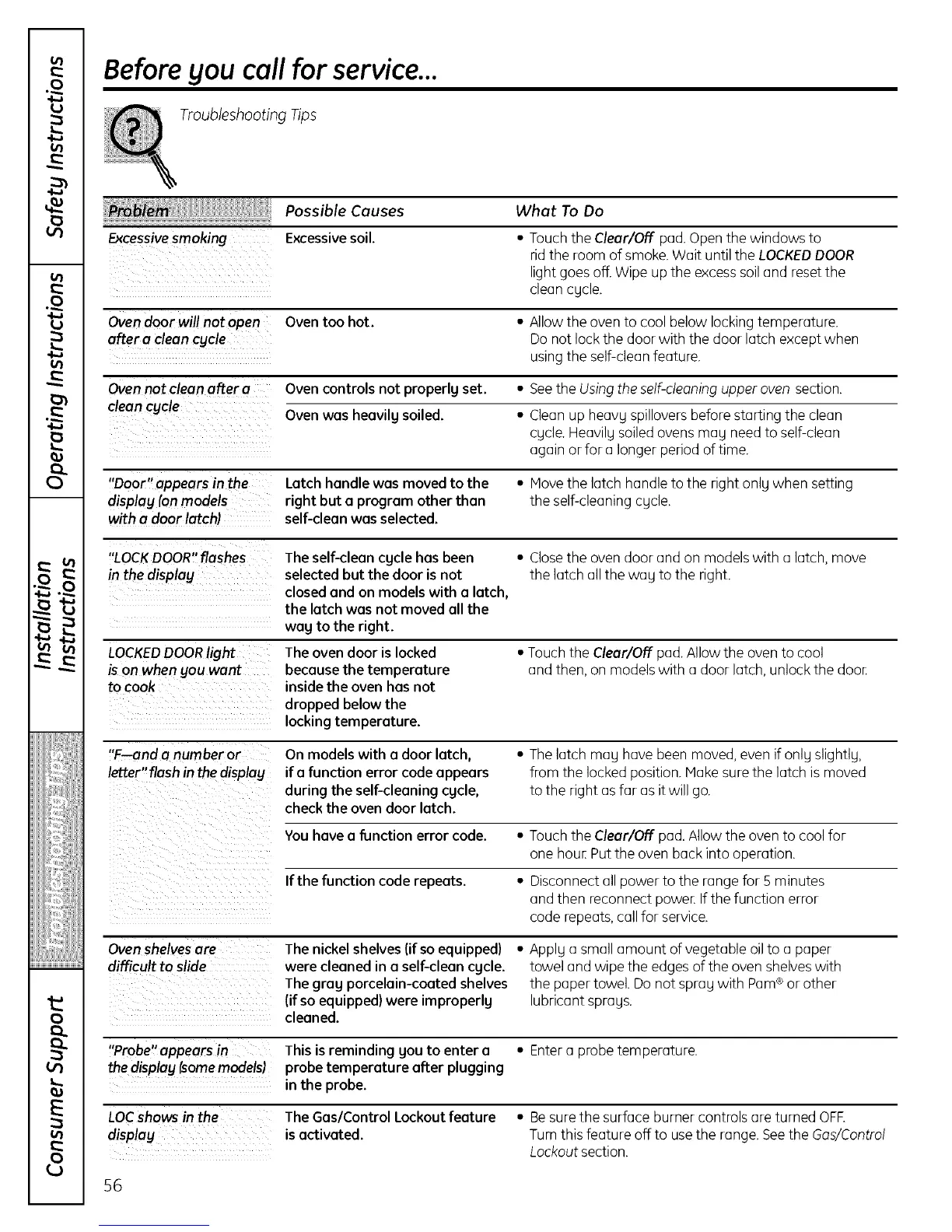
Beforeyou callfor service...
Troubleshooting Tips
Possible Causes
Excessivesmoking Excessivesoil.
Ovendoor will not open Oven too hot.
Ovennot clean after a Oven controls not properlg set.
clean cgcle _ --
Door appears in the Latch handle was moved to the
displag (on models right but o program other than
with a door latch) . self-cleanwas selected.
"LOCKDOOR"flashes The self-cleancgclehas been
in the display selectedbut the door is not
closedand on models with o latch
the latch was not moved oil the
wag tothe right.
ison when you want becausethe temperature
to cook insidethe oven has not
dropped below the
locking temperature.
"F--and a number or On models with a door latch,
letter"flash in the displag if a function error code appears
duringthe self-cleaningcgcle,
checkthe ovendoor latch.
You havea function error code.
Ifthe function code repeats.
Ovenshelvesare The nickel shelves(ifso equipped)
difficult to slide were cleaned ina self-cleancgcle.
The grog porcelain-coated shelves
(ifso equipped) were improperlg
cleaned.
"Probe" appears in This is reminding gou to enter o
the display (somemodels) probe temperature after plugging
in the probe.
LOCshows in the The Gas/Control Lockout feature
displag is activated.
56
What To Do
• Touchthe Clear/Off pad. Openthe windows to
rid the room of smoke.Wait until the LOCKEDDOOR
light goes off.Wipe up the excesssoil and resetthe
clean cycle.
• Allow the ovento cool below lockingtemperature.
Do not lock the door with the door latch except when
using the self-cleanfeature.
• Seethe Usingthe self-cleaning upper oven section.
• Cleanup heavy spilloversbefore starting the clean
cycle. Heavily soiledovens may need to self-clean
again or for a longer period of time.
• Hove the latch handle to the right only when setting
the self-cleaning cycle.
• Closethe oven door and on models with a latch, move
the latch all the way to the right.
• Touch the Clear/Off pad. Allow the oven to cool
and then, on models with a door latch, unlock the door.
• Thelatch may havebeen moved,even if only slightly,
from the locked position. Hake sure the latch is moved
to the right asfar as itwill go.
• Touchthe Clear/Off pad. Allow the oven to cool for
one hour.Put the oven back into operation.
• Disconnect all power to the range for 5 minutes
and then reconnect power.If the function error
code repeats,callfor service.
• Apply a small amount of vegetable oilto a paper
towel and wipe the edges of the oven shelveswith
the paper towel. Do not spray with Pam®or other
lubricant sprays.
• Entera probe temperature.
• Be sure the surface burner controls are turned OFR
Turn this feature off to use the range. See the Gas/Control
Lockout section.


 To Next Page
 Loading...