Models: MCL2040PSBB, MCL2040PSDG, MCL2040ESBB, MCL2040GSBB,
CLGG70214BAB, MCL2040ESDG, ICL2040PSDG, MCL2040PWBB,
MCLC2040PSDG, MCLC2040GSBB, MKTG15DNAWB, CLME70204BBB,
CLMG70204BBB, CLMG70204DBB.
4
1
5
2 3a
1
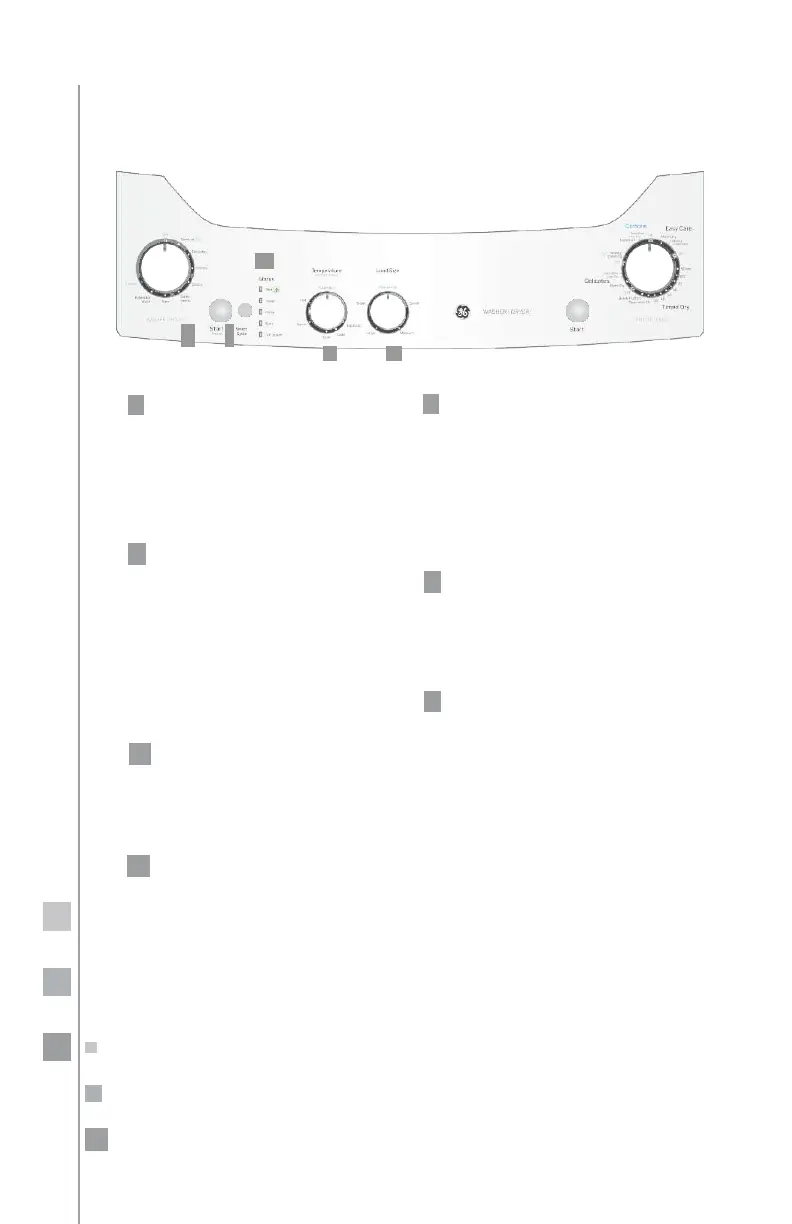
Selecting cycles
Turn the knob to select from among
the programs available depending
on the type of clothes you are going
to wash.
Each program controls the duration
and intensity of the washing process.
2
Temperatures
Knob Model
Select the water temperature for the
wash and rinse cycles.
Digital Model
Select from the 3 wash temperature
levels or allow the automatic sensor
to decide according to the selected
program (automatic sensor position).
3a
Load size
There are 4 load levels and an automa-
tic sensor. Select the one you need or
let the automatic sensor do it for you.
4
Selecting functions
Press the select button repeatedly to
choose the independent functions of
the wash cycle or the combination of
stages you need to wash only, rinse
only, wash and spin, etc. The lights
will turn on indicating the functions
selected.
5
Start/pause
With this button, you can
start
operating your washer or pause
once
in operation. to resume, just press the
button again.
6
Aqua saver
Selecting this stage activates the
water saving function.
3b
Water level
Knob Model
There are 4 water levels and one
automatic sensor. Select the one
you
need or let the automatic sensor
do it for
you.
Digital Model
There are 3 water levels and the one
automatic or let the automatic
sensor do it for you.


 To Next Page