Cdiing Etemindw
@’tn-Tm~~~~~~~
‘mv.mDEFR’OSTCYCM
Toremindyouthatyouhavefoodinthe
oven,theovenwillbeeponceaminuteuntil
you.eitheropentheovendoorortouchthe
CLEAR/OFF pad.
<
L“
--l
:“e- ;---
.-
:::.:>
-------
-.-.::.-<
:.-.....%
: ::-:..:...
..- .
....:*
::..
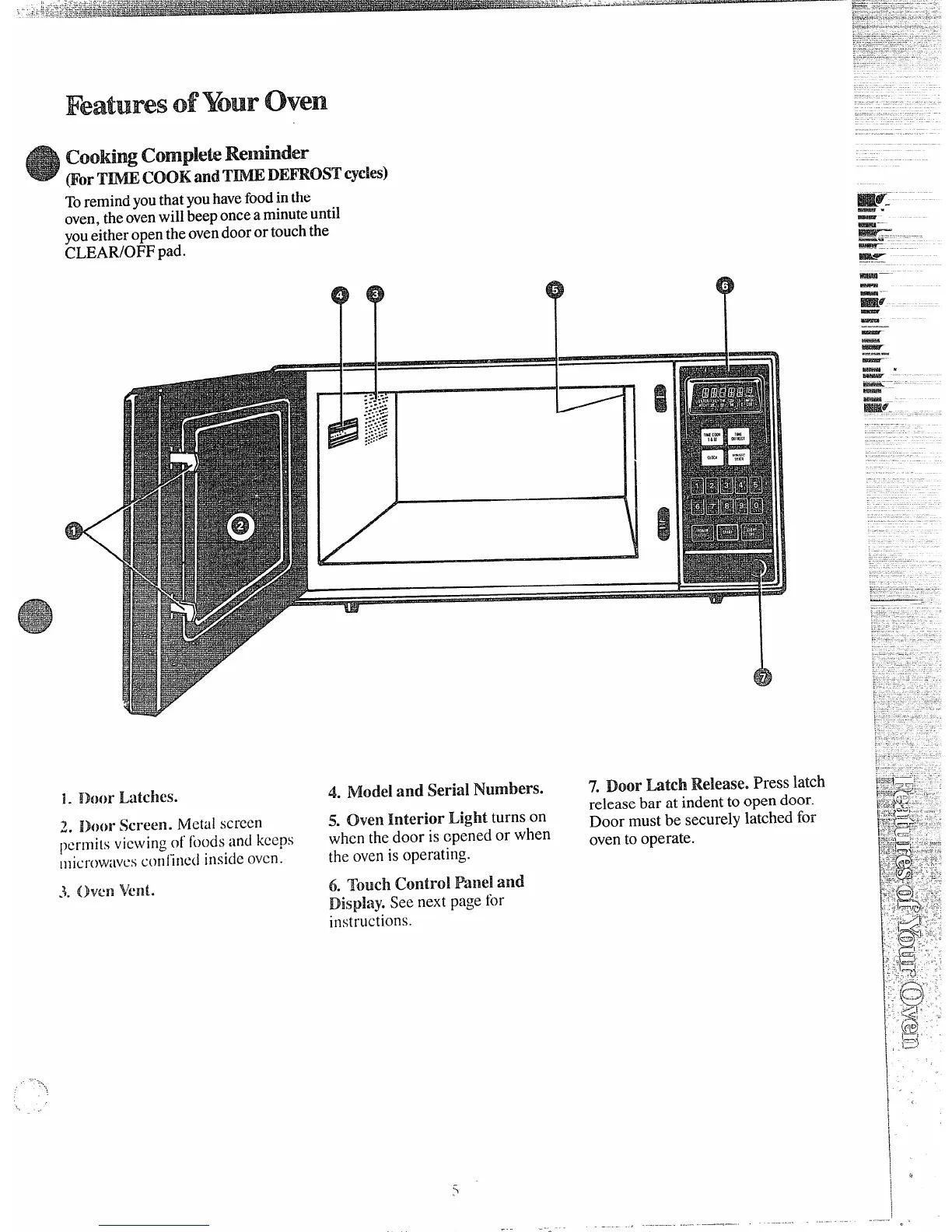
1. mm-Latches.
2,
i!hm’$krew. Metal SC1”Cf31~
permits viewingd hods and keeps
microwmwsconiird insideoven.
3. Oven vent.
.,---
“’1,
*=====?%
4. Model and Serial Numbers.
!3.Oven InteIfiOrLight turns on
when the door is cpened or when
the ovenis operating.
6. Touch Controi Panel and
Dispky. See nextpage for
instructiOllS.
7. Door Latch Release. Press latch
release bar at indentto open door.
Door must be securely latched for
ovento operate.
=$4-
.—. ..-—
-
-.-—.—
—
-
!$23ET
—.
—
-.
—
—
-




 To Next Page