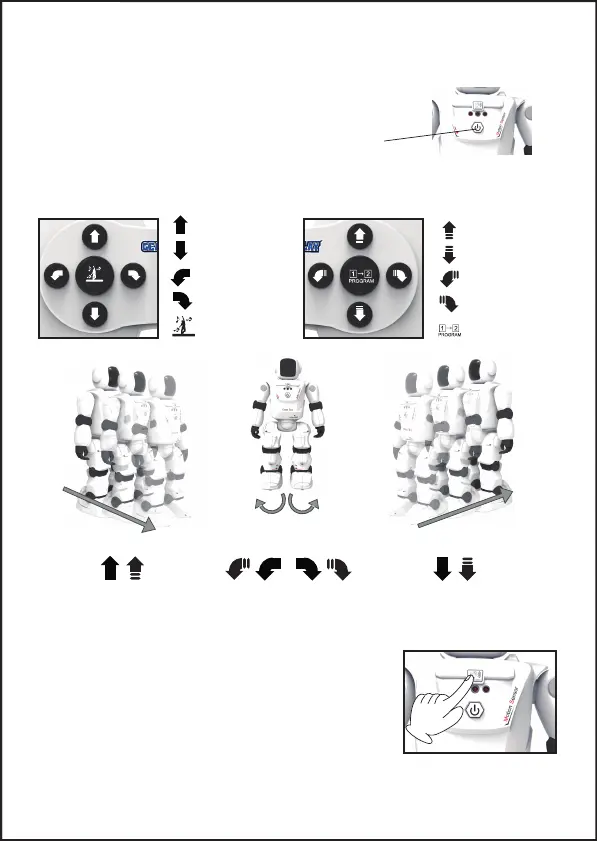
6. START DE ROBOT
Druk op de ON/OFF-knop aan de voorkant van de Orbit Bot (1). De
Orbit Bot begroet JE met enkele bewegingen en geluiden.
OPMERKING: de robot moet op de vloer staan om vallen te
voorkomen.
(1)
7. BASIS FUNCTIES
Vooruit schuiven
Achteruit schuiven
Dansmodus
Naar rechts schuiven
Naar links schuiven
Programmeren
Vooruit lopen
Achteruit lopen
Naar rechts lopen
Naar links lopen
Loop of schuif voorwaarts Naar links of rechts gaan Loop of schuif achterwaarts
8. HANDBEWEGINGSMODUS KNOP
Door op de knop van de Orbit Bot te drukken gaat hij in de
handbesturingsmodus, je kan de robot nu met je hand naar
voren/achteren/link of rechts laten gaan.
Na 2 minuten van inacviteit gaat de robot automasch in
de standby modus, druk nogmaals op de "Hand Control Mode"
knop om hem weer te herstarten.
-3-


 To Next Page