1
2
3
4
5
6
7
8
Air Conditioning and Entertainment System
67
Press and release button to skip to the
previous station in the radio mode; to skip
to the previous track or video in the music
and video modes; to select the previous
one from the list in the voice recognition
mode.
Press and release the voice recognition
function button to confirm the voice
prompt option and press and hold to cancel
it.
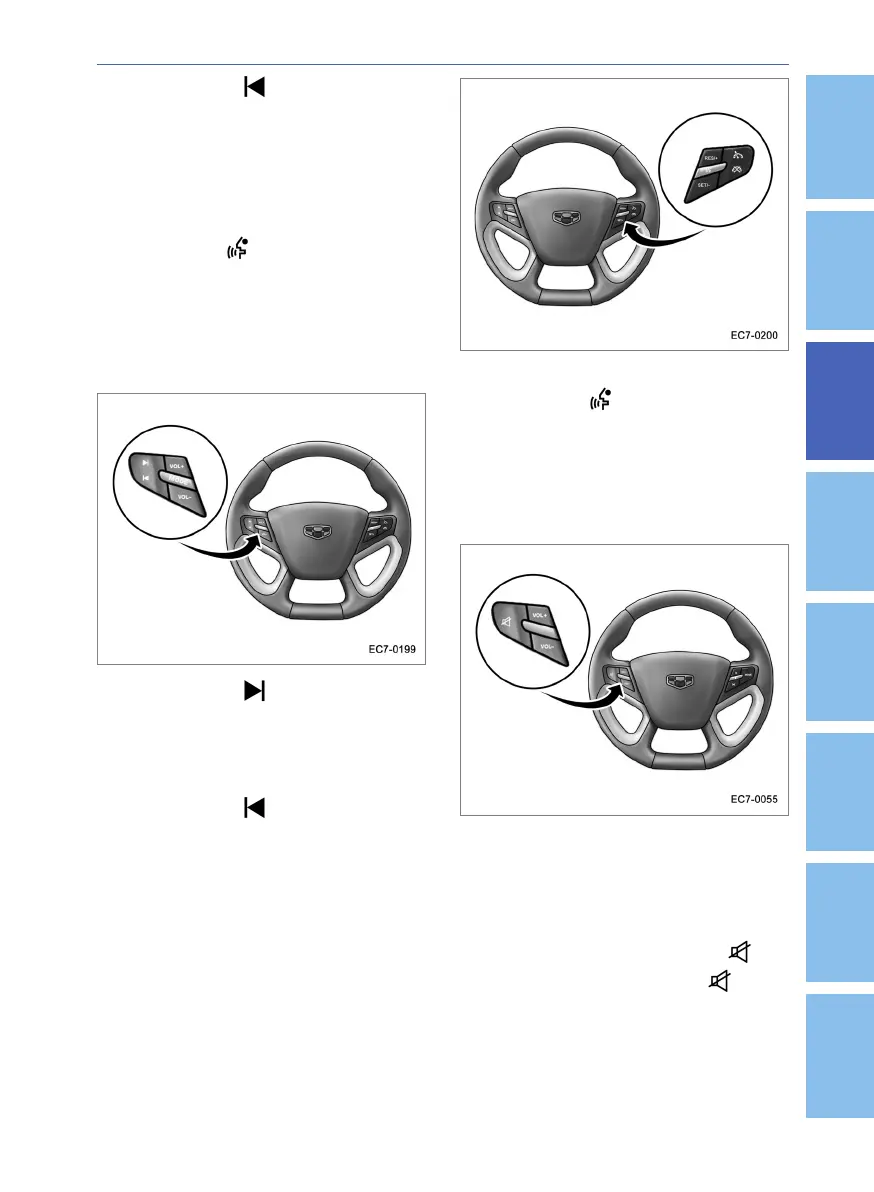
Steering Wheel Button(w/ VR But-
ton, w/ Cruse Control Buttons)
Press and release button to skip to the
next station in the radio mode; to skip to the
next track or video in music and video
modes; to select the next one from the list in
the voice recognition mode.
Press and release button to skip to the
previous station in the radio mode; to skip
to the previous track or video in music and
video modes; to select the previous one
from the list in the voice recognition mode.
Press and release the VOL+ button to
increase the volume of the system. Press
and release the VOL- button to decrease
the volume of the system.
Press and release MODE button to cycle
through the navigation, radio, music, video
and image functions.
Press and release the voice recognition
function button to confirm the voice
prompt option and press and hold to cancel
it.
Steering Wheel Button(w/ Phone
button, w/o Cruse Control Buttons)
Press and release the VOL+ button to
increase the volume of the system. Press
and release the VOL- button to decrease
the volume of the system.
You can perform the mute setting in any
modes by pressing and releasing but-
ton. If you press and release button
again or VOL+ or VOL-, the mute function
will be canceled.





 To Next Page