74
Air Conditioning and Entertainment System
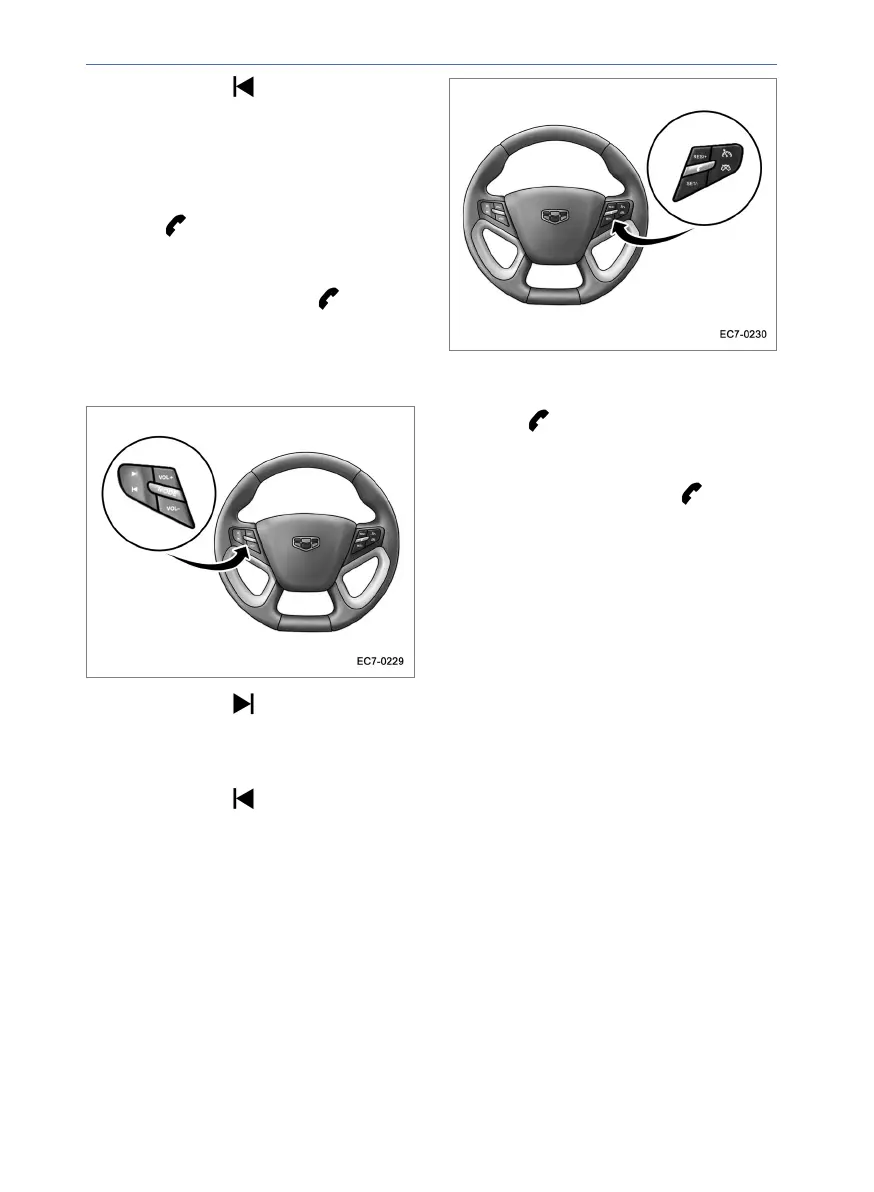
Press and release button to skip to the
previous station in the radio mode; to skip
to the previous track or video in music and
video modes.
When the bluetooth - compatible phone is
connected, if there is an incoming call,
press the button on the steering wheel
to answer the call; When there is a call in
progress and the phone is in connection
(call unanswered), press the button on
the steering wheel to end the call.
Steering Wheel Button (w/o Cruise
Control Buttons)
Press and release button to skip to the
next station in the radio mode; to skip to the
next track or video in music and video
modes.
Press and release button to skip to the
previous station in the radio mode; to skip
to the previous track or video in music and
video modes.
Press and release the VOL+ button to
increase the volume of the system. Press
and release the VOL- button to decrease
the volume of the system.
Press and release MODE button to cycle
through the navigation, FM, music and
video functions.
When the bluetooth - compatible phone is
connected, if there is an incoming call,
press the button on the steering wheel
to answer the call; When there is a call in
progress and the phone is in connection
(call unanswered), press the button on
the steering wheel to end the call.



 To Next Page