12
USER GUIDE
!!! Please refer to our website: www.geemarc.com for an up to
date user guide, as there may be important updates and
changes you need to be aware of !!!
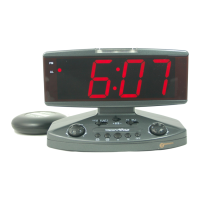
DESCRIPTION OF THE SAMPLE
BATTERY INSTALLATION
Your clock requires 1 x AAA and 2 x AA alkaline batteries (included) to
operate.
1.Place your unit face down on a flat surface.
2.Press the latch and remove the battery cover at the back of your unit.
3.Insert 1 x AAA and 2 x AA new alkaline batteries into the battery
compartment by observing the correct “+” and “- “polarity.
4.Replace the battery cover.
AUTO KEY-LOCK
Auto key-lock applies to all other buttons (1 minute after no press of any
button). Press and hold
DOWN button (most right sided button)
to release key lock, two soft and short beep tones will be heard.
TO SET TIME AND THE SNOOZE DURATION
1.Press and hold SET / TIMER, the hour digits “0” flash. Press or
to set the time in hours (hold
or to advance rapidly).
2.Press SET / TIMER again, the minute digits “00” flash. Press
or
to set the time in minutes. (hold
or to advance rapidly).
3.Press SET / TIMER again, the display shows “24Hr” and flashes.
Press
or to select “12Hr” or “24Hr” time format. There has AM
icon to indicate the morning time and PM icon to indicate the afternoon
time.
4.Press SET / TIMER again, the display shows “05” and flashes. Press
or to select your snooze time from 5 to 60 minutes.
5.Press SET / TIMER again or if no key pressed for approx. 10 seconds
to exit the setting mode.
TO SET THE ALARM (default at 6:00 AM)
1.Press and hold AL SET / SELECT, the AL appear and the alarm’s
hour digits’ flash. Press
or to set the alarm in hours. (hold
or
to advance rapidly).
2.Press AL SET / SELECT once again, the alarm’s minute digits’ flash.
Press
or to set the alarm in minutes. (hold or to
advance rapidly).
3.Press AL SET / SELECT again,
and “HI” flash (vibration at HI
level), press
or to select “LO” (vibration at Low level) if need.
4.Press AL SET / SELECT again,
and “HI” flash (Sound at HIGH
level), press
or to select “LO” (Sound at Low level) if need.
5.Press AL SET / SELECT once again or no button around 10 seconds
to exit the alarm setting mode. Admist alarm setting, press SET /
TIMER once to exit and return to nomral time display mode.
TO SELECT THE ALARM MODE
At normal time display mode, press AL SET / SELECT one at a time to
activate the alarm(s), the corresponding alarm indicator(s) on the right
side of the time display will be on:
: only sound alarm is activated
: only shaker alarm is activated
: only strobe light alarm is activated
: both sound and vibration alarm are activated
: both strobe light and sound alarm are activated
Press AL SET / SELECT once more to turn off all the alarms, all
alarm indicators disappear.
TO STOP AND RESET THE ALARM TO COME
ON THE NEXT DAY
When alarm is sounding, the corresponding alarm indicator flashes.
Press AL SET / SELECT once to stop the alarm and reset it to come on
the following day. After that, the corresponding alarm indicator stays on
the display.
TO USE SNOOZE
When alarm is sounding, presses once, the alarm will be
stopped temporarily and the corresponding alarm indicator keeps
flashing. Alarm will come on again after the set snooze duration is over.
TO USE BACKLIGHT
Press once to active backlight 5 seconds.
TO USE FLASHLIGHT
Press and hold to active flashlight. Press and hold
to de-active the flashlight.
TO USE COUNTDOWN TIMER
(HOUR-MINUTE TIMER)
1.At normal time display, press SET / TIMER once, display change to
timer mode,
and appear with ”0:00” flash.
2.Press
to adjust countdown timer in hours, press to adjust
countdown time in minutes.
3.Press START / STOP once to start countdown in minutes, then ”:”
and ”
” flash.
4.During counting down, press START / STOP to pause counting down
and whole display flashes. Press and hold START / STOP to stop or
reset the counting down timer.
SNOOZE / FLASHLIGHT
AM
ALARM
COUNT-UP
(TIMER)
COUNT-DOWN
(TIMER)
DOWN
UNLOCK
SET
TIMER
PM
LOW BATTERY
TIMER
Wake-to-Flashing
LED
Wake-to-
Vibration
Wake-to-Buzzer
UP
TEST
AL SET
SELECT
BACK VIEW
BACK VIEW
BATTERY COMPARTMENT
BATTERY COVER
“AA” BATTERIES
“AAA”
BATTERY
START / STOP (TIMER)


 To Next Page
 Need help?
 General