EasyManua.ls Logo

General Monitors L3100H - User Manual

General Monitors L3100H
72 pages
Print Icon
To Next Page IconTo Next Page
Loading...
The information and technical data disclosed in
this document may be used and disseminated
only for the purposes and to the extent
specifically authorized in writing by General
Monitors.
Instruction Manual DATE 01-10
General Monitors reserves the right to change
published specifications and designs without
prior notice.
MANFL3100H/3101H
Part No. MANFL3100/3101H
Revision B/01-10
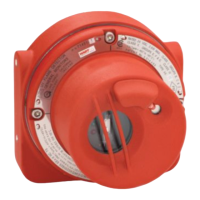
Models FL3100H/FL3101H
UV/IR and UV only
Flame Detectors

Table of Contents

Questions and Answers

  • M
    Mary McculloughAug 1, 2025
    What to do if General Monitors Smoke Alarm constantly signals 16 mA or 20 mA with no radiation?
    • C
      Cynthia RodriguezAug 2, 2025
      If your General Monitors FL3101H Smoke Alarm constantly signals a 16 mA or 20 mA signal (WARN or ALARM) even when there's no known radiation, it could be due to background UV radiation affecting the detector. To check this, cover the UV portion of the FL3101H for ten seconds. If the signal stops, remove the source of UV radiation or relocate the FL3101H. If the signal persists, the UV detector tube in the FL3101H may need replacement.
  • B
    Brent TorresAug 7, 2025
    What to do if General Monitors Smoke Alarm constantly signals 12 mA with no radiation?
    • S
      Sandra LeeAug 8, 2025
      If your General Monitors FL3100H Smoke Alarm constantly signals a 12 mA signal even when there's no known radiation, it might be detecting background UV radiation. Cover the UV portion of the FL3100H for ten seconds to see if the signal stops. If it does, eliminate the UV radiation source or move the FL3100H. If the signal continues, you may need to replace the UV detector tube.
  • B
    Brittany MoraAug 14, 2025
    Why is the green LED blinking slowly on my General Monitors Smoke Alarm?
    • M
      Michael SampsonAug 14, 2025
      A slowly blinking green LED on your General Monitors Smoke Alarm, accompanied by a 2 mA signal, often indicates a COPM FAULT caused by a dirty or obscured optical path. You should clean the UV and IR windows, as well as the associated source light rods.
  • M
    mharperAug 19, 2025
    What to do if General Monitors Smoke Alarm has no output signal and the green LED is rapidly blinking?
    • M
      Mr. Devon HarrisonAug 19, 2025
      If your General Monitors Smoke Alarm shows no output signal and the green LED is rapidly blinking, it's likely due to a low voltage fault, meaning the voltage at the unit is less than +18 VDC. Ensure the unit receives at least +20 VDC under load.
  • A
    Anthony BerryAug 25, 2025
    How to fix General Monitors Smoke Alarm with no output signal and the green LED is off?
    • R
      Rachel NelsonAug 26, 2025
      If your General Monitors Smoke Alarm has no output signal and the green LED in the UV window is off, the unit may not be receiving DC power. Ensure that +24 VDC is correctly applied with the correct polarity.

Summary

QUICK START GUIDE

Mount and Wire the Detector

Instructions for physically installing the detector and ensuring proper connections.

Apply Power to the Detector

Procedure for connecting electrical power to the unit and its initial startup sequence.

Test the Detector

Method for verifying detector functionality using test lamps like TL100 or TL105.

1.0 INTRODUCTION

Special Warnings

Important safety precautions and user responsibilities for the detector's operation.

System Integrity Verification

Procedures to ensure the safety system is correctly commissioned and functional.

2.0 PRODUCT DESCRIPTION

General Description

Overview of the UV/IR and UV flame detectors and their key features.

3.0 INSTALLATION

Tools Required

List of necessary tools for installation and setup.

Choosing Product Locations

Guidelines for selecting optimal placement for flame detectors.

Mounting and Wiring

Detailed instructions for physical mounting and electrical connections.

4.0 OPERATION

Checklist

Pre-operation checks to ensure correct system setup.

Start Up

Steps for powering up the flame detectors and their initial sequence.

User Selectable Options;Factory Defaults

Configuration settings controllable via DIP switches or software.

5.0 MODBUS INTERFACE

Baud Rate

Setting the communication speed for the Modbus interface.

Data Format

Configuring data transmission parameters for Modbus communication.

Modbus Read Status Protocol

Details on querying detector status via Modbus.

Modbus Write Command Protocol

Details on sending commands to the detector via Modbus.

Exception Responses and Exception Codes

Handling and understanding communication error responses.

6.0 EVENT LOGGING

Faults

Recording and logging of fault events within the detector.

Setting Clock

Procedure for setting the internal real-time clock for event logging.

7.0 MAINTENANCE

General Maintenance

Routine checks and upkeep procedures for the detector.

Cleaning the Lenses;Light Rods

Instructions for cleaning optical components to ensure sensitivity.

Sensitivity Check

Methods for verifying the detector's sensitivity.

8.0 TROUBLESHOOTING

Troubleshooting Table

Common problems, their causes, and corrective actions.

9.0 CUSTOMER SUPPORT

General Monitors Offices

Contact information for worldwide service locations.

10.0 APPENDIX

Warranty

Terms and conditions of the product warranty.

Principle of Operation

Explanation of how the UV and IR detectors function.

Specifications

Technical data including system, mechanical, electrical, and environmental specs.

General Monitors L3100H Specifications

General IconGeneral
BrandGeneral Monitors
ModelL3100H
CategorySmoke Alarm
LanguageEnglish