GENERAL PUMPA member of the Interpump Group
47 Series
Servicing Instructions
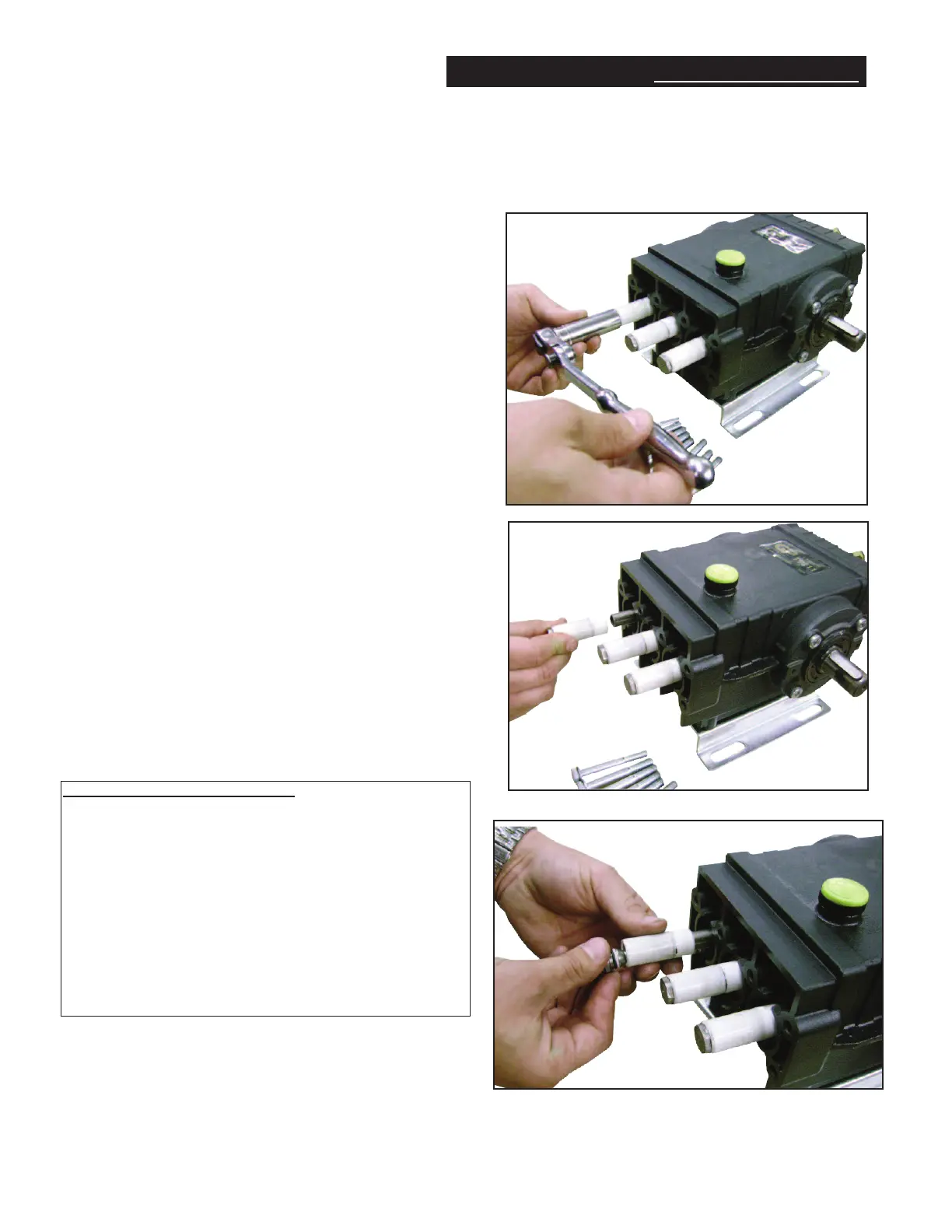
REPLACING PLUNGERS (Figure 3, 5 & 6)
1. Remove stainless steel piston screw and
plunger from piston rod.
2. If slinger washer comes off with plunger, be
certain this is replaced before new plunger is
installed.
3. Separate piston screw from plunger.
4. Install new o-ring and teflon backup ring on
piston screw. NOTE: A film of grease on the
outside of the o-rings insures a better
installation.
5. Carefully press piston screw into plunger.
6. Slide new plunger over the piston guide and
torque to specifications.
3
5
5
Recommended Tools/Supplies:
1) ZMVTOOL Packing Insertion Tool
2) 100783 Complete Extraction Kit
Includes the following tools:
2530016 handle 2530022 20mm sleeve
2530017 bolt 2530023 22mm sleeve
2530018 pin 2530024 24mm sleeve
3) 190446 Oil Drain Kit
4) 100295 General Pump Series 100 Oil (1-16 oz. bottle)
100214 General Pump Series 100 Oil (6-16oz. bottles)
100216 General Pump Series 100 Oil (24-16 oz. bottles)


 To Next Page