This document is a user manual for the Generark HomePower ONE, a portable emergency power supply.
The HomePower ONE is designed to provide reliable emergency power for various devices. It contains a high-energy-density cylindrical 18650 lithium-ion battery pack.
Technical Specifications:
- Capacity: 1002Wh (46.4Ah/21.6V)
- Weight: 10.6kg / 23.37lbs
- Dimensions: 33.2 x 23.3 x 24.3cm (13.1 x 9.2 x 9.6in)
- Battery Type: Lithium-ion
- Lifecycles: ≥ 500
- Operating Temperature: -10 ~ 40 °C (14 ~ 104 °F)
- Recharging Temperature: 0 ~ 40 °C (32 ~ 104 °F)
- DC Input: 24V-7.5A~8.33A (Supports 12~30V)
- Car Port Input: 12V-10A
- AC Output: 3x, 110V~9.09A, 60Hz, 1000W max continuous power, 2000W surge peak power (Pure Sine Wave)
- USB-C Output: 2x, USB-C PD Output: 5V-3A, 9V-2A, 12V-1.5A
- USB Output: USB-A Output: 5V-2.4A, Qualcomm® Quick Charge™ Output: 5~6.5V-3A, 6.5~9V-2A, 9~12V-1.5A
- Management System: Includes Over Voltage Protection, Over Current in Charge/Discharge Protection, Short Circuit in Charge/Discharge Protection, Over Temperature in Charge/Discharge Protection, and Overcharging Voltage Protection.
- MPPT: Supports Solar Panel MPPT Charging.
- Warranty: 5 Years
- Certifications: UN38.3, RoHS, FCC, Qualcomm 3.0 Quick Charge, BC Warning
- Technical Support: Lifetime
Usage Features:
The HomePower ONE features an LCD screen for displaying battery level and power information.
- Checking Battery Level: Press the "DISPLAY" button to check the battery level percentage. It is recommended to charge the unit if the battery level is low (below 20%). The LCD screen flickers around 10 times when battery capacity drains to 20% and 10%.
- Turning Outputs On/Off: AC or DC output can be turned on/off by pressing their respective buttons. It's important to turn off outputs when not in use to prevent battery drain.
- Power Output Monitoring: The LCD also shows the power of input and output in Watts (W). If the total output exceeds 1000W, the unit will automatically shut off. Ensure power consumption is less than 1000W before pressing the power button.
- Temperature Alarm: The device operates within a temperature range of -10 ~ 40°C (14 ~ 104°F). If the working temperature falls outside this range, the HomePower ONE may stop working, triggering a low or high temperature alarm.
- Automatic Shut-off: For power saving, the HomePower ONE will automatically turn off in 12 hours when drawing under 10W of power.
- Simultaneous Charging and Discharging: The HomePower ONE can be recharged while simultaneously supplying power to other devices, provided the device requires less than 1000W.
- Device Compatibility: To ensure compatibility, devices should require less than 1000W. Users need to check the power requirements of their specific devices.
Recharging Options:
The HomePower ONE offers four ways to recharge:
- Wall Charger: Approximately 7.5 Hours
- Electric Generator: Approximately 7.5 Hours
- 100W Solar Panel: Approximately 19 Hours (depending on weather conditions)
- Car Port: (Charging time not specified, but uses 12V/10A input)
Maintenance Features:
- Initial Charge: Before using or storing, fully charge the HomePower ONE. If the battery level is less than 20%, recharge it as soon as possible.
- Regular Recharging: To preserve battery lifespan, use and recharge the unit at least once every 6 months.
- Storage Conditions: Store the unit in a clean and dry environment. Avoid dusty, wet, high-temperature environments, and direct sunlight.
- Charger and Cables: Only use original or certified chargers and cables.
- Temperature Management: Avoid extreme temperatures during operation, charging, and storage.
- Physical Handling: Avoid dropping the unit. Do not place the unit on its side or upside down while in use or storage.
- Water Resistance: The unit is not waterproof; do not expose it to liquids.
- Disassembly: Do not disassemble the unit. Any repairs or modifications should only be performed by qualified service personnel.
- Disposal: Dispose of batteries and electronic goods in accordance with local regulations.
Safety Instructions:
The manual outlines critical safety instructions categorized as DANGER, WARNING, and CAUTION.
- DANGER (Serious injury or death likely): Do not disassemble, repair, or modify the unit/battery. Do not expose to fire, heat, or direct sunlight. Do not charge/use/store in wet environments or bathrooms. Only use output sockets for external devices; never connect to mains power. Do not touch with wet hands. Do not connect metallic objects to AC input/output. Avoid eye contact with internal fluid. Do not dispose with household waste. Do not use inappropriate power cords or operate outside specified input voltage. Do not use if malfunctioning. Do not move while recharging/in use. Do not put fingers/hands into the product. Do not use damaged/modified battery packs or appliances.
- WARNING (Serious injury or death possible): Use and store in clean, dry environments. Inspect before each use for damage. Keep away from children and pets. Avoid high-temperature areas. If internal fluid contacts skin/clothing, wash with tap water. Unplug during storms. Do not charge via power supply systems outside 100-240V. Do not place on its side/upside down. Do not use accessories for other usage.
- CAUTION (Injuries and/or property damage possible): Stop using immediately and contact customer service if rust, odors, overheating, or other abnormalities are observed. Ensure proper securing during vehicle transport. Charge, use, and store within 0-40°C. Switch off immediately if dropped or exposed to vibrations. Read instructions for connected electric devices. Ensure connected devices are switched off before connecting.
- Risk of Explosive Gases: Never smoke or allow sparks/flames near the battery. Be cautious to avoid dropping metal tools onto the battery. Do not expose the power pack to fire or excessive temperatures above 130°C.
The product comes with the HomePower ONE unit, an AC Charger & Cable (2 parts), and a User Manual.

 Need help?
 General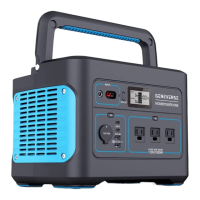

 To Next Page