This document provides the owner's manual for the Genesis 20" Box Fan, model G20BOX-BLK. It includes important safety warnings, operating instructions, user servicing instructions, and cleaning guidelines.
Function Description
The Genesis 20" Box Fan is designed to provide air circulation. It features a multi-speed control for varying airflow intensity, making it suitable for different cooling needs. The fan is equipped with a polarized plug for enhanced safety, intended to reduce the risk of electric shock. It also incorporates overload protection through a fuse, which is a critical safety feature to prevent damage from short-circuit or overload situations. The fan's design allows for easy setup and operation, with a simple switch knob for speed control.
Usage Features
The fan is designed for straightforward use with several key features:
- Polarized Plug: The appliance comes with a polarized plug, meaning one blade is wider than the other. This plug is designed to fit into a polarized outlet in only one way, serving as a safety feature to reduce the risk of electric shock. Users are instructed to reverse the plug if it doesn't fit initially and to contact a qualified electrician if it still doesn't fit, rather than attempting to bypass this safety feature.
- Speed Control: The fan offers three speed settings: Low, Medium, and High, in addition to an Off setting. These are controlled by a simple switch knob, allowing users to adjust the airflow to their preference. The settings are labeled as 0—Off, 1—Low, 2—Medium, and 3—High.
- Stable Operation: Users are advised to ensure the fan is placed on a stable surface during operation to prevent overturning, which is crucial for both safety and effective performance.
- Indoor Use Only: The manual explicitly states not to use the fan in a window, as rain could create an electrical hazard. This indicates the fan is intended for indoor use.
- Easy Assembly: The fan is designed for quick and easy setup. Upon removal from the carton, the fan needs to be placed upside down, and its support rotated 90 degrees counterclockwise to position it for use. Once upright, it is ready to operate after plugging it in. Figures 1, 2, and 3 illustrate this assembly process.
Maintenance Features
The manual provides clear instructions for both user servicing and general cleaning to ensure the longevity and safe operation of the fan.
- Fuse Replacement (Overload Protection): The fan includes an overload protection fuse located within the attachment plug. If the fuse blows, indicating an overload or short-circuit, users are instructed to unplug the product and replace the fuse. The process involves:
- Grasping the plug and removing it from the outlet without pulling on the cord.
- Opening the fuse cover by sliding the fuse access cover on top of the attachment plug towards the blades.
- Carefully removing the old fuse by inserting a tool tip into the fuse slot and gently prying it out. Users are advised to be gradual and slow, and not to overexert, trying multiple times if necessary.
- Replacing the fuse only with a 2.5 Amp, 125 Volt fuse.
- Closing the fuse cover by sliding it back into place.
- A critical safety note warns against replacing the attachment plug itself, as it contains a non-removable safety device (fuse). If the attachment plug is damaged, the product should be discarded.
- Users are also cautioned not to operate suddenly or overexert when replacing the fuse to avoid damaging the product or causing an accident. If operation is difficult, users should ensure they are following the correct procedure.
- General Cleaning: Regular cleaning is recommended to maintain the fan's performance and appearance.
- Safety First: Always unplug the fan from the electrical supply source before cleaning to prevent electric shock.
- Plastic Parts: Plastic components of the fan should be cleaned using mild soap and a damp cloth or sponge. It is important to thoroughly remove any soap film with clean water afterward.
- Motor Protection: A crucial instruction is to ensure that water or any other liquid does not enter inside the motor housing, as this could cause damage or create an electrical hazard.
- Cord and Plug Care: Specific rules are provided for the care of the power cord and plug to prevent damage and ensure safety:
- Never operate the fan with a damaged cord or plug. If the cord or plug is damaged, the fan should be discarded or returned to an authorized service facility for examination and/or repair.
- The cord should not be run under carpeting or covered with throw rugs, runners, or similar coverings.
- The cord should not be routed under furniture or appliances.
- It is important to arrange the cord away from traffic areas to prevent tripping hazards.
- Grille Maintenance: Users are advised to disconnect the fan when removing grilles for cleaning, and never to insert fingers, pencils, or any other objects through the grille while the fan is running. This highlights the importance of keeping the grilles clean and maintaining their integrity for safety.
The manual emphasizes that pictures in the owner's manual are for reference only, indicating that the actual product may have minor visual variations.

 Need help?
 General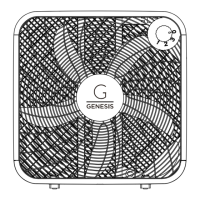

 To Next Page