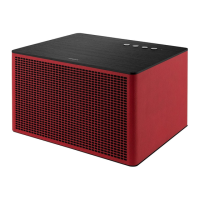
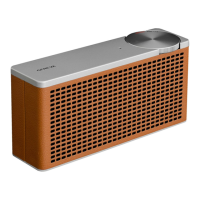
The Geneva DeCon/M is a versatile audio system offering a wide range of playback options and features, designed for both casual listening and more advanced audio enthusiasts. It supports various sources including CD, WiFi, Spotify, Internet Radio, DAB/DAB+, FM, AUX, and Bluetooth music streaming.
Function Description:
The DeCon/M serves as a comprehensive entertainment hub, allowing users to access music from traditional physical media like CDs, as well as modern digital and streaming services. Its core functionality revolves around providing high-quality audio playback across multiple platforms.
Key Features and Usage:
- Power and Volume Control: The system features an ON/OFF/VOLUME DIAL (1) that allows users to turn the DeCon/M on or off by pressing, adjust the volume by rotating, and mute the sound by keeping it pressed.
- Navigation and Selection: A SCROLL/OK dial (2) is used to scroll through menu items and confirm selections by pressing.
- CD Playback: The DeCon/M includes a CD slot (4) and an EJECT BUTTON (3). To play a CD, gently push it into the slot; playback will start automatically. The display shows track number and time, along with CD text if available. The eject button unloads the CD, and pressing it longer forces an eject. It's important to note that the DeCon/M does not play MP3/WMA/AAC files from CDs.
- Navigation Buttons (5):
<< (Previous Track/Auto-scan FM/DAB): Press to select the previous track in Spotify, FM, DAB, Bluetooth, or CD modes. Press and hold to auto-scan FM stations.>> (Next Track/Auto-scan FM/DAB): Press to select the next track in Spotify, FM, DAB, Bluetooth, or CD modes. Press and hold to auto-scan FM stations.>II (Play/Pause/Auto-scan FM): Press to play/pause in Internet Radio, Spotify, CD, and Bluetooth modes. In FM mode, it performs auto-scans for stations.MENU: Press to enter menu mode and select desired functions from the display.MODE: Press to select the audio source.BACK: Press to step back while navigating menus.PRESETS: Press to access presets. Keep pressed to store new presets.
- DeCon/M Display (6): Provides visual feedback for current mode, track information, menu navigation, and other system messages.
First Steps and Setup:
- Power Connection: Insert the power cord into the backside of the unit.
- Antenna: Insert the telescopic antenna and extend it fully for optimal FM/DAB reception.
- Power On: Press the POWER button to start the unit.
- Menu Navigation: The MENU button accesses mode-specific menus. Pressing it a second time returns to the "playing screen." The SCROLL/OK dial is used for selection, and the MENU button exits the menu. The MODE button selects different sources.
- Internet Setup (Wizard): The first time the DeCon/M is used, it prompts to run a SETUP WIZARD for Internet Radio. This wizard guides the user through setting the hour format, updating from the network, selecting timezone, daylight savings status, WLAN region, and connecting to a network. If the network is password-protected, the user enters the password using the joystick controller. The wizard can be accessed later via
MENU > System settings > Network.
- UNDOK App: The DeCon/M can be controlled via the UNDOK smartphone app (available for Apple and Google devices). Both the smartphone and DeCon/M must be on the same Wi-Fi network.
Sources (Mode):
The DeCon/M supports the following audio sources:
- FM Radio: Displays station name and RDS/RBDS information.
- Change Station: Use
<< or >> for auto-tuning. The SCROLL/OK dial fine-tunes.
- Scan Setting:
Menu > Scan setting > Strong stations only to stop at strong signals.
- Program Information:
Menu > Info to choose display information.
- Presets: Press and hold
PRESETS to save, press to recall.
- Mono:
Menu > Mono to reduce hiss on weak signals.
- DAB Radio: Displays station name and DLS information. Performs an auto-scan on first selection.
- Change Station: Use
<< or >> for auto-tuning. SCROLL/OK dial lists stations.
- Program Information:
Menu > Info to choose display information.
- Presets: Press and hold
PRESETS to save, press to recall.
- Station Order:
Menu > Station order to sort by Alphanumeric, Ensemble, or Valid.
- Station Scan:
MENU > Scan to perform a full scan for new stations.
- Internet Radio: Accesses thousands of stations and podcasts (requires internet connection).
- Station List:
MENU > Station List to view stations by location, genre, etc.
- Presets: Saved similarly to FM and DAB.
- Bluetooth: Connects to Bluetooth devices for CD-quality streaming.
- Pairing: Displays "Awaiting connection" if it's the first time. Select "DeCon/M" on your device.
- New Device:
MENU > Connect Device to pair up to 7 devices.
- Basic Functions: Use navigation buttons or remote for play/pause, next track, stop.
- Line-In (AUX): Accepts analog audio via a mini-jack connector.
- Input Level:
MENU > Input level to adjust between -3dB to +18dB for optimal performance.
- Spotify: Use a phone, tablet, or computer as a remote control via Spotify Connect.
Additional Functions:
- Equalizer:
MENU > System Setting > Equalizer to select EQ settings or MY EQ Settings for custom Bass/Treble.
- Alarm:
MENU > Main Menu > Alarms to set 2 independent alarms.
- Sleep Timer:
MENU > Main Menu > Sleep to set 15-90 minute sleep timers.
- USB Charge: Charges Type1 USB devices (up to 5V - 1A) via the backside port.
- Firmware Update:
MENU > System Settings > Firmware upgrade and confirm with SCROLL/OK dial.
- Factory Reset:
MENU > System Settings > Factory reset and confirm with SCROLL/OK dial.
Remote Control (Optional):
The optional remote control provides additional convenience with dedicated buttons for:
- ON/STAND-BY
- SLEEP / MUTE / VOLUME + / VOLUME -
- PRESET / INFO
- BACK / OK / MENU
- UP (MENU) / PREVIOUS / NEXT / DOWN (MENU)
- STOP (CD) / PLAY-PAUSE / EJECT (CD)
- BLUETOOTH / LINE-IN - AUX / CD
- FM / DAB / INTERNET RADIO
Technical Specifications:
- Model: DeCon/M
- Type: CD/ WiFi/Spotify/Internet Radio/DAB/DAB+/FM/AUX/Bluetooth Music system
- Power Supply: 100-240V
- Dimension (mm): 355W x 250W x 235D
- Weight: 8.10 KG
- USB Charge Output: 5V/1A
Maintenance and Troubleshooting:
- General Safety: Do not expose to rain or moisture. Avoid placing liquid-filled objects on the apparatus. The direct plug-in adapter is the disconnect device and must remain readily operable.
- Cleaning: Clean only with a dry cloth. Unplug from the wall outlet before cleaning.
- Placement: Place on a solid surface. Avoid enclosed spaces that restrict airflow. Do not install near heat sources.
- Power Cord: Protect the power cord from being walked on or pinched.
- Servicing: Do not attempt to service the product yourself. Refer to qualified personnel.
- CD Handling: Do not use CD lens cleaning discs. Avoid bending discs. Do not move the unit with a disc playing or ship it with a CD inside. Do not insert a disc if one is already inside. Do not insert specially shaped or 3" "single" discs. Avoid paper labels on CD-R/CD-RWs.
- Error Resolution: If an error occurs, unplug the power cord for 60 seconds and then plug it back in firmly.
Troubleshooting / Errors Messages:
- FM HISS / DAB Burbling/Intermittent Cut-Out: Low signal strength. Solution: Check/move antenna, move radio, rescan local (high-strength) stations only.
- DAB 'No stations available': Low signal strength. Solution: Rescan stations.
- Cannot connect to network:
- Network down: Check network between computer and router.
- Router restricts MAC addresses: Obtain DeCon/M's MAC address (
Menu > System settings > Network > View settings) and add to router list.
- Insufficient Wi-Fi signal strength: Check distance to router, ensure a computer can connect.
- Unusual network configuration: Setup manually (
Menu > System settings > Network > Manual settings).
- Firewall preventing access: Check UDP/TCP ports 80, 123, DNS port 53 are open. For Windows shares, ports 135-139, 445.
- Cannot connect to Internet:
- Internet connection down: Check if a computer on the same network has internet.
- Firewall preventing access: Check UDP/TCP ports 80, 123, DNS port 53 are open. Some Internet radio stations may require additional ports.
- Cannot play particular Internet radio station: Station not broadcasting, overloaded, insufficient bandwidth, unknown codec, or out-of-date link. Solution: Try other stations, listen on computer via portal website, try later.
- Bluetooth Mode: Can't connect to a paired device: Solution: Select
BT DISCONNECT from Bluetooth Menu, delete DeCon/M's profile from your device, then re-pair.
- Bluetooth Mode: Poor audio quality: Device out of range or electromagnetic interference. Solution: Move device closer to DeCon/M, move device away from other sources of interference.
- CD playback does not start:
- CD format not compatible: CD format is not compatible.
- CD is damaged: Insert a different CD.
- CD is dirty: Clean the CD.
- Failed to connect: Correct key entered, but router rejects request. Example: MAC filtering enabled on router.
- Network error: Incorrect data received from network. Example: Data obtained from server is unreadable.
- Service not available (DAB): No DAB reception.
- Update failed: Software upgrade failed.
- Network not ready: Problem with connection to router. Example: Router switched off.
Product Disposal Instructions (WEEE Directive):
The product is classified as Electrical or Electronic Equipment and should not be disposed of with household or commercial waste. It must be recycled responsibly through return and collection systems to minimize environmental impact and avoid hazardous substances. Contact local authorities or the retailer for disposal information.

 Need help?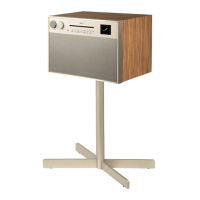

 To Next Page
 General