10
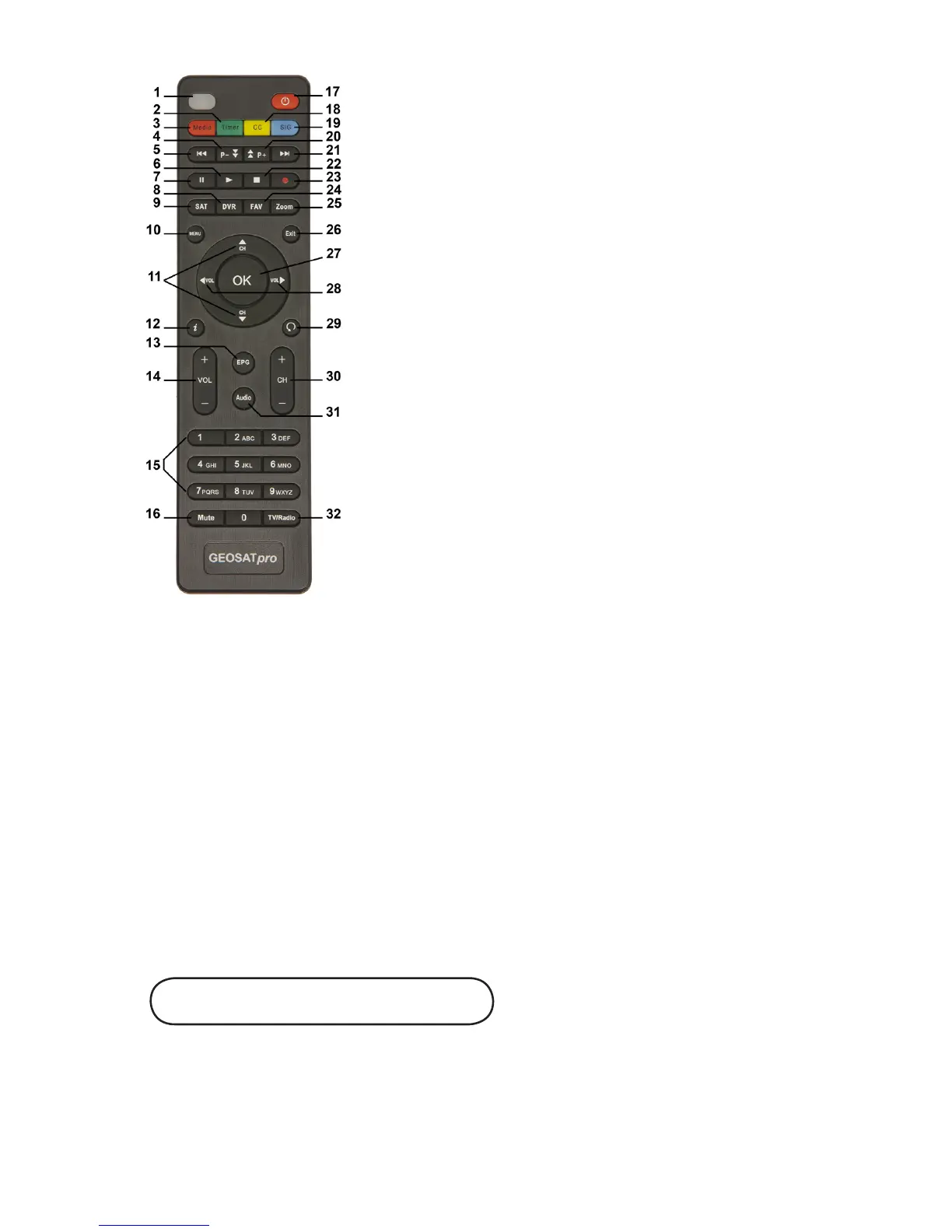
LED display lights to verify remote operation
Enter the Manual Timer Setting menu
Display Media Player for Videos / Photos / Music
Page Down in a List and DVR Scan Rewind
Skip Rewind
Play DVR / Media
Freeze Video or Pause DVR / Media
Display DVR Recordings List
Display Satellite List
Display the Main Menu Screens
Change Channel or Menu Navigation Up / Down
Display Channel Banner, 2x for Program EPG,
3x for Service Information
Display Electronic Program Guide (if provided)
Increase / Decrease Volume
Numeric / Alpha Keys for direct Channel Change
and Menu Setting
Mute or Enable Muted Audio
Select Standby or Operation Mode
Select Closed Caption ON / OFF
Display a Full Screen Signal Meter
1.
2.
3.
4.
5.
6.
7.
8.
9.
10.
11.
12.
13.
14.
15.
16.
17.
18.
19.
Page Up in a List and DVR Scan Forward
Skip Forward
Stop DVR Play or Record / Stop Media Playback
Start DVR Manual Record
Select the Favorite List Mode
Magnify a Portion of the Screen
Exit Screens or Functions
Display the Channel List or Accept a Menu Item
Increase / Decrease Volume or Menu Navigation Left / Right
Return to Previous Channel
Change Channel Up / Down
Select Alternative Language / Audio Mode / Sound Track
Select to View TV or Listen to Radio Channels
20.
21.
22.
23.
24.
25.
26.
27.
28.
29.
30.
31.
32.
Turn the Receiver ON / OFF - 17
Change Channels - 11 or 30
Adjust Volume - 14 or 28
Mute Audio - 16
View TV / Listen to Radio - 32
•
•
•
•
•
Remote Shortcuts
View Channel List - 27
View Channel Banner - 12
View Signal Meter - 19
Electronic Program Guide - 13
(if available from the broadcaster)
•
•
•
•


 To Next Page