Instructions for use MBeg+
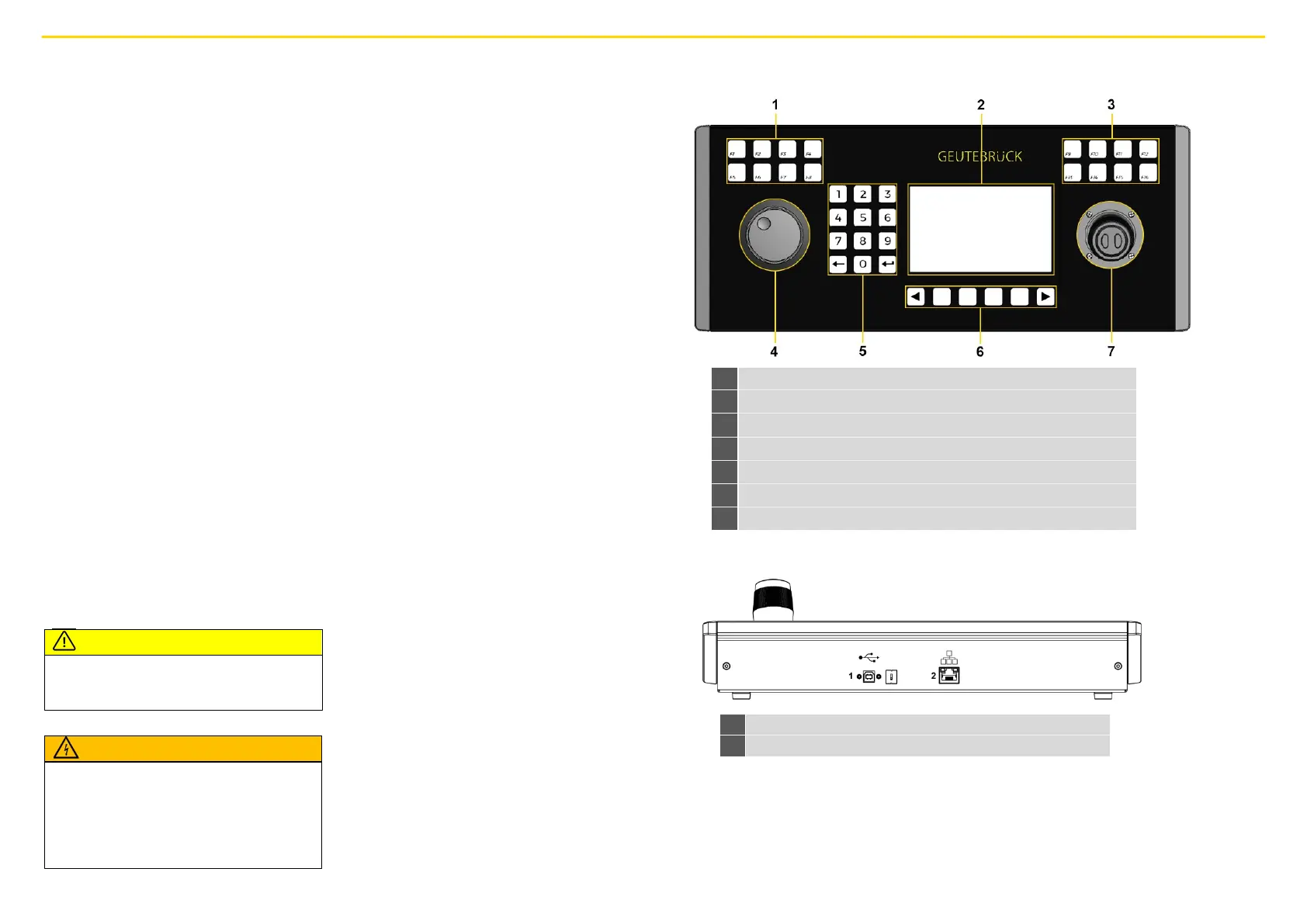
Front view
General safety instructions
Commissioning
The device may only be commissioned by qualified
personnel who are familiar with the device and the
technology.
Make sure that all applicable safety requirements
are fulfilled.
For the connection of control lines, please refer to
the instructions in the user manual.
Operation
When operating the device, the local applicable
laws, other regulations, standards, and rules of
technology must be observed. In the interest of a
safe work process, operating company and
supervisors are responsible for their compliance.
During all work, check the device for any damage.
All parts must be correctly mounted and fulfill all
conditions to ensure proper operation.
In dangerous situations or in case of malfunctions,
disconnect the device from the power supply
immediately.
Repair and maintenance
Ensure that the appliance is repaired
professionally. Mark the defect clearly a n d
unplug the appliance from the mains so that no
accidents or damage can occur or be caused by a
defective appliance until it has been repaired.
Do not remove the housing cover! There are only
maintenance-free components inside the device.
Connect MBeg+
Connecting the device to the network
The MBeg+ is connected to the network via a
100/1000 MBit/s Ethernet LAN connection.
Connect the MBeg+ to the network via the RJ45
network interface on the back of the device.
Ensure that the plug connections are secure.
The MBeg+ requires a valid IPv4 address with a
suitable subnet mask, gateway and primary and
secondary DNS to be able to communicate with
Geutebrück systems. In the settings menu, you
can either activate automatic IP configuration
using DHCP or select manual address
assignment.
With automatic address assignment, the
automatically applied settings can be validated
in the settings menu. In addition to the IP
address and subnet mask, the default gateway
and primary and secondary DNS servers can
also be specified for manual address
assignment.
The IP addresses are set by number pair or jog
shuttle. Client port that is used in all Geutebrück
applications: Port 10001
Connect the device to the power supply
and switch it on
Connect the device with USB, PoE 802.3 AF or
PoE+.
It switches on automatically
Operating MBeg+ with redundant power
supply
MBeg+ can be supplied with power via USB.
MBeg+ can be supplied with power via POE/
POE+.
If the MBeg+ is connected to USB and POE/
POE+, the device restarts when the network
cable is disconnected.
Numeric keypad with delete key and enter key
Programmable buttons for the menu functions
Rear view
RJ45 network connection PoE 802.3 AF
Explosion hazard!
If the mainboard battery is replaced by an
unsuitable battery type, explosions may occur.
► Make sure that a suitable battery type is used.
► Dispose the battery according to the valid legal
requirements and local regulations.
Danger due to the use of non-original parts!
Personal and property damage
► Only use original spare parts.


 To Previous Page
 Loading...