Interface Board
Dip-Switch Settings (serial Version) ST-100-S2
Pos. On = Off = Function
8 Reverse Printing Normal Printing Printing direction
7 M-19X M-16X,18X Type of printer
6 7 Bits 8 Bit Data Bits
5 Odd Even PARITY
4 Enable Disable PARITY.
4 2 Stop bits 1 Stop bit Stop bits
3 BR3
2 BR2 - see Baud Rate Table
1 BR1
NOTE: 7 DATA BITS, NO PARITY an 1 STOP BIT is NOT a valid
combination to send to the printer
Baud Rate Table
BR1 BR2 BR3 BAUD
On On On 150
Off On On 300
On Off On 600
Off Off On 1200
On On Off 2400
Off On Off 4800
On Off Off 9600
Off Off Off 19200
Jumper Options E3 and E4 (parallel version ST-100-C)
E3: must be set short for M-19X printers
E4: must set short form normal printing direction
13
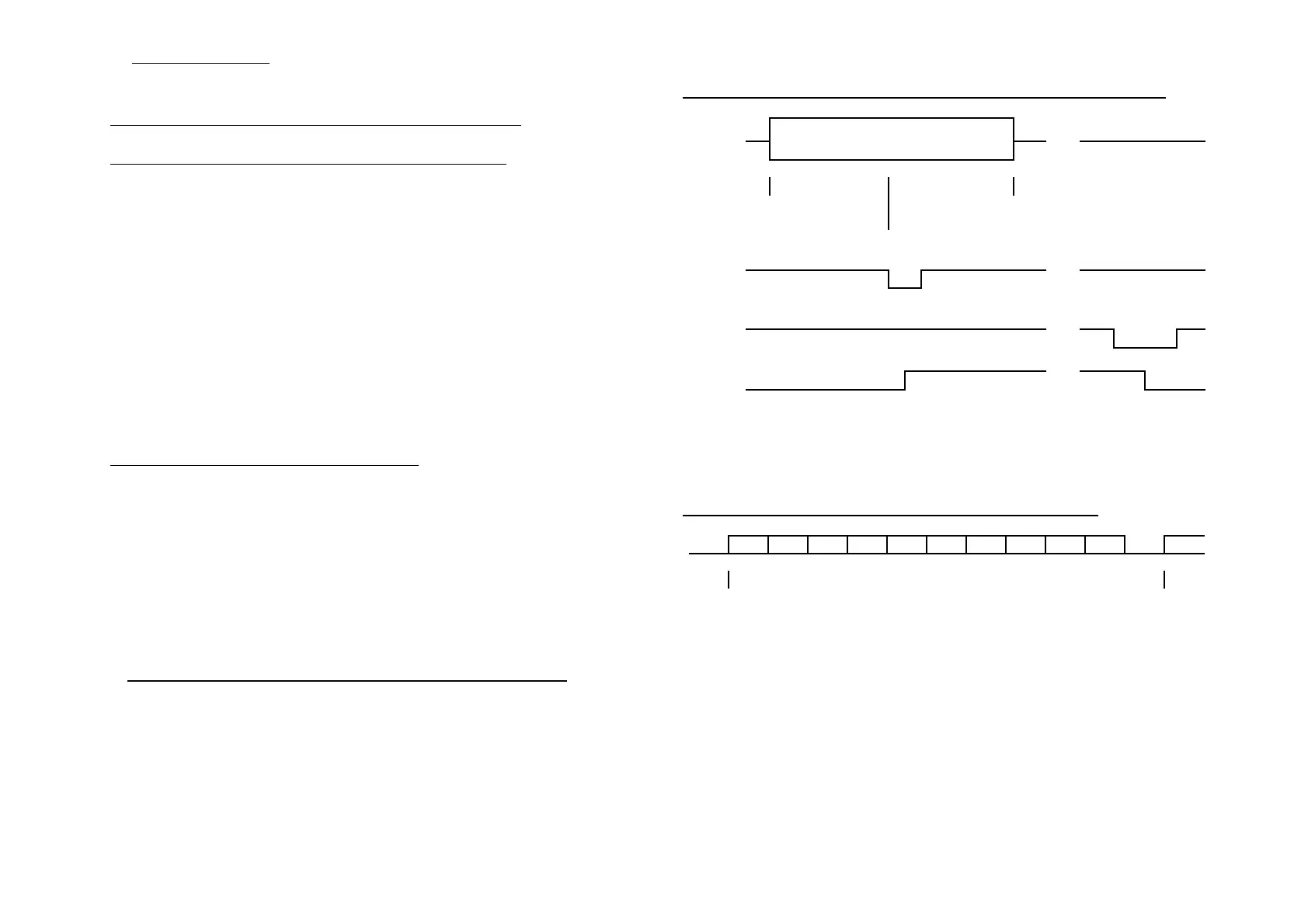
Parallel Timing Diagram (Parallel Interface Centronics)
DATA
DATA VALID
...
<------ su ------> <----- hold ------>
= 50 nSek
(min.)
= 50 nSek (min.)
/STB
...
/ACK
...
...
BUSY
su = Set-Up-Time Data valid until /STB LOW = 50 nanoseconds (min.).
hold = Hold-Time /STB LOW until DATA changes = 50 nanosesconds
(min.). /STB-width = 20 nanoseconds (min.). /ACK-width = 0.5 microseconds
(nominal). /STB LOW until BUSY HIGH = 40 nanoseconds (nominal).
Serial Timing Diagram (serial Interface RS-232)
st d0 d1 d2 d3 d4 d5 d6 d7 p sp
<--------------------- 1 character time ------------------------->
st = Start bit. sp = Stop bit. p = Parity bit (optional). d0 through d7 = Data bits.
d7 is optional unless needed for graphics. The width of each bit depends on the
baud rate.
NOTE: The data byte must be 10 bits minimum length. 7 DATA BITS, NO
PARITY and 1 STOP BIT is NOT a valid combination to send to the printer.
NOTE: Polarity shown (START BIT high and STOP BIT low) is for RS232 voltage
levels of serial data stream(± 12 Volt).
14



 To Next Page