English 01
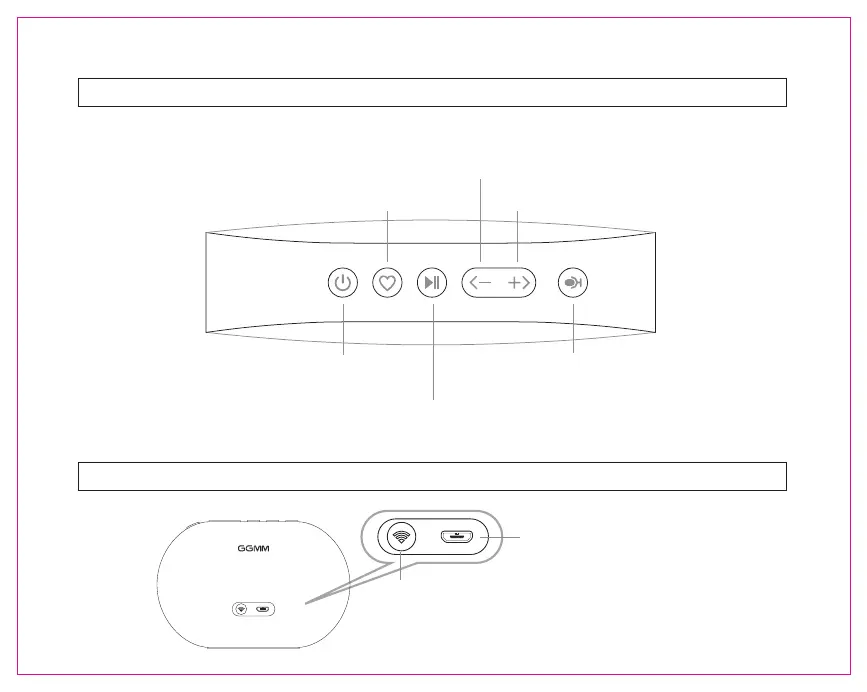
Control Panel
Short press to decrease volume.
Press and hold for 3 seconds to play previous song.
Short press to increase volume.
Press and hold for 3 seconds to play next song.
Press and hold for 3 seconds to Power on/Power off.
Short press for Mode switch.
Press and hold for 3 seconds to set the current playlist to
your presets. Short press to switch the preset playlists.
In Wi-Fi mode: short press to use Alexa.
In Bluetooth mode: short press to answer/hang up phone
call, long press to reject phone call.
Play/Pause
Back Panel
DC5V 1A~2A Power interface
In Wi-Fi Mode: Press to initiate Wi-Fi setup.
Press and hold for 5 seconds to restore factory settings.
In Bluetooth Mode: Press to unpair the current Bluetooth
device, and re-enter the Bluetooth search status.


 To Next Page