EasyManua.ls Logo

Giada F210 Series - Product Appearance Overview; OS Setup and System Recovery; System Recovery Procedure

Giada F210 Series
8 pages
Print Icon
To Next Page IconTo Next Page
To Previous Page IconTo Previous Page
Loading...
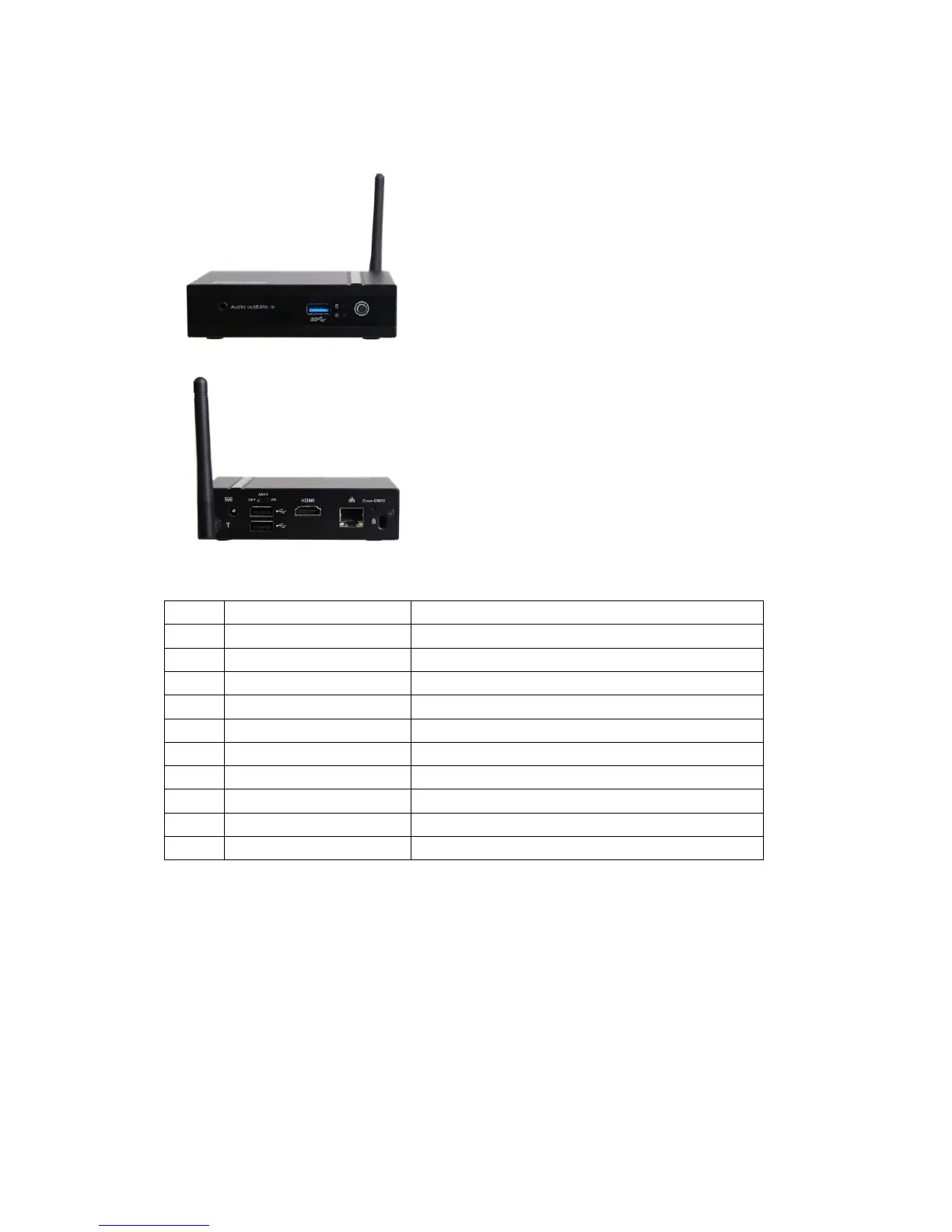
. Product appearance
NO
Description
Usage
1
Audio-out&MIC-in
Connect audio output /Microphone devices
2
USB3.0 Port
Connect USB 3.0 devices
3
Power Switch
Start the PC
4
Wi-Fi Antenna
Makes wireless signal better
5
DC-IN
Connect to AC/DC Power adapter
6
USB2.0 Port
Connect USB devices
7
JAHC Switch
On/Off JAHC
8
HDMI/VGA Port
Connect HDMI/VGA port monitor
9
Network interface
RJ45 Port
10
Clear CMOS
Clear BIOS
Ⅲ. Operation System Setting Up And Driver Installation
1. Please read Giada Mini PC MANUAL which is in Drivers DISK.
2. System Recovery (Some custom models have this function)
After Powered on the Host, press “Ctrl+F3” when the screen is showing “Press
Ctrl+F3 to start GRUB, any other key to boot previous MBR…”.

Related product manuals