This GIT-EZDS Aftermarket Distributorship Manual contains important information on the sensitive business practice and confident
ial business facts and figures that must be kept confidential and protected from the third party’s unauthorized approach. Du
plication, photo copy,
reproduction or translation to the other language is strictly prohibited without GIT and EZDS’ prior written consent, and any
violation of such prohibition will entitle GIT or EZDS to terminate the distributorship contract.
TROUBLE SHOOTING GUIDE
GIT-EZDS
AFTERMARKET DISTRIBUTORSHIP MANUAL
GIT-EZDS AFTERMARKET DISTRIBUTORSHIP MANUAL
Feb 19
th
, 2019
FIRST EDITION
According to the user license agreement, a G-scan3 must be used in the region where it was
originally shipped to, and actual use of the product is monitored to make sure that this user
license is not violated.
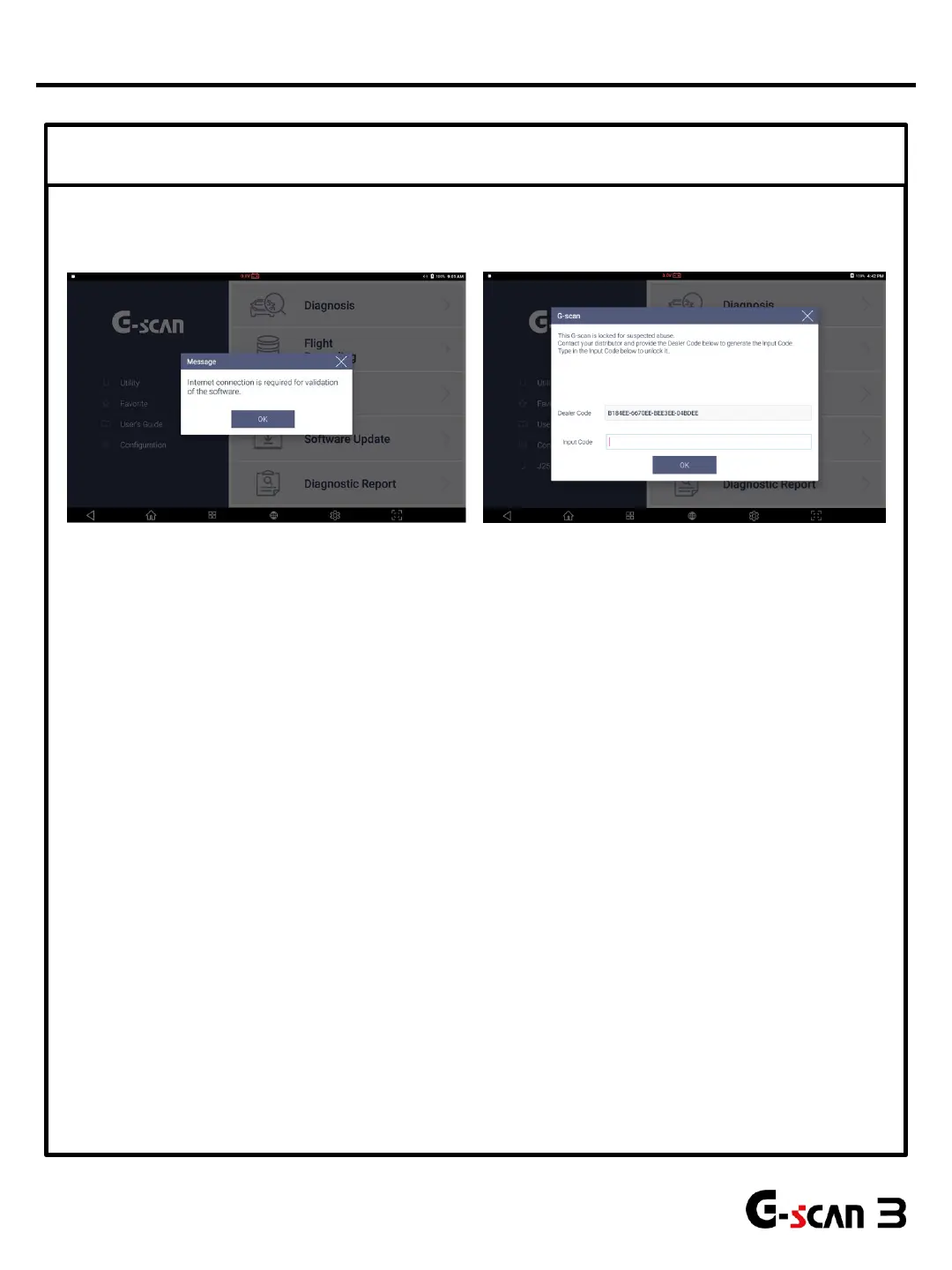
G-scan 3 will be locked down if it is found to have been used outside of designated country
or if the device does not access to EZDS server through the internet for more than 90 days.
In case of no access to the server for 90 days, G-scan3 displays notification message 10 days
before it is finally locked down as shown above. Once G-scan3 is online and access to the
server is checked, the system lock-down warning will be removed.
Once G-scan3 gets locked down for the violation of the user license agreement, the input
code must be entered in order to unlock the G-scan3.
Contact EZDS manager in charge of your region immediately and provide the complete and
detailed report including the description of the situation, serial number and customer
information in order to receive the Input code. The process may require remote access to the
device for analysis.
EZDS will decide whether or not to provide the unlock code case by case based on the
provided information and the result of remote analysis, and be reminded that EZDS holds the
right to refuse the provision of the unblock code if the product is locked as the result of
border-crossing sales activities or caused damage to the business of the other
distributor(s). No service related with unlocking the device is subject to warranty.
After G-scan3 is locked, input code must be entered in order to use G-scan3. Complete and detailed
report including country, serial number and customer information must be provided to EZDS in order
to receive the Input code. EZDS will determine to provide input code or not.
④ User license Violation Lock
36
G-Scan3 System Lock


 To Next Page