- 2 -
Proper Drainage
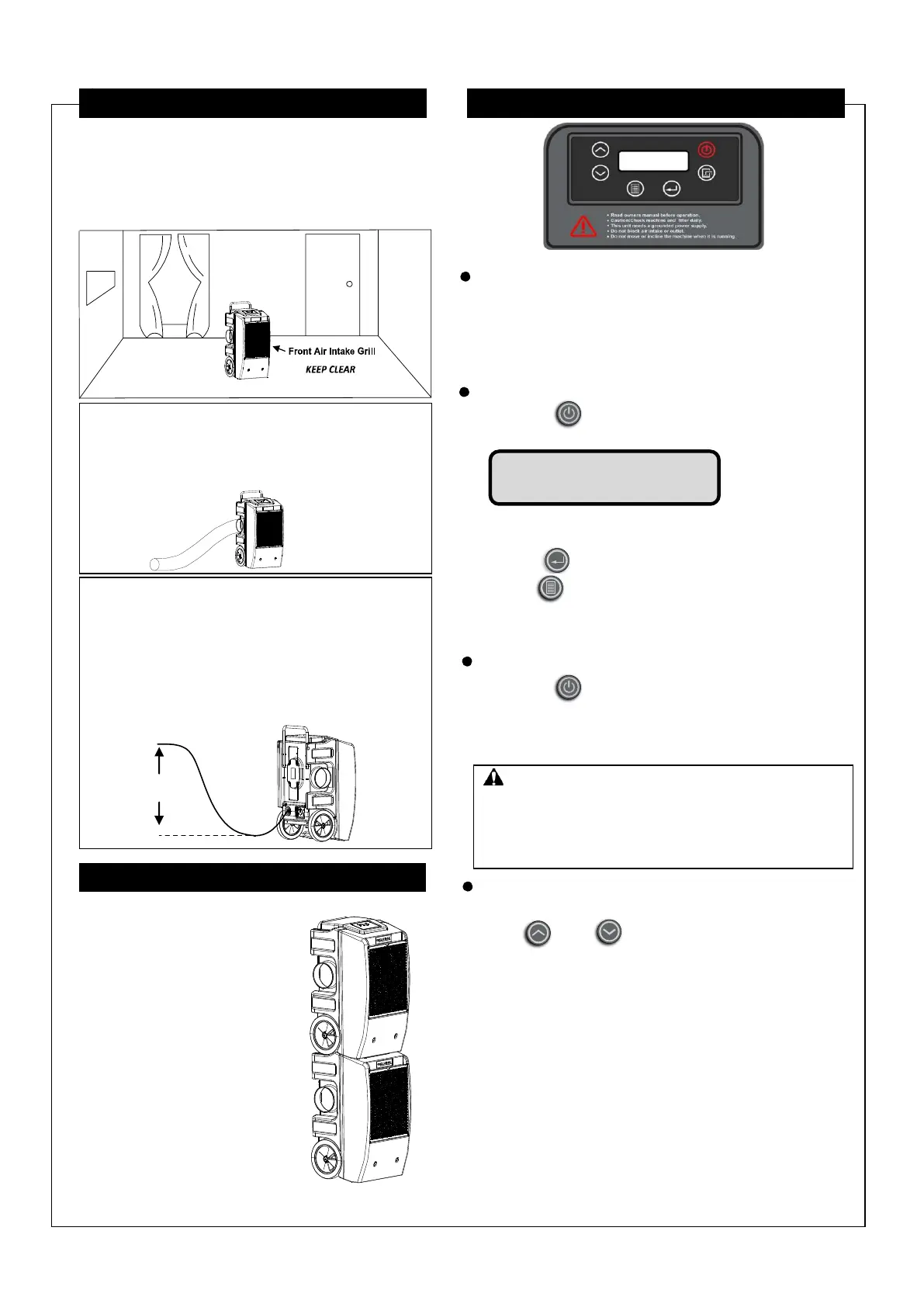
This dehumidifier contains a built-in pump that
connects to a draining hose in the back of the unit.
1. Ensure that external water does not create a
slipping hazard.
2. To avoid pump damage or overuse, do not
exceed 10 foot vertical lift between the pump
and drain.
Press the “ON/OFF” keys to turn the
Dehumidifier ON. The screen will display main menu:
SH-setting humidity; AH- ambient humidity
TMP-Temperature; JOB-This running/job time
1.Press to switch the temperature to Fahrenheit.
2.Hold menu keys for 10s, it will lock all button.
The lock icon will show on the main menu.
Hold menu keys again for 10s, it will unlock all buttons.
Press the “ON/OFF” keys to turn the unit OFF.
When the unit turns OFF, the water pump will run for 40
seconds to drain the residual condensate water in the
dehumidifier. The screen will display: Draining……
The factory setting is continuous dehumidifier mode.
Press up or down to set the desired humidity
level.
Increment settings are in increments of 5%.
Humidity setting ranges between CO, 20% - 95%.
1. When the adjusting humidity is between 20% and
95%, the unit will stop working while reaching the
Set humidity. The fan will run every 30 minutes
for 1 minute to sense humidity level. The unit will
resume operation when humidity level is higher
than set humidity level.
2. When the adjust humidity is below 20%, “CO” will
be displayed. The unit will enter continuous
dehumidifying mode .
10 FT. MAXIMUM
DRAIN HEIGHT
IMPORTANT:
To avoid water spillage, do not move the dehumidifier
for at least 3 minutes after turning the power off.
Before transporting, remove the external drain hose,
drain it carefully, and return it to the space on the
back of the unit.
SET UP INSTRUCTIONS OPERATION
Place dehumidifier in the upright position.
After transporting the dehumidifier to the desired
location, allow the unit to sit for 30 minutes before
powering ON. This allows the refrigerant system to
stabilize and will avoid damage.
Illustration of correct positioning for best performance:
.
STORING THE UNIT
Follow the guidelines below when
storing the unit:
1. Prior to storing the unit,
clean filters and drain water.
2. Wrap the power cord and
water hose to the back of
the unit.
3. If necessary,
stack machines as shown.
NOTE:
Do not stack more than
2 machines high.
Be sure to secure the
machines to ensure
they do not fall or move.
Ductwork Attachment
This dehumidifier can attach ductwork with
diameter of 8 inch to the air outlet.
To avoid airflow restrictions, do not attach duct
that exceed 16.5 feet in length and keep air outlet
clear.
This dehumidifier must be plugged into a grounded
115 VAC/60Hz outlet rated at least 15 amps.
The drain hose must be connected and routed to a
safe location.
SH AH TMP JOB
CO% 50% 00
0
C 00000h


 To Next Page
 Loading...