To adjust for compass variance, do the following:
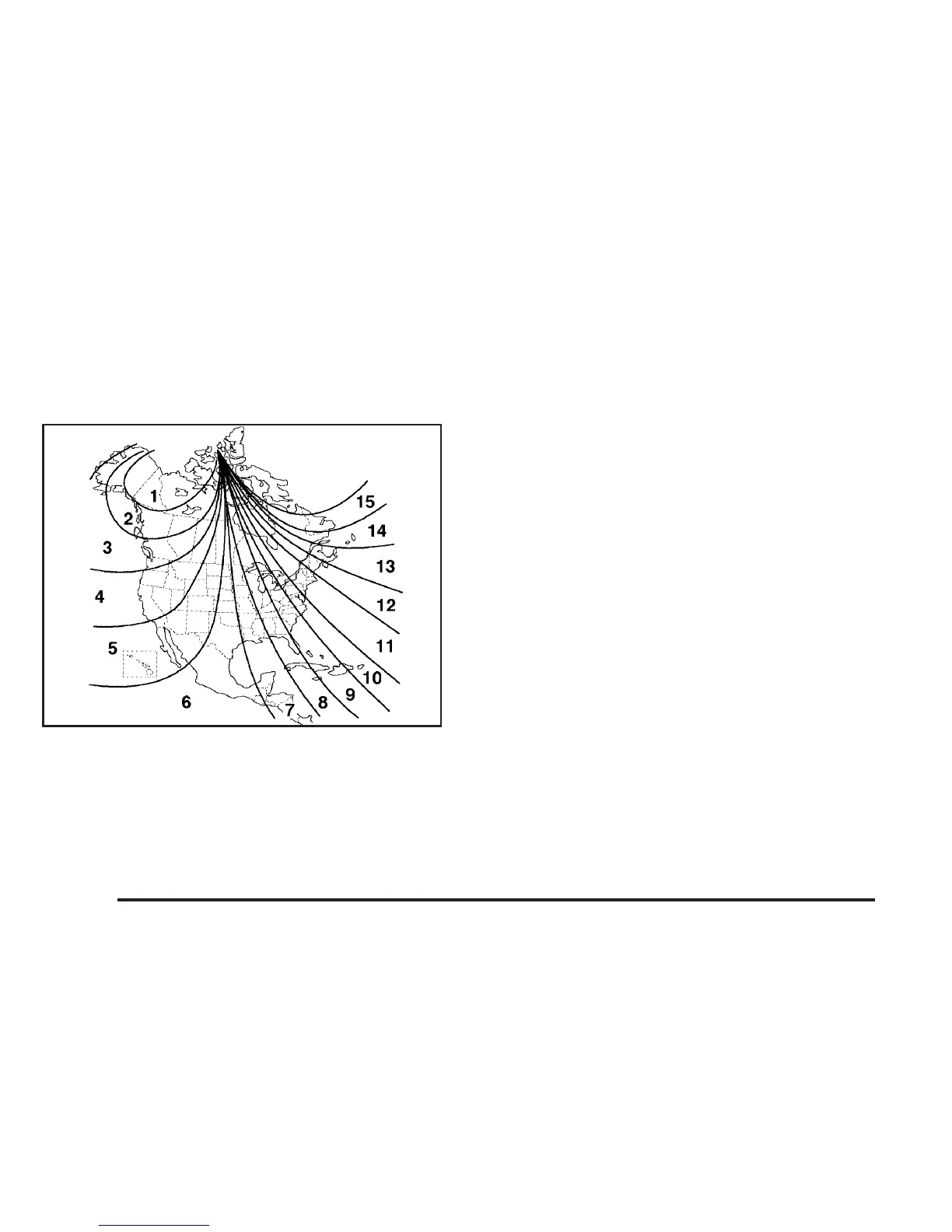
1. Find your current location and variance
zone number on the following zone map.
2. Press and hold the on/off button for
six seconds. Release the button when
(FOR ZONE) is displayed. The number shown
is the current zone number.
3. Scroll through the zone numbers that appear in
the window on the mirror by pressing the on/off
button. Once you find your zone number,
release the button. After about four seconds,
the mirror will return to the compass display,
and the new zone number will be set.
Automatic Dimming Rearview
Mirror with Compass and
Temperature Display
If the vehicle is equipped with an automatic mirror, it
will, when on, automatically dim to the proper level
to minimize glare from lights behind you after dark.
The mirror also includes a display in the upper
right corner of the mirror face. The compass
reading and the outside temperature will both
appear in the display at the same time. The dual
display can be turned on or off by briefly
pressing either the TEMP or the COMP button.
140



 To Next Page
 Loading...







