11
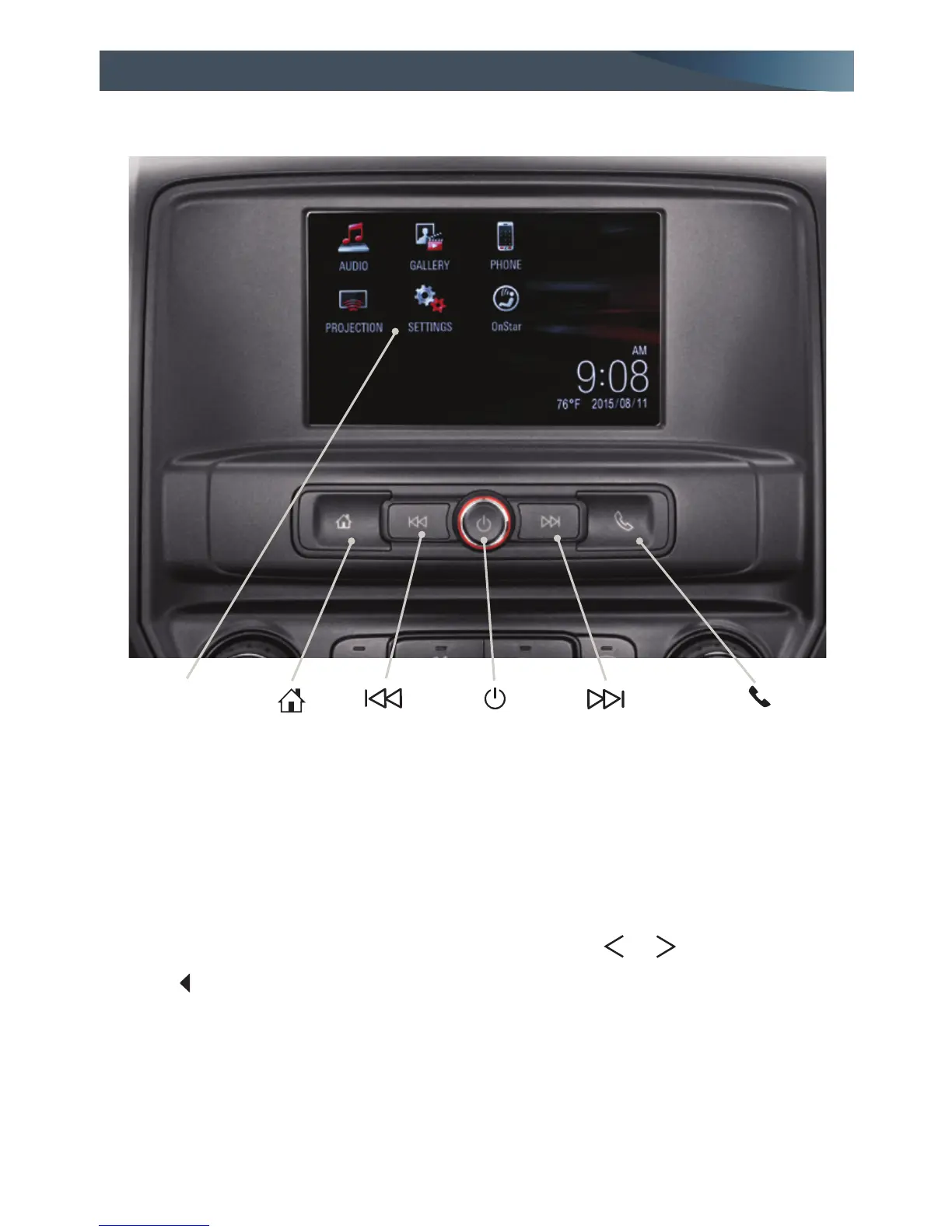
GMC IntelliLink Radio with 7-Inch* Color Screen
F
F
Optional equipment *Screen measured diagonally
Press to view Phone screen
or answer a call/Press
and hold to access
Push to Talk
Home
screen
Power/
Volume
Setting the Time
1. Touch Settings on the home page.
2. Touch Time and Date.
3. Touch Set Time.
4. Touch the arrows to adjust the hours,
minutes and AM or PM.
5. Touch BACK to exit the menu.
Storing Favorites
Up to 25 AM, FM and SiriusXM radio
stations can be stored, in any order, on up
to ve pages.
1. Tune in the desired radio station.
2. Touch the
or
button to display
where the station is to be stored.
3. Touch and hold one of the preset screen
buttons until a beep is heard.
4. Repeat the steps for each desired station.
Applications:
Touch the screen
icon to access the
application
SEEK
Previous radio
station or
track
SEEK
Next radio
station or
track
Refer to your Owner Manual for important safety information about using the infotainment
system while driving.
For assistance with the IntelliLink system, contact Customer Assistance at
1-855-4-SUPPORT (1-855-478-7767) or visit www.gmc.com and click the More GMC link.
See Infotainment System in your Owner Manual.



 To Next Page