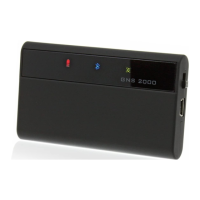
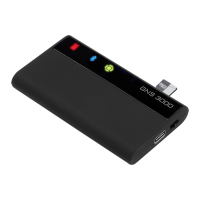
The GNS 5870 MFI is a highly sensitive 32-channel GPS receiver with Bluetooth technology, designed to provide accurate position information to a variety of handheld devices. It is compatible with Apple iPod touch 2G, iPod touch 3G, iPhone 3G, iPhone 3GS (starting with iPhone OS 3.0.1), iPad, as well as other PDAs and Notebooks. This device is notable for being a Bluetooth-Hybrid-GPS (HGPS) receiver, combining GPS positioning signals from the worldwide freely available GPS navigation system with wireless Bluetooth communication for data transfer.
Technical Specifications:
- Weight: 47g (5870 MFI only)
- Dimensions: 79.1mm x 45.3mm x 11.3mm
- Ambient Temperatures:
- Storage: -10°C to +40°C
- Operation: 0°C to +50°C
- Power Supply and Consumption:
- Charging & Operation: 5.0V DC (+-5%) / 500mA
- Via Car Adapter: 12-24VDC / 10-300mA
- Battery: Li-Ion rechargeable battery
- Operating Time: > 10 hours
- Charging Time: Approximately 3.5 hours (0-90%)
- Connectors: Mini-USB socket (for supply)
- Data Interface: Via Bluetooth, 57600 baud
- GPS Chip Set: MediaTek MTK 3318 32-channel GPS receiver
- Start Times:
- Cold start: 60 seconds
- Warm start: 3 seconds
- Hot start: 1 second
Usage Features:
The GNS 5870 MFI features "STT SmartTouchTechnology" for its on/off switch. To switch the device on, users slide a finger from top to bottom over the LEDs; to switch it off, the finger is moved from bottom to top.
The device's status is indicated by an illuminated display with three LEDs:
- Red charging light:
- Off: Normal
- On: Charger cable attached, battery fully charged
- Blinking: Charger cable attached, battery charging
- Fast blinking: Battery almost empty, device switching off in about 10 minutes
- Blue Bluetooth status:
- Off: 5870 MFI is off
- On: Bluetooth connection established
- Blinking: No Bluetooth connection established
- Green GPS status:
- Off: 5870 MFI is off
- On: GPS position received
- Blinking: GPS position not (yet) calculated
For installation, the GNS 5870 MFI should be positioned to have an unobstructed "view" of the sky and secured to prevent slipping. To establish a Bluetooth connection, activate Bluetooth on your Apple device, PDA, or PC and initiate a search for the GNS 5870 MFI. When prompted for a PIN, enter "0000". After connection, start your navigation software and select the appropriate interface under GPS settings if required.
A special feature for Apple devices is the automatic connection renewal. After the initial connection, the GNS 5870 MFI will automatically reconnect upon restart. This automatic connection is interrupted if the GNS 5870 MFI is connected to another device in the interim.
The GNS 5870 MFI supports operation over car ignition for fixed and unfixed installations in motor vehicles with a 12-24V power supply. It includes an automatic activator switch for in-vehicle use. If connected to a cigarette lighter socket linked to the ignition, the device will turn on automatically when the ignition is activated, displaying its status as described in the "Illuminated Display" section.
Power Management:
- Without an external power supply or car ignition, the GNS 5870 MFI will automatically shut down after 15 minutes without a Bluetooth connection to conserve battery life.
- If the device is installed in an easily accessible location (e.g., glove box), it can be switched off using the SmartTouchTechnology on/off switch.
- To switch the GNS 5870 MFI on again, either reconnect it to the power cable or use the SmartTouchTechnology on/off switch for portable use.
Maintenance Features:
- Charging: The GNS 5870 MFI is equipped with a Li-Ion rechargeable battery. For charging, connect the supplied charging cable to the cigarette-lighter charger device and the GNS 5870 MFI. The red indicator light will blink to show that the device is charging. The loading cable can also be used to charge the GNS 5870 MFI at PC USB connectors.
- Reset: In case of an unexpected malfunction (e.g., no data sent, partner device not recognizing the GNS 5870 MFI, or display malfunction), carefully insert a paper clip or similar object into the opening and press the reset key.
Safety Notices:
- Never manipulate or adjust the GPS Navigation System while driving.
- Protect the GNS 5870 MFI from moisture and observe operating and storage temperature limits.
- The device contains a Li-Ion battery and should only be operated between 0°C and 50°C. Do not expose it to direct sunlight or heat.
- Do not open or modify the device, as this will void the guarantee and warranty. There are no user-serviceable components inside.
- Only connect the GNS 5870 MFI to the connector types described in the instructions.
- Respect local laws regarding the operation of devices while driving.
- Do not operate the GNS 5870 MFI with a damaged cord or if the unit has been dropped or damaged.
- Do not bend the cable forcibly or place heavy objects on it, as this can damage the cord and cause fire or electrical shock.
- Ensure the GNS 5870 MFI is firmly fixed in your car to prevent damage.
Bluetooth Operation Safety Notice:
Bluetooth should not be used near medicinal devices, pacemakers, automatic control devices, automatic doors, fire alarms, aeroplanes, or public transport. If unsure about the permissibility of wireless device operation in certain environments, inquire before operating the device.
Approvals and Declarations:
- CE: The GNS 5870 MFI complies with R&TTE directives (99/5/EG), EMC directives (2004/108/EC), and low voltage directive (2006/95/EC) as issued by the EU commission.
- FCC: This device conforms to section 15 of the FCC regulations.
- R&TTE Bluetooth EMC: This device complies with EN 301489-1/-17; EN 300 440; EN 300 328 (Modul) and is listed under Bluetooth Qualified Products. While conforming to strict guidelines, it cannot be guaranteed that other devices will not be affected by interference.
- WEEE Declaration: The device is labeled in accordance with European directive 2002/96/EG concerning waste electrical and electronic equipment (WEEE). WEEE reg. no. DE 30136236.
Warranty Notice:
The product is eligible for free repair within a 24-month legal warranty period, provided there is no damage from third-party interference, moisture, dropping, or other improper handling. The internal Li-Ion accumulator has a separate 6-month warranty period and is excluded from the 24-month warranty.

 Need help?

 To Next Page
 General