TURNING OFF IN HOSPITALS
Follow all restrictions. Turn off the phone near medical equipment.
TURN ON AIRCRAFT
Follow all restrictions. Wireless devices may cause interference in aircraft.
TURN OFF WHEN LOADING FUEL
Do not use the phone in / near stations. Do not use near fuel or chemicals.
USE WITH SENSATEZ
Only qualified personnel may install or repair this product.
BATTERIES AND ACCESSORIES
Use only appropriate batteries and enhancements. Do not connect incompatible products.
WATER RESISTANCE
Your phone is not waterproof. Keep it dry.
BACKUPS
Remember to make backups or keep a written record of all the important information stored on your phone.
CONNECT TO OTHER DEVICES
When connecting to any external device, read its manual for detailed instructions. Do not connect to
incompatible products.
Cell Phone
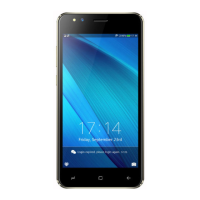
The appearance of the phone is shown below. The photo is for reference only; The phone may be different.
Please take your current phone as thestandard.
Keyboard Descriptions
Key Description
Power On/Off Key
(Right side)
Press the key to switch the phone on. In power in the state, press
the key to lock keyboard and display;
options.
Back Key
In the menu mode, press the key to return to the top menu.
Home Key
Press the key to return to the standby mode. Long press the key
to display the recent list.
Option Key Press the key to enter the options menu.


 To Next Page
 Loading...