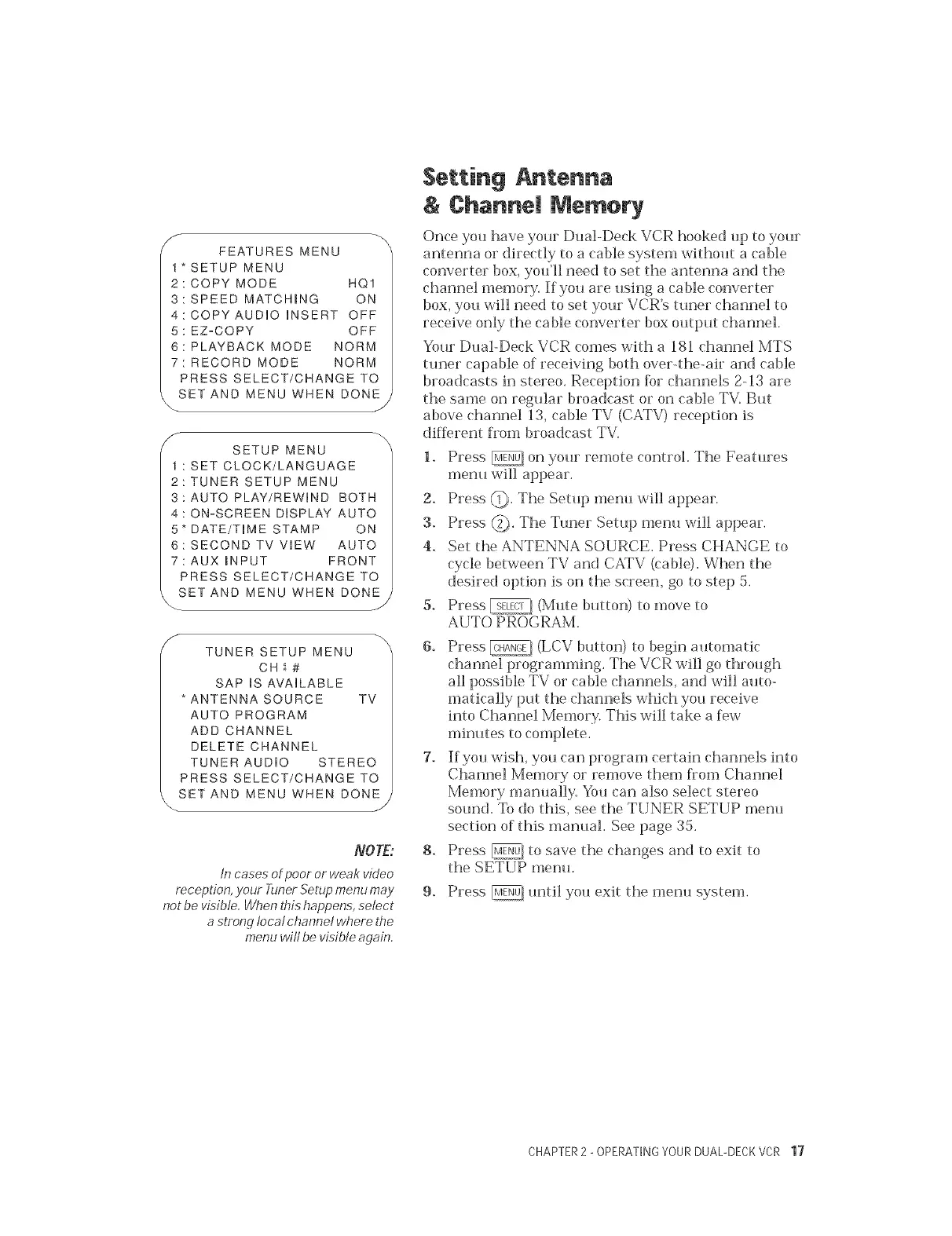
FEATURESMENU
*SETUPMENU
2:COPYMODE HQ1
3:SPEEDMATCHING ON
4:COPYAUDIOiNSERTOFF
5:EZoCOPY OFF
6:PLAYBACKMODE NORM
7:RECORDMODE NORM
PRESSSELECT/CHANGETO
SET AND MENU WHEN BONE j
SETUP MENU
: SET CLOCK/LANGUAGE
2:TUNER SETUP MENU
3:AUTO PLAY/REWIND BOTH
4 : ON-SCREEN DISPLAY AUTO
5" DATE/TIME STAMP ON
6: SECOND TV ViEW AUTO
7: AUX mNPUT FRONT
PRESS SELECT/CHANGE TO
SET AND MENU WHEN DONE,
J
f
TUNER SETUP MENU
CH_#
SAPIS AVAILABLE
*ANTENNA SOURCE TV
AUTO PROGRAM
ADD CHANNEL
DELETE CHANNEL
TUNER AUDIO STEREO
PRESS SELECT/CHANGE TO
SET AND MENU WHEN DONE
J
NOTE:
tn cases ot poor or weak video
reception, .your Tuner Setup menu may
not be visible. W/ten this happens, select
a strong local channel where the
menu wilt be visible again.
Setting Antenna
& £hanne| Memory
Once you have your Dual-Deck VCR hooked up to your
antenna or directly to a cable system without a cable
converter box, you'll need to set the antenna and the
channel memory. If you are using a cable converter
box, you will need to set your VCR's tuner channel to
receive only the ca ble converter box output channel.
Your Dual-Deck VCR comes with a 181 channel MTS
tuner capable of receiving both over-the-air and cable
broadcasts in stereo. Reception for channels 2-13 are
the same on regular broadcast or on cable TV. But
above channel 13, cable TV (CATV) reception is
different from broadcast TV.
1. Press _q on your remote control. The Features
menu will appear.
2. Press @. The Setup menu will appear.
3. Press @. The Tuner Setup menu will appear.
4. Set the ANTENNA SOURCE. Press CHANCE to
cycle between TV and CATV (cable). When the
desired option is on the screen, go to step 5.
5. Press _ (Mute button) to move to
AUTO PROGRAM.
6. Press _ (LCV button) to begin automatic
channel programming. The VCR will go through
all possible TV or cable channels, and will auto-
matically put the channels which you receive
into Channel Memory. This will take a few
minutes to complete.
7. If you wish, you can program certain channels into
Channel Memory or remove them fiom Channel
Memory manually. You can also select stereo
sound. To do this, see the TUNER SETUP menu
section of this manual. See page 35.
8. Press _J, to save the changes and to exit to
the SETUP menu.
9. Press _/until you exit the menu system.
CHAPTER2 - OPERATINGYOURDUAL-DECKVCR 17


 To Next Page
 Loading...