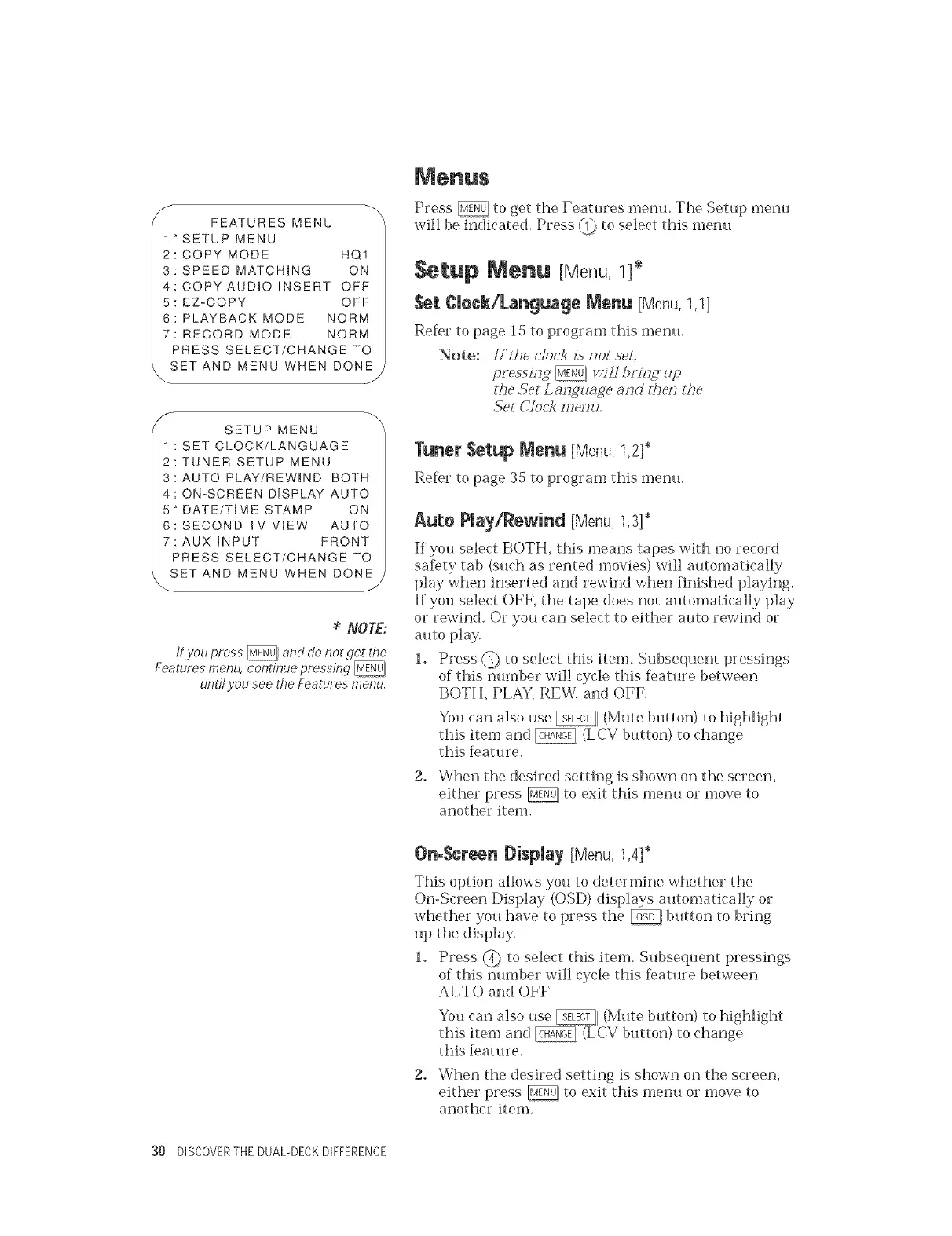
_- FEATURES MENU
1*SETUP MENU
2: COPY MODE HQ1
3: SPEED MATCH(NG ON
4: COPY AUDIO iNSERT OFF
5: EZoCOPY OFF
6: PLAYBACK MODE NORM
7: RECORD MODE NORM
PRESS SELECT/CHANGE TO
t SET AND MENU WHEN DONE
\
J
SETUP MENU
1 : SET CLOCK/LANGUAGE
2: TUNER SETUP MENU
3: AUTO PLAY/REWHD BOTH
4: ONoSCREEN D(SPLAY AUTO
5*DATE/T(ME STAMP ON
6: SECOND TV ViEW AUTO
7:AUX iNPUT FRONT
PRESS SELECT/CHANGE TO
SET AND MENU WHEN DONE _
NOTE:
tf you press _ and do not get the
Features menu, continue pressing _
until you see the Features menu.
Press _ to get the Features metal The Setup n_enu
will be indicated. Press (_ to select this menu.
SetUp Menu [Menu, 1]*
Set £Ueek/Language Menu [Menu,1,1]
Refer to page 15 to program this menu.
Note: Sf the dock is s_ot set,
gressin, g _ :,_4tlt)s'islg zLp
tL,e Set Lm;_uage m_d :hes_ the
Set Clock s77es_u,
Tuner Setup Nenu [Menu,1,2}_
Re_r to page 35 to program this metal
Auto Play/Rewind [Menu,1,3}*
If you select BOTH, this means tapes with no record
saf)ty tab (such as rented movies) will automatically
play when inserted and rewind when finished playing.
If you select OFF, the tape does not automatically play
or rewind. Or you can select to either auto rewind or
auto play.
1. Press @_ to select this Rein. Subsequent pressings
of this nmnber will cycle this feature between
BOTH, PLAY, REW, and OFF.
You can also use _1 (Mute button) to highlight
this item and _ (LCV button) to change
this feature.
2. When the desired setting is shown on the screen,
either press _ to exit this metal or move to
another item.
OnoScreen l)isNay {Menu,1,4]*
This option allows you to determine whether the
On-Screen Display (OSD) displays automatically or
whether you have to press the _ button to bring
tap the display.
1. Press @ to select this item. Subsequent pressings
of this number will cycle this [)ature between
AUTO and OFF.
You can also use _1 (Mute button) to highlight
this item and _ (LCV button) to change
this feature.
2. When the desired setting is shown on the screen,
either press _, to exit this metal or move to
another item.
30 DISCOVERTHE DUAL-DECKDIFFERENCE


 To Next Page
 Loading...