EasyManua.ls Logo

GOAL ZERO Yeti 6000X - User Manual

GOAL ZERO Yeti 6000X
25 pages
Print Icon
To Next Page IconTo Next Page
Loading...
Question and Answer IconNeed help?

Do you have a question about the GOAL ZERO Yeti 6000X and is the answer not in the manual?

Summary

Important Safety Instructions

Get To Know Your Gear

Buttons Under Lid

Details the WiFi, 8mm input, and reset buttons located under the lid of the Yeti.

How it Works

Charging Your Goal Zero Yeti

Charging from the Wall

Instructions for recharging the Yeti using a standard AC wall outlet and the included charger.

Charging from Solar

Instructions for recharging the Yeti using solar panels, including input ports and maximum wattage.

Using Your Goal Zero Yeti

How to Use Your Goal Zero Yeti

Step-by-step guide on operating the Goal Zero Yeti for powering devices.

Best-Use Strategy

Tips for optimizing performance and understanding capacity when charging devices.

Cold Weather Usage

How cold temperatures affect battery capacity and recommendations for use.

LCD Display

Explanation of the information displayed on the unit's built-in LCD screen.

Storage and Downtime Maintenance

Technical Specifications

Frequently Asked Questions

Troubleshooting

Education

Batteries 101

Guidance on battery care, including exercise, memory myth, stadium effect, and manual reading.

Solar 101

Tips and explanations for recharging gear using solar power effectively.

Warranty & Contact

Summary

Important Safety Instructions

Get To Know Your Gear

Buttons Under Lid

Details the WiFi, 8mm input, and reset buttons located under the lid of the Yeti.

How it Works

Charging Your Goal Zero Yeti

Charging from the Wall

Instructions for recharging the Yeti using a standard AC wall outlet and the included charger.

Charging from Solar

Instructions for recharging the Yeti using solar panels, including input ports and maximum wattage.

Using Your Goal Zero Yeti

How to Use Your Goal Zero Yeti

Step-by-step guide on operating the Goal Zero Yeti for powering devices.

Best-Use Strategy

Tips for optimizing performance and understanding capacity when charging devices.

Cold Weather Usage

How cold temperatures affect battery capacity and recommendations for use.

LCD Display

Explanation of the information displayed on the unit's built-in LCD screen.

Storage and Downtime Maintenance

Technical Specifications

Frequently Asked Questions

Troubleshooting

Education

Batteries 101

Guidance on battery care, including exercise, memory myth, stadium effect, and manual reading.

Solar 101

Tips and explanations for recharging gear using solar power effectively.

Warranty & Contact

Overview

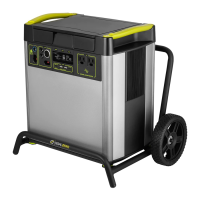
The Goal Zero Yeti 6000X is a portable power station designed to provide power for a wide range of devices, anywhere you need it. It features a robust Li-ion NMC battery with a pack capacity of 6010Wh (10.8V, 557Ah) and a single cell equivalent capacity of 1668Ah @ 3.6V. The battery is rated for 500 cycles to 80% capacity (at a discharge rate of 1C, full charge/discharge, and 25°C temperature), and has a shelf-life requiring a charge every 3-6 months. Its management system includes an MPPT charge controller.

Function Description:

The Yeti 6000X serves as a versatile power source, capable of being charged from solar panels or an AC wall outlet, and then providing power to various electronic devices and appliances through multiple output ports. It's designed for use in diverse scenarios, from camping and outdoor adventures to powering essential equipment in emergencies or off-grid living. The device is equipped with interactive buttons and an LCD screen for monitoring its status and controlling outputs. It also includes WiFi connectivity for remote monitoring and control via a dedicated app.

Important Technical Specifications:

Charge Times:

  • Maximum input (standard): 11 hours
  • Goal Zero Ranger 300: 24-48 hours
  • Goal Zero Boulder (3X) 200 Briefcase: 12-14 hours
  • Goal Zero Boulder (6X) 200 Briefcase: 11-12 hours

Battery:

  • Cell Chemistry: Li-ion NMC
  • Pack Capacity: 6010Wh (10.8V, 557Ah)
  • Single Cell Equivalent Capacity: 1668Ah @ 3.6V
  • Lifecycles: 500 Cycles to 80% capacity (Discharge rate: 1C, Full charge/discharge, Temp: 25C)
  • Shelf-life: Charge every 3-6 months
  • Management System: MPPT charge controller

Ports:

  • USB-A Port (output): 5V, up to 2.4A (12W max), regulated
  • USB-C Port (output): 5-12V, up to 3.0A (18W max), regulated
  • USB-PD Port (output): 5-20V, up to 3.0A (60W max), regulated
  • 6mm Port (output, 6mm): 12V, up to 10A (120W max), regulated
  • 12V Car Port (output): 12V, up to 13A (160W max), regulated
  • 12V Power Pole port (output): 12V, up to 30A (360W max), regulated
  • 120V AC Inverter (output, pure sine wave): 120VAC 60Hz, 16.5A (2000W, 3500W surge)
  • 230V AC Inverter (output, pure sine wave) UNIVERSAL OR AUSTRALIA (TYPE 1) AC PLUGS: 230VAC 50Hz, 8.5A (2000W, 3500W surge)
  • Charging Port (input, 8mm): 14-50V, up to 10A (120W max)
  • Power Pole Charging Port (input): 14-50V, up to 50A (600W max)
  • Expansion Module port: Covered port under the lid. To be used with Goal Zero expansion modules only.

Connectivity:

  • WiFi RF Certification: FCC/CE/IC/TELEC/KCC/SRRC/NCC
  • WiFi Protocols: 802.11 b/g/n (802.11n up to 150 Mbps)
  • WiFi Frequency Range: 2.4~2.5 GHz
  • Bluetooth Protocols: Bluetooth Low Energy

General:

  • Weight (Yeti only): 97.35 lbs (44.16 kg)
  • Weight (cart only): 106.1 lbs (48.11 kg)
  • Dimensions (Yeti only): 15.25 x 10.23 x 17 in (38.74 x 25.98 x 43.2 cm)
  • Dimensions (Yeti & Roll Cart): 20.5 x 14.6 x 19.01 in (51.99 x 36.98 x 48.28 cm)
  • Operating Usage Temp.: 32-104 F (0-40 C)
  • Certs: BCCE FC
  • Warranty: 24 months

Usage Features:

Charging the Yeti:

The Yeti 6000X should be fully charged before initial use or storage. It can be charged from a wall outlet using the included 600W AC Wall Charger, which takes approximately 11 hours. Solar charging is also supported via 8mm input ports (up to 120W each) and an Anderson Power Pole port (up to 600W total capacity across all input ports). When solar charging, ensure the total voltage from solar panels does not exceed 50V to prevent damage. The device features a blue LED light next to the INPUT port and blinking battery segments on the display to indicate charging status.

Powering Devices:

To use an output port, press the power button located above it. A white LED light indicates the port is active. It's recommended to turn off unused ports to conserve power. The Yeti can charge itself and power devices simultaneously. When connecting devices, observe the BATTERY DISPLAY and the device's power requirements. The AC inverter provides 2000W of continuous power with a 3500W surge capacity. If a device pulls more than 2000W for an extended period, the inverter will shut off. The Yeti's advanced surge management system maximizes compatibility, but some devices may still exceed its surge capacity, causing the port to turn off.

LCD Display:

The built-in LCD display provides crucial information:

  • INPUT: Shows the power (watts) entering the Yeti during charging.
  • OUTPUT: Shows the power (watts) consumed by connected devices.
  • TIME TO EMPTY/FULL: Estimates the time until the Yeti is fully charged or empty, based on current input/output rates. This estimate adjusts as rates fluctuate.
  • BATTERY LEVEL: Displays 5 segments, approximating 20%, 40%, 60%, 80%, and 100% capacity. Blinking segments indicate charging.

Front Buttons:

  • LIGHT: Toggles the display backlight on/off.
  • UNIT: Scrolls through different output and power consumption settings. Holding UNIT + INFO performs a factory reset (deletes WiFi info/configurations). Holding UNIT alone resets the watt-hour counter.
  • INFO: Alternates the screen between detailed battery state of charge percentage and Time to Empty/Full.

Buttons Under Lid:

  • WiFi button: Activates the Yeti's WiFi for device connection. Holding it switches between pairing and connecting modes. Pressing and holding performs a soft reset (does not factory reset or reset watt-hours).
  • Reset button: Used for troubleshooting.

Cold Weather Usage:

Cold temperatures can reduce battery capacity. For sub-zero conditions, it's recommended to keep the Yeti in an insulated cooler, connected to a power source, to maintain optimal capacity. The Yeti will not allow charging below freezing for safety reasons and will display a warning on the LCD.

Troubleshooting:

  • If devices aren't charging, ensure the output port is on (white LED). If a light is red, it indicates a trip; push the button to reset.
  • Check the battery display; if below 20%, charge the Yeti.
  • Look for OVERLOAD (red port light) or Temperature warnings (snowflake/thermometer icon). An OVERLOAD means power draw exceeds limits. A "cold" warning means the Yeti needs warming; a "hot" warning means it needs cooling.
  • Verify device compatibility with the Yeti's port capacities (refer to Tech Specs).
  • For WiFi connection issues, press and hold the WiFi button for 3 seconds to force connection mode (WiFi symbol will flash).
  • If issues persist, try resetting the unit by holding the Units and Info button for 3 seconds.

Maintenance Features:

Storage and Downtime:

To maintain battery health, keep the Yeti plugged into a power source (solar or wall) when not in use or during storage. If storing unplugged, fully charge the Yeti every 3 months and store it in a cool, dry place. Failure to do so can lead to battery damage and void the warranty. If unused for several months, it may require several charge cycles to restore accurate battery percentage and time remaining values.

Battery Care (Batteries 101):

  • Exercise: Regular use is beneficial. Avoid leaving the battery uncharged for extended periods.
  • No "Battery Memory": Unlike old NiCd batteries, modern Li-ion batteries (like those in the Yeti) do not benefit from deep cycling. Avoid completely draining them.
  • "Stadium Effect": Charging slows down as the battery approaches full capacity.
  • Read the Manual: Always refer to the user guide for specific battery care instructions.

Solar Charging Tips (Solar 101):

  • Collect – Store – Use: Solar panels collect energy; the Yeti stores it; then use the Yeti to power gear.
  • Solar Charge Times: Actual solar recharge times may be 50-75% of laboratory-rated wattage due to real-world conditions.
  • Overcast Conditions: Solar panels still collect power in cloudy conditions, though efficiency is reduced.
  • Avoid Shade and Windows: Solar panels perform best when fully exposed to direct sunlight. Windows can decrease efficiency.
  • Proper Alignment: Angling the solar panel towards the sun significantly increases efficiency.

Warranty:

The Goal Zero Yeti 6000X comes with a 2-year limited warranty for the original consumer purchaser, covering defects in workmanship and material under normal consumer use. A sales receipt or product registration is required to establish the warranty start date. Goal Zero will repair or exchange defective products. The warranty does not cover damage from accident, abuse, misuse, non-Goal Zero products, unauthorized service, modifications, removed serial numbers, or products purchased through online auctions. It also requires the battery to be fully charged within seven days of purchase and at least once every six months.

GOAL ZERO Yeti 6000X Specifications

General IconGeneral
BrandGOAL ZERO
ModelYeti 6000X
CategoryBattery Charger
LanguageEnglish

Related product manuals