The Gofort UA1100 Portable Solar Power Station is a versatile power solution designed for emergency situations and off-grid use. It features a robust lithium-ion battery with a capacity of 1100Wh (297600mAh at 3.7V), providing reliable power for various devices. The device generates a pure sine wave AC output, making it compatible with most AC electrical appliances that work with sinusoidal waveforms and have a power consumption of less than 1200W. However, it's important to note that for long-term use, especially with appliances like refrigerators, microwaves, and compressors that use AC motors, or delicate medical equipment, a standard DC or AC power supply might be better suited as the UA1100 is primarily for emergency use and may not operate AC motors at full capacity, potentially causing noise.
Important Technical Specifications:
- Battery: Lithium-ion, 1100Wh, 297600mAh (3.7V)
- AC Output: Pure Sine Wave, 1200W continuous, 2000W peak. Standard output voltage is 110V.
- Input (Adapter): 12V-24V
- Input (Solar Panel): 18V-24V (≥100W recommended)
- Input (Car): 12V cigarette lighter
- USB Output: 1 x QC3.0, 2 x 5V/2.4A
- PD Type-C Output: 45W
- DC Output: 12V/10A (Max) via double DC5521 ports (outer diameter 5.5mm, inner diameter 2.1mm). The DC output is approximately constant 12.8V.
- LED Light: 5W/450lm
- Charging Time: Approximately 6 hours (with 22V/5A adapter)
- Operation Temperature: -10℃ to 40℃
- Life Cycle: >800 times
- Dimensions (LWH): 192 x 303 x 192MM
- Net Weight: Approximately 11.5kg
- Gross Weight: Approximately 13.5kg
Usage Features:
The Gofort UA1100 features a comprehensive display screen that provides real-time information about its operation. The display includes:
- Input Power in Watts: Shows the current input power to the UA1100.
- Battery Indicator Arc: Each grid represents approximately 9% capacity. A yellow grid indicates input charging, while a red grid alarms capacity below 5% and signals urgent charging.
- Battery Percentage: Displays the remaining battery percentage.
- Output Power in Watts: Shows the total power of the output load.
- Operating Function Modes Indicator: Synchronizes and displays the operating modes for fan, AC, DC, USB, and LED.
- Frequency Indicator: Shows the AC output frequency (60Hz).
- Thermometer Icon: Lights up when the UA1100 is overheated, indicating an overheat protection state.
Operation:
The device is operated via several dedicated switches:
- USB Switch: A long press for 1.5 seconds activates the USB function, displaying USB-A and USB-C modes on the screen. Another 1.5-second long press shuts off the USB function. A long press for over 3 seconds shuts down the entire generator.
- DC Switch: A long press for 1.5 seconds starts the DC function, showing DC mode on the screen. Another 1.5-second long press shuts off the DC function. A long press for over 3 seconds shuts down the entire generator.
- LED Switch: A long press for 1.5 seconds turns on the LED light, with "LED" appearing on the screen. Another 1.5-second long press switches off the LED light.
- AC Switch: A long press for 1.5 seconds starts the AC function, displaying AC mode on the screen. Another 1.5-second long press shuts off the AC function. A long press for over 3 seconds shuts down the entire generator.
Charging the Device:
The UA1100 offers multiple charging methods:
- AC Wall Charger: Connect the provided power adapter to any wall outlet. The Battery Indicator Arc on the LCD screen will blink, indicating charging. Once fully charged, the arc will be fully lit and stop flashing, and the battery percentage will show 100%. It is recommended to unplug the charger promptly after full charge.
- Solar Panel (18V, ≥100W recommended): Position a solar panel in direct sunlight and connect its output to the input port of the UA1100. The Battery Indicator Arc will blink during charging and become fully lit when 100% charged. If sunlight is insufficient for continuous input charging, press the USB power switch to trigger the system. Actual charging efficiency can vary based on weather, temperature, and battery state of charge. The device supports MPPT (Maximum PowerPoint Tracking) technology, which optimizes charging from solar panels by comparing panel output to battery voltage to maximize AMPS.
- Car Cigarette Lighter (12V-15V): Use the car charger to plug the product into your car's 12V-15V cigarette lighter receptacle. The battery indicator arc will flash during charging and become fully lit at 100%. To avoid draining the car battery, it is advised to charge the UA1100 via the car cigarette lighter only when the car engine is running.
Charging External Devices:
- DC Output: Connect 12V DC appliances (Power < 120W) to the DC output ports. Ensure the appliance supports charging with a DC 5521 port.
- AC Output: Connect AC electrical appliances (Power < 1200W) to the AC outlets and press the AC power switch.
- USB Ports: Connect digital devices via standard USB cables to the USB output ports and press the USB POWER button. If a USB port fails to supply power, an external mobile charger can be used with the AC output.
UPS Functionality:
The UA1100 supports simultaneous input and output charging (UPS function), displaying both charging status and various function modes. During simultaneous charging and discharging, overheat temperature protection is based on the charging temperature. However, the UPS function is intended for short-term use. It is not recommended to use the lithium battery UPS power for long-term continuous input and output charging, unlike lead-acid battery UPS systems.
Protection Modes:
- DC Output Protection: In case of short-circuit or overpower (load > 120W), the product will shut down to protect itself. Disconnect the 12V appliances and repress the button to restart.
- AC Output Protection: In case of short-circuit or overpower (load > 1200W), the product will shut down. Disconnect the appliance and repress the button to restart. Some electronic devices (e.g., refrigerators, ice makers, laser printers) may require a surge power exceeding 700W, which could trigger overpower protection. Consult device manufacturers for more information.
Maintenance Features:
Cautions for Use and Storage:
- Avoid Short-Circuits: Keep the product away from metal objects (coins, hair-pins, keys, etc.) to prevent short-circuiting.
- Temperature and Environment: Do not heat the product, dispose of it in fire or water, or expose it to high ambient temperatures or direct sunlight. Store in humid-free, dust-free places.
- Physical Handling: Do not disassemble or reassemble the product. Avoid dropping it, placing heavy objects on it, or subjecting it to strong impacts.
- User Safety: The product is not intended for use by persons with reduced physical, sensory, or mental capabilities. Keep it away from children.
- Ventilation: Do not cover the product with towels, clothing, or other items to ensure proper ventilation.
- Charging Practices: Do not over-charge the product. Disconnect it from the power source immediately when fully charged.
- Load Management: Always double-check the total power of devices to be charged, ensuring it does not exceed the power station's rated power.
- Optimal Operating Temperature: For optimal charging capacity, use the product within an ambient temperature range of -10℃ to 40℃.
- Interference: When charging, keep the product away from TVs, radios, and other equipment to avoid radio wave interference.
- Long-Term Storage: If not using the product for a long time, disconnect the cable before storing it.
- Charging Portable Devices: For some portable electronic devices, you may need to set them to charge mode first. Refer to their user manuals for confirmation.
- Battery Life Extension: To extend the life of the lithium battery, it is best to charge it once every 3 months, or at least once every 6 months.
Cold Weather Usage:
Cold temperatures (below freezing) can affect the battery's chemical characteristics and capacity. If operating off-grid in sub-zero conditions, it is recommended to keep the product in an insulated cooler and connected to a power source (e.g., solar panels). The natural heat generated by the product within the insulated cooler will help maintain battery capacity.
Disposal and Recycle:
This product should not be disposed of with household waste. Dispose of or recycle the product and its internal battery according to local rules and regulations.
The product contains an internal, non-removable, rechargeable battery. Do not attempt to remove the battery, as this may cause serious injury or damage to the device.
Warranty:
The company provides a 12-month warranty from the date of purchase.

 Need help?
 General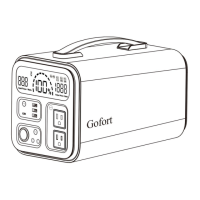

 To Next Page