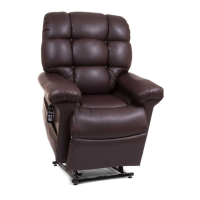
This document is an owner's manual for Golden Technologies Power Lift & Recline Chairs, specifically covering MaxiComfort™ Models. The manual provides detailed information on installation, operation, safety guidelines, maintenance, and warranty.
Function Description:
The Golden Technologies Power Lift & Recline Chair is a medical device designed to assist individuals in sitting down and standing up. It features the MaxiComfort™ System, which offers a wide range of body positioning options, including three recline positions, one lift position, and combinations thereof. This system allows users to find their preferred comfort position. The chair is equipped with an AutoDrive hand control for easy operation.
Important Technical Specifications:
- Power Source: The chair can be configured with three external power source scenarios:
- Transformer without battery backup (an uninterruptible power supply or UPS can be purchased separately for battery backup).
- Transformer with battery backup using two 9-volt alkaline batteries (not included). These batteries provide enough energy to bring the chair to a seated position from recline in case of a power failure and should be replaced after one use or yearly.
- Transformer with a rechargeable lithium battery pack. This pack also provides enough energy to bring the chair to a seated position from recline during a power failure and self-charges when the chair is plugged in.
- Voltage: The chair operates on standard household voltage (115-120V A.C., 60 Hz).
- Recline Space: Approximately 25 inches of space is required between the back of the chair and a wall or other obstruction for unobstructed recline.
- Hand Control: The AutoDrive hand control features buttons for various movements:
- S1: Recline back
- S2: Bring back to upright position
- S3: Raise footrest and seat
- S4: Lower footrest and seat (also lifts chair from seated position in some models)
- S5: Lower chair from raised position (also raises footrest in some models)
- S6: Lift chair from seated position (also closes and lifts chair from reclined position in some models)
- S7: Raise chair to standing height
- S8: TV position (preprogrammed memory button)
- S9: Recline position (preprogrammed memory button)
- S10: Sleep position (preprogrammed memory button)
- SP (M): Program button for memory functions and feature locks.
- Additional buttons for headrest (S11, S12) and lumbar (S13, S14) adjustments are available on specific models (e.g., PR512, PR632, PR735, PR766).
- Safety Features:
- Motors are designed to shut off when they reach their fully extended or retracted positions.
- Smart Tek™ (Power Indication) system with LED lights on the hand control, transformer, and motor connection to indicate power status and aid in troubleshooting electrical disconnects.
- Function Lock feature to disable all hand control buttons except S7 (Raise) and S9 (Recline) to limit functionality.
- Hand control disable feature to disable all functions on the hand control.
- Weight Limit: Exceeding the stated weight limit can cause instability and a tip-over hazard.
Usage Features:
- Installation:
- The manual details how to install the seat back by aligning brackets and pushing down until an audible click is heard.
- Instructions are provided for connecting the AC/DC adapter (transformer) and, if applicable, installing 9-volt batteries or connecting a rechargeable lithium battery pack.
- Users are advised to adjust leg levelers to ensure the chair is level and to prevent the footrest from rubbing on high-pile carpets.
- The hand control cord should be routed and secured to the quick release cable clamp.
- Operation (AutoDrive Hand Control):
- Getting In/Out: Press S7 to raise the chair to a comfortable standing height. Press S5 (or S9 on PR512/PR632/PR735/PR766) to lower the chair to a seated position.
- Micro Adjustments: Buttons S1-S4 allow for precise adjustments of the backrest and footrest.
- Memory Buttons (S5, S6, S8, S10): These buttons are preprogrammed for common positions (Sit, ZG, TV, Sleep) but can be reprogrammed by the user.
- Programming Memory Buttons: To reprogram, hold the program button (SP) until the backlight flashes, then press the desired memory button (S5, S6, S8, or S10) within 5 seconds.
- Factory Reset: To reset memory buttons to factory settings, hold SP until the backlight flashes, then press S1 within 5 seconds, and then S4 within another 5 seconds.
- Hand Control Disable/Enable: Hold SP for 4 seconds until the backlight flashes, then press S7 to toggle disable/enable.
- Function Lock/Unlock: Hold SP for 4 seconds until the backlight flashes, then press S1, S2, S3, S6 in sequence to toggle lock/unlock.
- Headrest and Lumbar Adjustments (on specific models): Buttons S11 and S12 control headrest movement, while S13 and S14 control lumbar support.
- Lights Out Feature: Automatically turns off the hand control backlight after approximately 15 seconds of inactivity. Activated by holding SP until the backlight flashes, then pressing S1, S2, and S5.
Maintenance Features:
- Routine Checks: The manual emphasizes the importance of routine maintenance checks, some of which can be performed by the user, while others may require a provider's assistance.
- Cleaning: Users are advised to consult their provider for proper cleaning methods and types of cleaners.
- Electrical Components: Keep all electrical components free from moisture and liquid spills. Do not open any electrical components; there are no serviceable parts, and doing so will void the warranty.
- Wiring Inspection: Periodically inspect all wiring harnesses for cuts, damage, fraying, or disconnections. If damage is found, unplug the chair and contact the provider.
- Fastener Checks: Periodically check all fasteners for tightness, wear, and corrosion.
- Battery Replacement: 9-volt backup batteries should be replaced after one use or yearly, even if not used, to prevent leakage and property damage.
- Hand Control Routing: Instructions are provided for routing the hand control wire from one side of the chair to the other, involving lifting the back fabric, removing the wire from J-clips, unlocking and separating the extension wire, re-routing, and reconnecting.
Safety Guidelines:
The manual uses specific symbols to identify warnings, mandatory actions, and prohibited actions:
- WARNING (!): Indicates a hazardous situation that could result in death or serious injury.
- MANDATORY (square with dot): Indicates actions that must be performed to prevent personal injury or equipment damage.
- PROHIBITED (circle with slash): Indicates actions that should not be performed under any circumstance to prevent personal injury or equipment damage.
Specific safety warnings include:
- Read and follow the owner's manual.
- Beware of pinch/crush points (including child/pet crush hazards, transformer crush hazards).
- Adult, child, and/or pet tip-over hazard.
- Fire hazard (do not use electrical extension cords; ensure electrical products and wires are clear of the lift frame mechanism).
- Electrical hazard (do not immerse components in liquid, spill liquids, or open components).
- Indoor use only.
- Do not smoke while operating, sitting, or resting in the chair.
- Do not allow children or pets near the chair while operating, or to play with/operate the chair.
- Disable or unplug the hand control when the chair is not in use.
- Do not flop into the chair, especially in the lift position, to avoid damage and injury.
- Do not allow anyone to sit on laps, armrests, or footrests while operating the chair, as this can cause tipping.
- Do not place fingers/hands between the seat cushion and armrest while operating or plugged in.
- Do not retrieve fallen objects from under the chair while plugged in.
- Do not operate the chair if persons, pets, or obstructions are under/in front of the footrest or under/behind the chair.
- Position yourself, children, and pets correctly when reclining to avoid tip-over hazards.
- Do not operate the chair while intoxicated or with impaired mental/physical abilities.
- Consult a doctor if you have medical conditions that limit mental/physical capacity.
- Consult a physician regarding the Trendelenburg position.
- Place the chair at the specified distance from a wall/corner (25 inches) to prevent damage and voiding the warranty, and to avoid tripping hazards from power wires.
- Periodically inspect and replace 9VDC backup batteries to prevent leakage.
- If the user is unconscious or sleeping, the hand control may activate inadvertently.
- Discontinue use and contact a provider immediately if any problem with operation is discovered.
- Do not allow objects to restrict movement of the back or footrest, as this can cause damage.

 Need help?
 General

 To Next Page