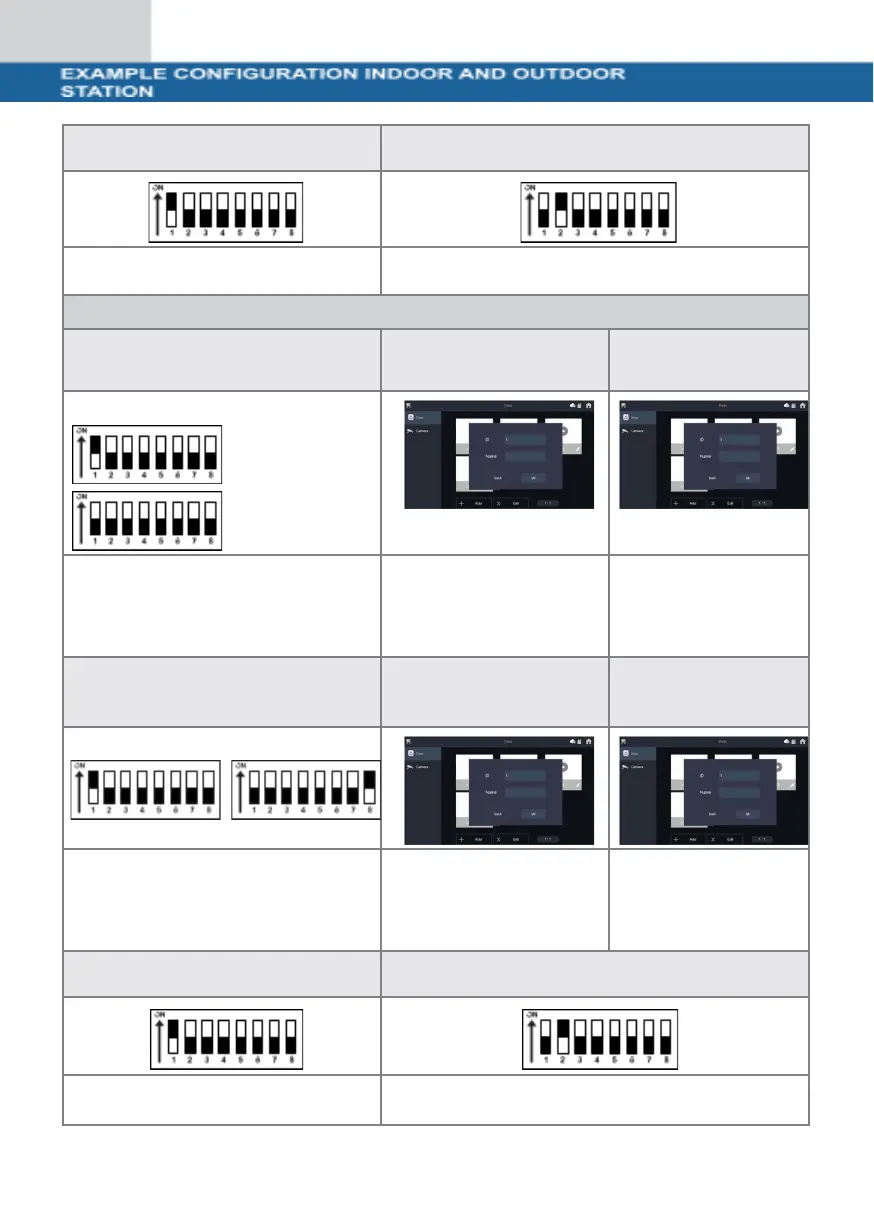
DIP switch door station 1
DIP switch door station 2
Set DIP switch 1 to the ON
position (up).
Set DIP switch 2 to the ON
position (up).
Configuration 2x indoor station and 2x door station
DIP switch indoor station 1
Indoor station settings
for door station 1
Indoor station
settings for
door station 2
Switch DIP switch 1 to the ON
position (top).
Click on
"Add" to assign a name to
the door station and set
the ID to 1.
Click on
"Add" to assign a
name to the door
station and set the
ID to 22.
DIP switch indoor station 2
Indoor station settings
for door station 1
Indoor station
settings for
door station 2
Switch DIP switch 1 and DIP
switch 16 to the ON position
(top).
Click on
"Add" to assign a name
to the door station and
set the ID to 1.
Click on
"Add" to assign a
name to the door
station and set the
ID to 22.
DIP switch door station 1
DIP switch door station 2
Set DIP switch 1 to the ON position
(up).
Set DIP switch 2 to the ON
position (up).


 To Next Page
 Loading...