STEP 3: CAPTURE / CAPTURE / CAPTURA
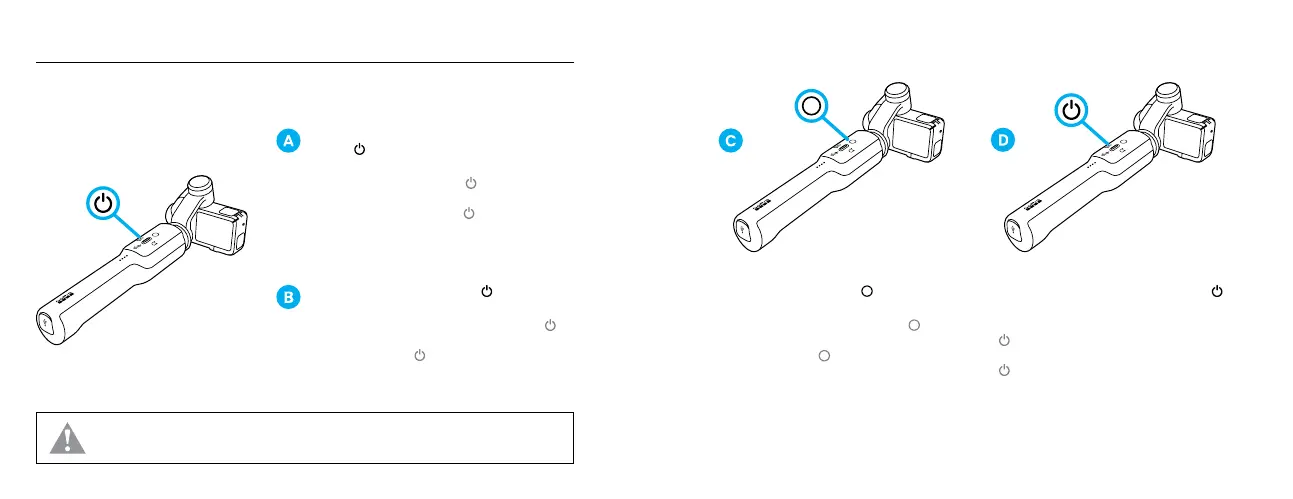
Press the Power/Mode button [ ] to select
the mode.
Appuyez sur le bouton Alimentation/Mode [
]
pour sélectionner un mode. / Pulsa el botón de
Encendido/Modo [ ] para seleccionar el modo.
WARNING: To prevent damage to the grip, do not power it on without a camera installed. / AVERTISSEMENT: pour éviter
d’endommager la poignée, ne l’allumez pas sans qu’une caméra soit installée. / ADVERTENCIA:
Para evitar que la empuñadura sufra
cualquier daño, no la enciendas sin que hayas montado una cámara.
With the camera installed, press the Power/Mode
button [ ] to power on the system.
Lorsque la caméra est installée, appuyez sur le
bouton Alimentation/Mode [
] pour allumer
le système. / Con la cámara instalada, pulsa el
botón de Encendido/Modo [ ] para encender
el sistema.
Press the Shutter button [
] to start and
stop recording.
Appuyez sur le bouton Obturateur [
] pour
lancer et arrêter l’enregistrement. / Pulsa el
botón Obturador [ ] para iniciar y detener
la grabación.
Press and hold the Power/Mode button [
]
to power o.
Maintenez le bouton Alimentation/Mode
[
] enfoncé pour éteindre le système. / Pulsa
y mantén presionado el botón Encendido/Modo
[ ] para apagar.


 To Next Page