STEP 2: ASSEMBLE / ASSEMBLAGE / ENSAMBLAJE
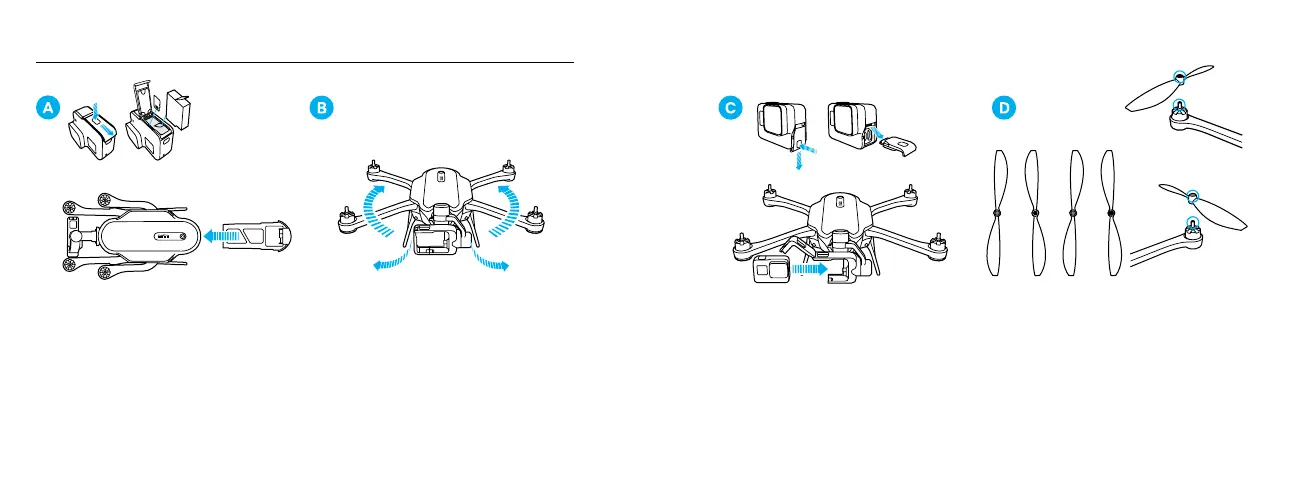
Insert the microSD card and batteries.
Insérez la cartemicroSD et les batteries. /
Inserta la tarjeta microSD y las baterías.
Unfold the landing gear and arms.
Déployez le train d’atterrissage et les bras. /
Despliega el tren de aterrizaje y los brazos.
Remove the camera door, then open the harness
and insert the camera.
Retirez la porte de la caméra, ouvrez le harnais
puis insérez la caméra. / Retira la puerta de la
cámara. Luego, abre el arnés e inserta la cámara.
Lightly tighten the propellers by hand. Propellers
are color-coded to match the correct motors.
Serrez légèrement les hélices à la main. Un
code couleur permet d’associer chaque hélice
au moteur correspondant. / Ajusta suavemente
las hélices con la mano. Las hélices están
codicadaspor color para coincidir con los
motores correspondientes.


 To Next Page