EasyManua.ls Logo

GoPro REMO - The Basics of Your GoPro Remo; Device Components Overview; Updating Remo and Camera Software

GoPro REMO
23 pages
Print Icon
To Next Page IconTo Next Page
To Previous Page IconTo Previous Page
Loading...
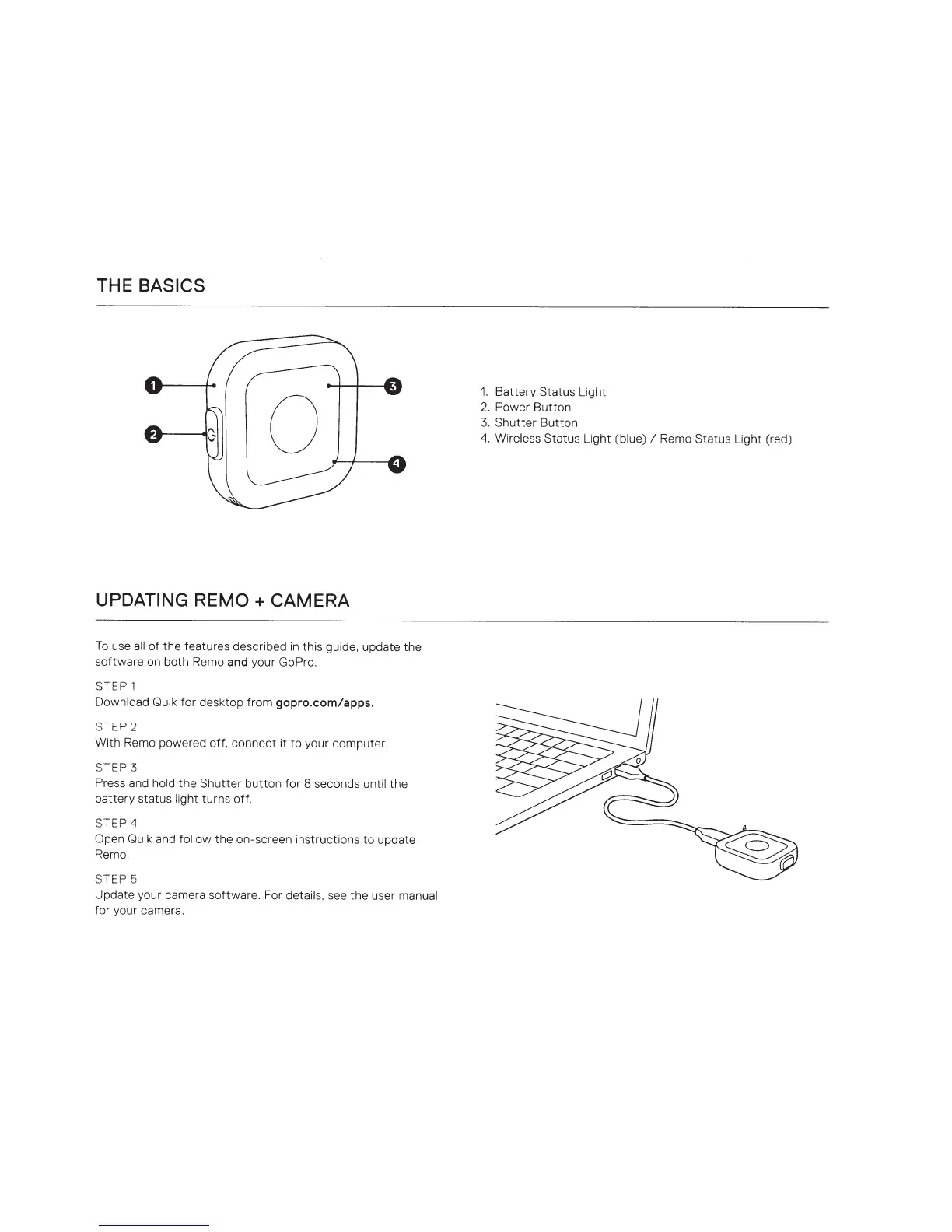
THE BASICS
UPDATING
REMO
+
CAMERA
To
use
all
of
the
features described
in
this guide, update
the
software on both Remo
and
your GoPro.
STEP
1
Download
Quik
for
desktop from gopro.com/apps.
STEP 2
With Remo powered off,
connect
it
to
your computer.
STEP
3
Press and
hold
the
Shutter
button
for 8 seconds
until
the
battery
status
light
turns off.
STE
P~
Open
Quik and
follow
the on-screen instructions
to
update
Remo.
STEP 5
Update your camera software. For
details, see
the
user
manual
for your camera.
1.
Battery
Status Light
2.
Power
Button
3.
Shutter
Button
~.
Wireless
Status Light
(blue)
I
Remo Status Light (red)

Related product manuals