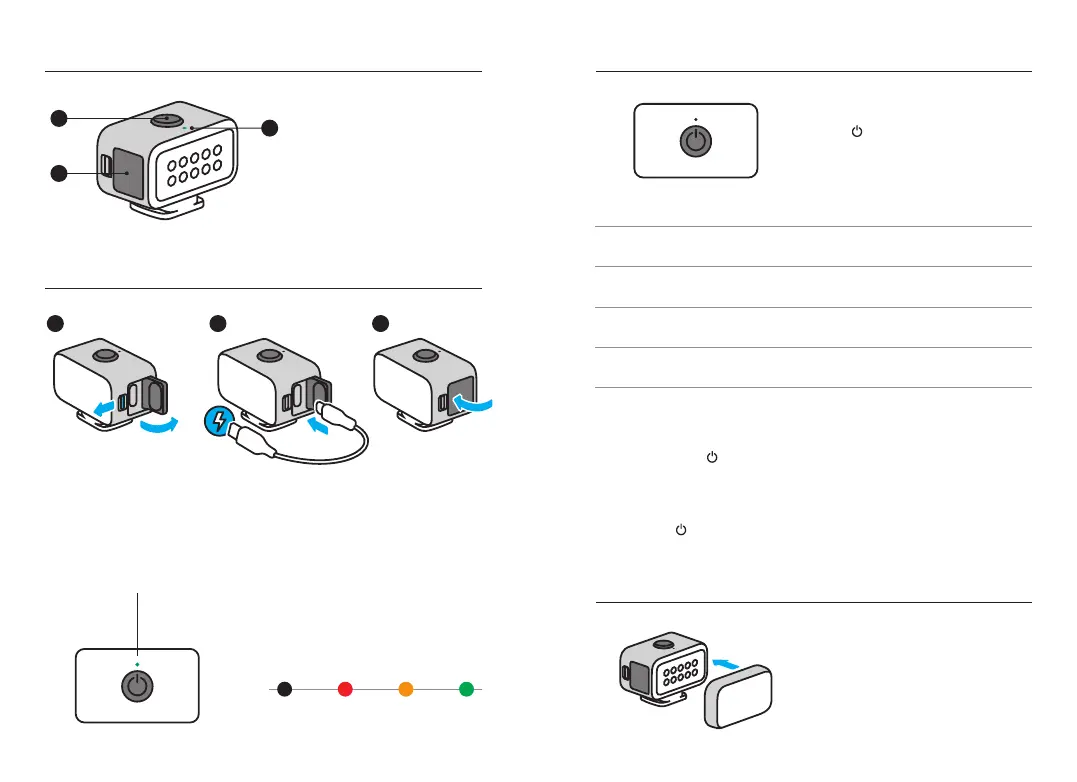
Attach the diuser to soften the light.
Attaching The Diuser
Light Basics
Charging It Up
1. Power Button
2. USB-C Door
3. LED Power Indicator
O 1–10% 11–40% 41–99%
CHARGING
The LED will pulse green when charging
and turn o when the battery is fully
charged. It takes about 1.5 hours to
fully charge the battery.
BATTERY LIFE
1
2
3
Heads Up: Be sure that the door is locked and waterproof by rmly pressing it shut
after charging.
3
1
2
LED Power Indicator
Choosing The Brightness
Press
to cycle through the three
levels of illumination and the strobe.
OVERDRIVE
Quickly double press
to boost
illumination to 200 lumens for
30 seconds.
POWERING OFF
Press and hold
.
TECH SPECS
Color temperature without
diuser: 5700K.
Color temperature with
diuser: 5000K.
CRI: 90+
Brightness Battery Life
*
Level 1 20 lumens 6 hours
Level 2 60 lumens 2 hours
Level 3
125 lumens
120 lux @1m
1 hour
Strobe 7 hours
*Battery life may vary based on usage and other external conditions.


 To Next Page