GOST Phantom – Installation + Programming Guide
support@gostglobal.com or (954) 565-9898 8
08-System Setup
“User Profile”
This is the only initial step of the installation where the
installer will need to enter the master code when entering the
system setup menu. You can program up to sixteen different
users onto the GOST Phantom. A User is defined as a person
with access to the system via a pass code and/or key fob
remote. Common examples of the Master, User 2, and User 3
are the owner, crew member, and boat washer respectively.
Every user can have only one key fob. The User Profile area
of programming allows the master user to change user
passwords, user voice labels, user text labels, and add/delete
key fobs. Once you change the master code (User 1) from the
default “1234”, only the new master code will be able to access
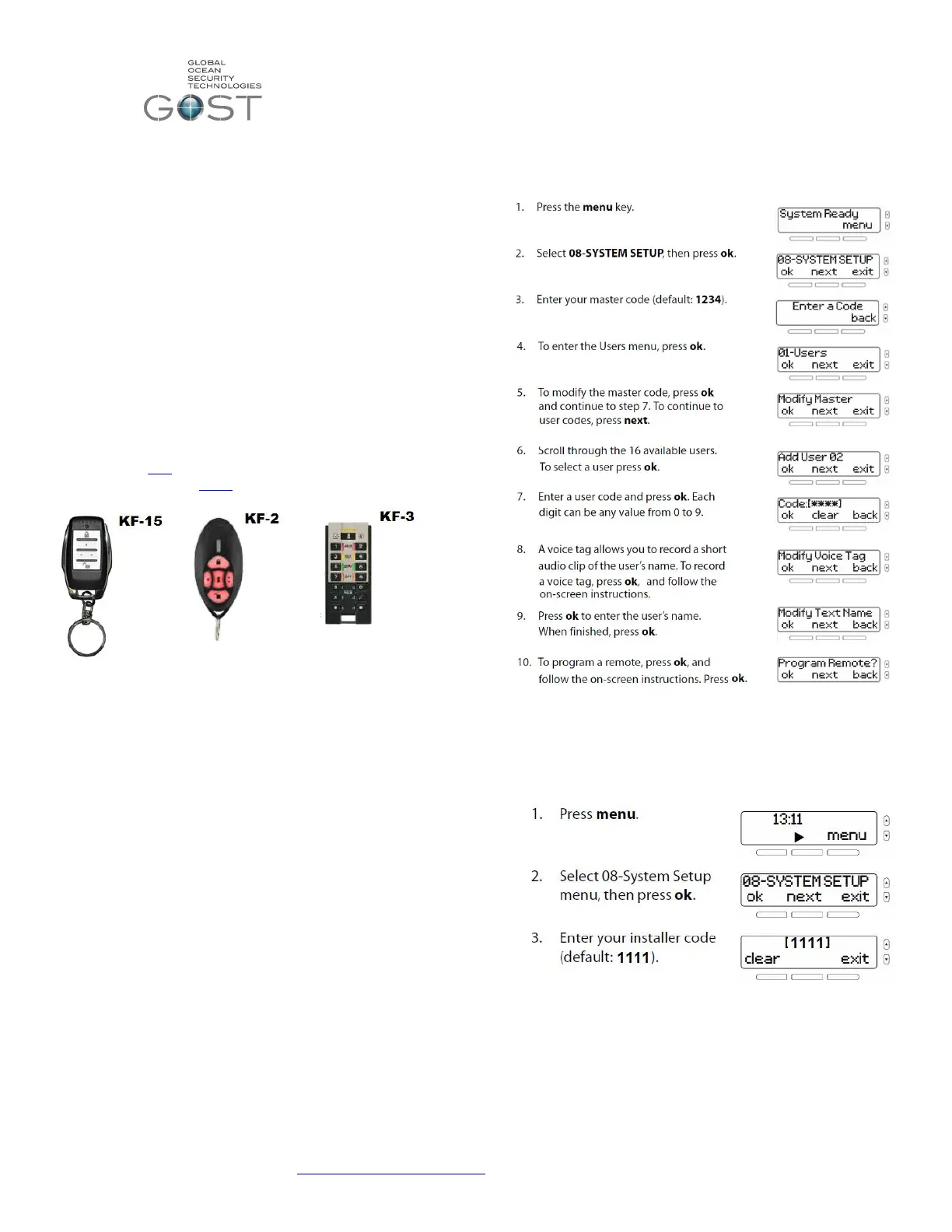
the user profile. The three types of key fobs that are
compatible with the GOST Phantom shown in Figure 9 below.
* Note- For every user code programmed to the GOST
Phantom, there can be a key fob. However for every key
fob programmed, there must be a user code associated to
it.
Figure 9
To program the user codes and Key Fobs follow the steps
below. Note that if adding multiple key fobs you will need to
add additional users. Until the installer is ready to turn over the
system to the system master, it is suggested that you make the
user 2 code “2222”, the user 3 code “3333”, etc. as to keep
things easy to remember. Though it is extremely important to
change the codes later once the owner is ready to take master
user control over their new yacht security and monitoring
system.
08-System Setup
“Installer Programming”



 To Next Page
 Loading...