29 EN
program change is possible. With the On / Off button, the cooking process can be
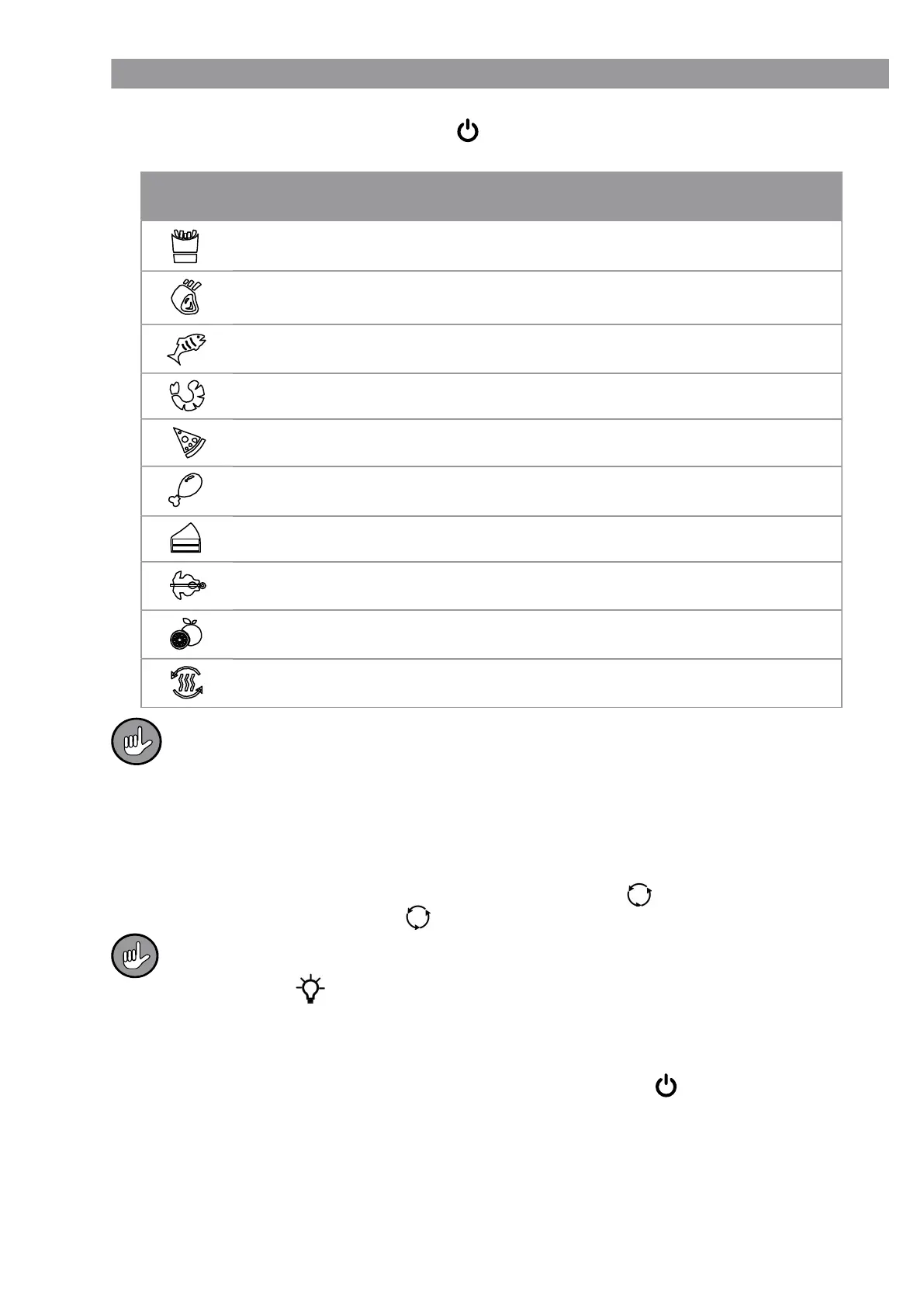
started immediately. The symbols represent the following presettings:
Symbol Programme Temperature
Cooking
time
Chips 200 °C 15 min
Steaks / cutlets 175 °C 25 min
Fish 165 °C 15 min
Shrimps 160 °C 12 min
Pizza 180 °C 15 min
Chicken 185 °C 40 min
Baking 160 °C 30 min
Rotary grilling
(with automatic rotating function)
190 °C 30 min
Drying 30 °C 2 h
Heat up 115 °C 12 min
The temperatures and cooking times which are set for the programmes are mere-
ly averages and should be adjusted if necessary. As the ingredients diff er due to
their origin, size, shape and quality, the actual cooking temperatures and times
may vary. Make sure before serving that meat and poultry are thoroughly
cooked.
If needed, change the cooking time or temperature of a selected programme wirh the
buttons + / - (17 and 21).
11. If the rotating basket or the rotating spit is used, touch the button (18) to start the
rotating function. (Touching the button again will stop the rotating function.)
Until you are properly familiar with the device, the condition of the food should be
checked in between times to ensure that it does not burn. To do this, switch on the
light using the button (20) or open the door. When the door is opened, oper-
ation is interrupted automatically and the light switches on. Operation is resumed
once the door is closed.
12. Once the cooking time has elapsed, the device switches off automatically and a beep
is heard. If the device is to be stopped prematurely, press the On / Off button.
13. Carefully open the door and take the cooked items out of the device. Only ever take
out the rotating basket or rotating spit using the removal tool (5).
14. Remove the mains plug from the plug socket after use.
15. Allow the used accessories and device to cool down and then clean them (see the
“Cleaning” chapter).



 To Next Page