EasyManua.ls Logo

GPX KC220S - Remote Control Guide; Remote Control Button Functions

GPX KC220S
12 pages
Print Icon
To Next Page IconTo Next Page
To Previous Page IconTo Previous Page
Loading...
CUSTOMER HELPLINE | 1-314-621-2881 GPX | KC220S 7
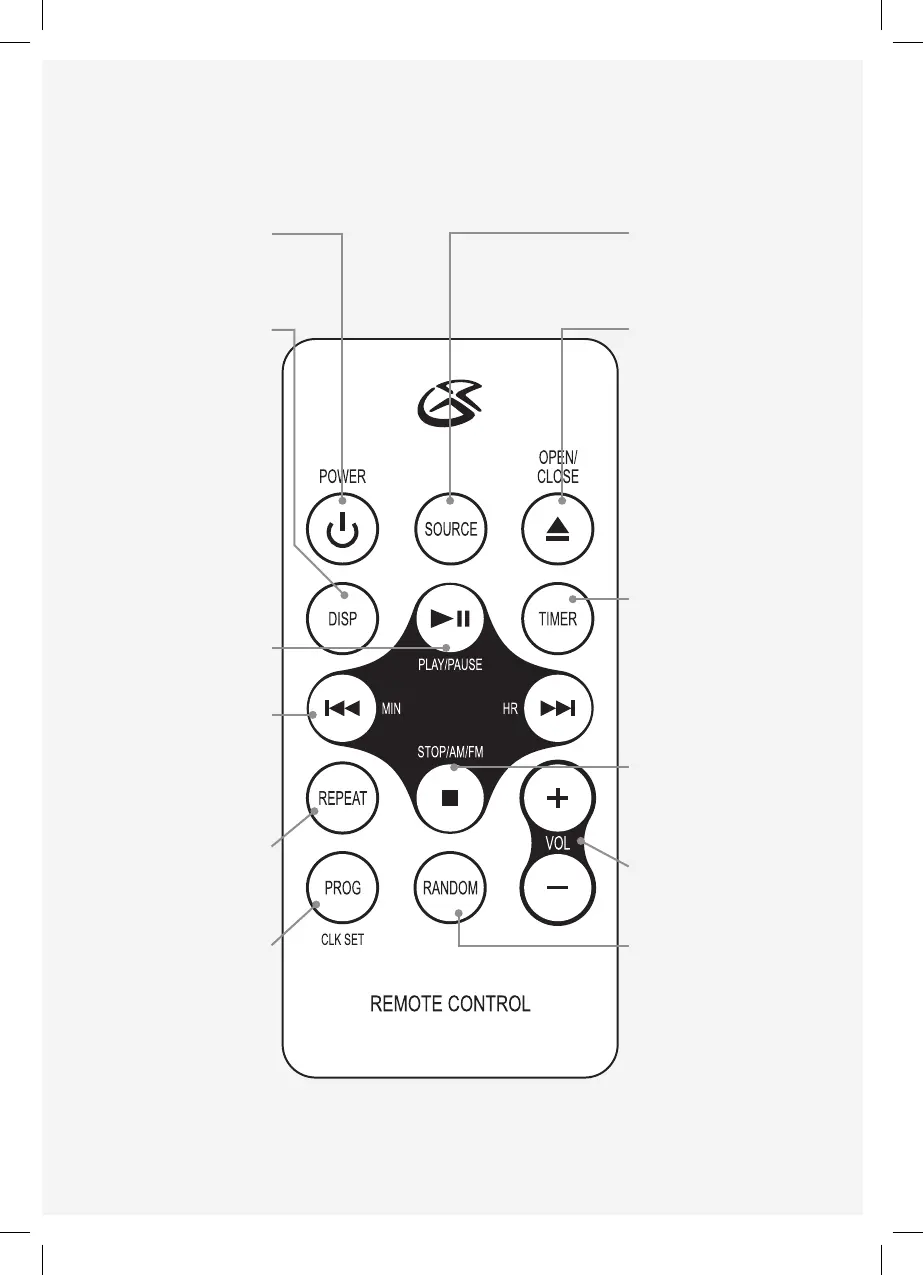
POWER
Press to turn the under
cabinet music system
o or on.
DISPLAY
Press to switch between
the clock and radio
station in RADIO MODE.
PLAY/PAUSE
Press to play or pause a
loaded CD.
SKIP/SEARCH
Press to skip between
tracks on a loaded CD.
Press and hold to search
and individual track on
a loaded CD.
REPEAT
Press to repeat the
current CD track or the
entire album.
PROG/CLKSET
Press to program a
CD to play tracks in a
designated order.
Press and hold in power
o mode to set the
clock.
SOURCE
Press to switch between
CD MODE, RADIO
MODE, and AUX MODE.
OPEN/CLOSE
Press to open or close
the CD DRAWER.
TIMER
Press repeatedly to set
the timer.
STOP/AM/FM
Press to stop a CD
during play.
Press to switch between
AM and FM in RADIO
MODE.
VOLUME
Press to adjust the
volume.
RANDOM
Press to play tracks
from a loaded CD in a
random order.

Related product manuals