TodownloadthisUser’sGuideinEnglish,Spanish,orFrench,ortogetanswerstofrequentlyaskedquestions,visit
thesupportsectionat:www.gpx.com
ParadescargaresteManualdelUsuarioeninglés,españolyfrancés,oparaobtenerrespuestasapreguntas
frecuentes,visitelaseccióndeapoyoen:www.gpx.com
Pourtéléchargerceguidedel’utilisateurenanglais,espagnoloufrançais,oupourobtenirdesréponsesàdes
questionsfréquemmentposées,consultezlarubriqued’assistancesur:www.gpx.com
ForWarrantyInformationandthemostup-to-dateversionofthisUser’sGuide,gotowww.gpx.com
Customer Service:1-888-999-4215| Email Support:prodinfo@dpiinc.com| Email Parts:partsinfo@dpiinc.com
Copyright©2014DigitalProductsInternational(DPI,Inc.)Allothertrademarksappearinghereinaretheproperty
oftheirrespectiveowners.Specicationsaresubjecttochangewithoutnotice.
INTERNATIONAL SUPPORT
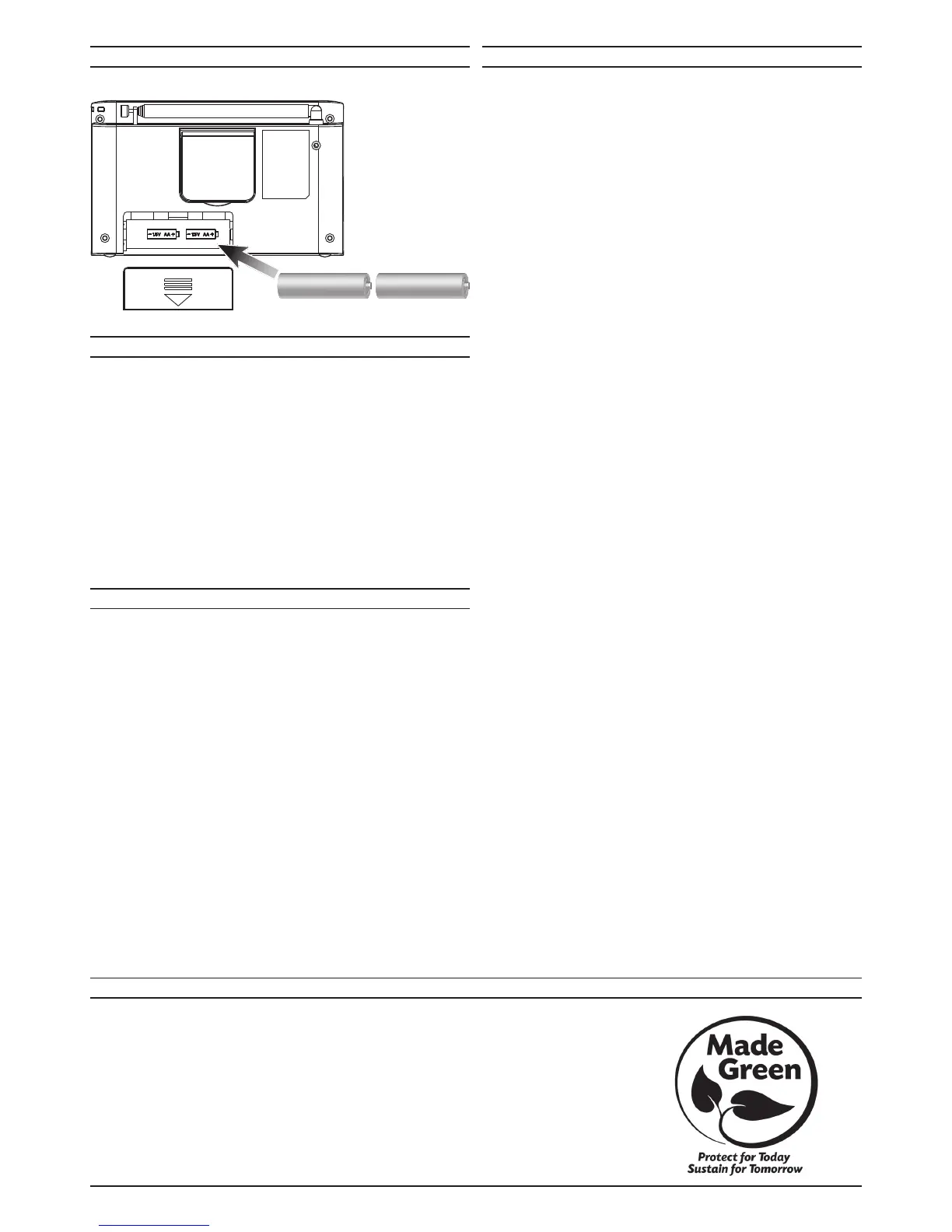
BATTERY POWER
Requires2AAbatteries(notincluded).
Tuning the AM or FM Radio
1. PresstheBandbuttontoswitchbetweenAMorFM.
2. PresstheSearchbuttonstomoveupordownthefrequencyscale.
Setting Memory Presets
1. PresstheBandbuttontoselectthedesiredradioband:AM,FM,orSW.
2. PresstheSearchbuttonstoselectthedesiredfrequency.
3. PresstheMembutton. “P01” will begin ashing on the display.
4. PresstheM−/M+buttonstoselectwhichpresettosaveto(P01-P10).Press
theMembuttonagaintosetthatpreset.
5. UsetheM−/M+buttonstoquicklyselectradiopresets.Eachband,AM,FM
andSW,hastheirownradiopresets.
Shortwave Radio
Itistypicalforshortwaveradioreceptiontobepoororspotty.Itishighly
recommendedtousetheradioatnight,asmorefrequenciesaregenerally
available.Theshortwavefrequencybandonthismodelhassixseparatefrequency
ranges.Thesecanbefoundonthebackoftheunit,ontheretractableapabove
thebatterycompartment.
DX Button
SwitchotheDXfunctionifonlystationswithahigheldstrengtharetobe
received.Thisisrecommended,forexample,ifadesiredweaklocalstationis
superimposedbystrongernationalchannels.
ToswitchotheDXfunction,presstheDXbuttonwhenthedeviceisswitchedon.
The“DX”indicatorthenfadesoutfromthedisplay.
CLOCK & SLEEP TIMER
ALARM
RADIO
Setting the Clock
1. Withtheradioo,presstheClockbuttontwice.The LED display will begin
ashing the time.
2. PresstheM−/M+buttonstosetthehours.“PM” will display when in 12 hour
time format.
3. PresstheSearchbuttonstosettheminutes.
4. Thetimeissetwhenthedisplaystopsashing.
Setting the Sleep Timer
1. PresstheSleepbuttontobeginsettingthetimer.The time in minutes will be
seen on the display. Example: 90 = 90 minutes, 80 = 80 minutes, etc.
2. KeeppressingtheSleepbuttonuntilthedesiredtimeisreached.Waitfor
thedisplaytoreturntotheradioinformation.When the timer is set, the word
“SLEEP” will be seen above the radio information.
3. ToturntheSleepTimero,setthetimefor“00”.The word “SLEEP” will
disappear from the display.
Setting the Alarm
1. Withtheradioo,presstheAlarmbuttontwice.The LED display will begin
ashing the Alarm time.
2. PresstheAlarmbuttonagaintosetthealarmforbuzzer, radio,orOFF.
A bell indicates the alarm buzzer, a music note indicates radio, and no graphic
indicates the alarm is o.
3. PresstheM−/M+buttonstosetthehours.
4. PresstheSearchbuttonstosettheminutes.
5. Thealarmtimeissetwhenthedisplaystopsashing.
SNOOZE & Alarm O
1. PresstheSNOOZEbuttontopostponethealarmforabout9minutes.The
alarmsoundsagainafterthistime.
2. PressthePOWER ON/OFFbuttontostopthealarm.Thealarmisswitched
ountilthenextday.
AnAMantennaisbuiltintotheunit.ToimproveAMradioreception,adjustthe
positionoftheclockradio.ToimproveFMandSWradioreception,extendand
adjustthepositionofthetelescopicantennaontherearoftheunit.


 To Previous Page
 Loading...