18
4-C To Use Bottom Position
• Para usar la posición inferior
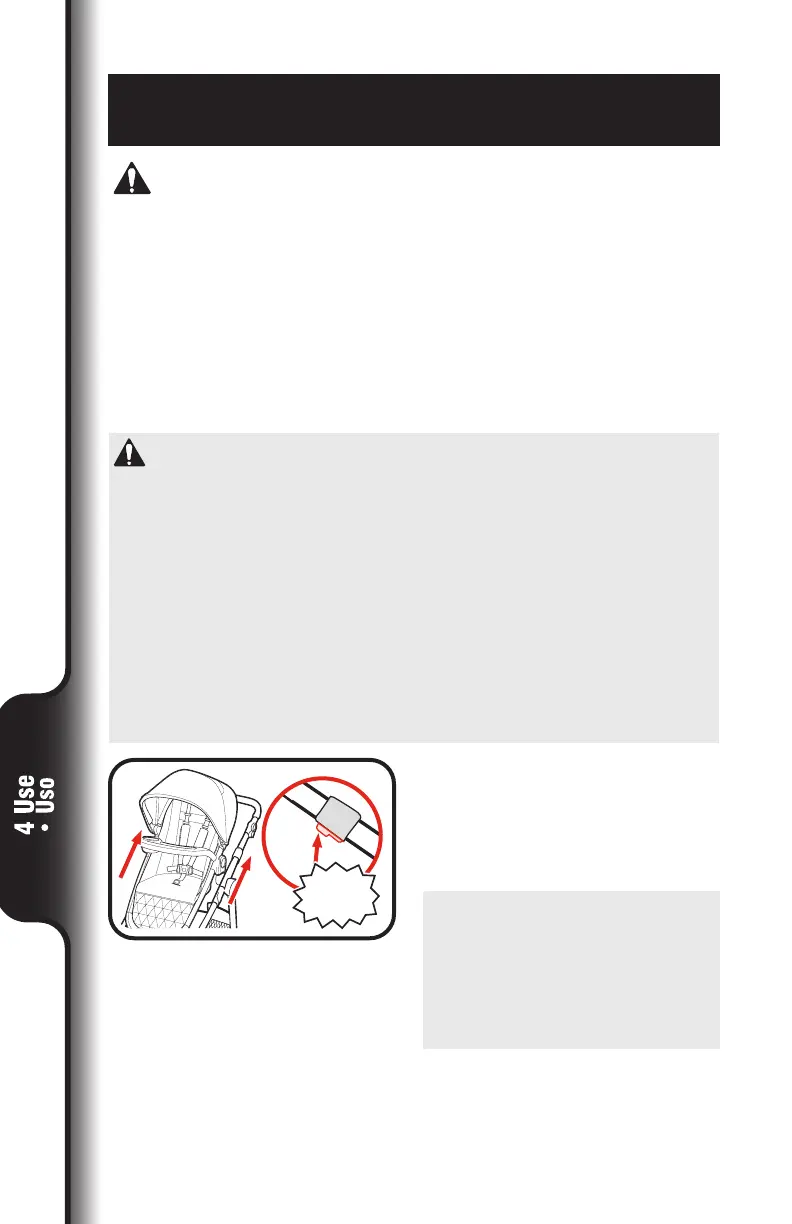
1. Para elevar la altura mientras el
asiento está instalado, oprima
los botones en los costados del
armazón y tire del asiento hacia
arriba hasta que ambos costados
se bloqueen en la posición más
alta.
1. To raise the height while the seat
is installed, push buttons on
sides of frame and pull up on the
seat until both sides lock into the
highest position.
SNAP!
¡CLIC!
WARNING
• ONLY the toddler seat, accessory seat (sold separately), and
Click2Store™ Stroller Organizer (sold separately) can be used in the
bottom mount.
• DO NOT USE infant car seat or carry cot in the bottom mount.
• TOP stroller mount must be in highest position to use bottom
accessory mount.
• DO NOT use the bottom seat position without the top position also being
loaded.
See warnings for additional information.
ADVERTENCIA
• En el montante inferior, SOLO pueden usarse el asiento para niños
pequeños, el asiento accesorio (vendido por separado) y el
organizador para cochecito Click2Store™ (vendido por separado).
• NO USE el asiento de automóvil para niños pequeños o el moisés de
transporte en el montante inferior.
• El montante SUPERIOR del cochecito debe estar en la posición más
alta para usar el montante inferior.
• NO utilice la posición del asiento inferior sin que la posición superior
también esté ocupada.
Vea las advertencias para más información.




 To Next Page