Mo
Tu We Th Fi
PM
Mo
Tu We Th Fi
PM
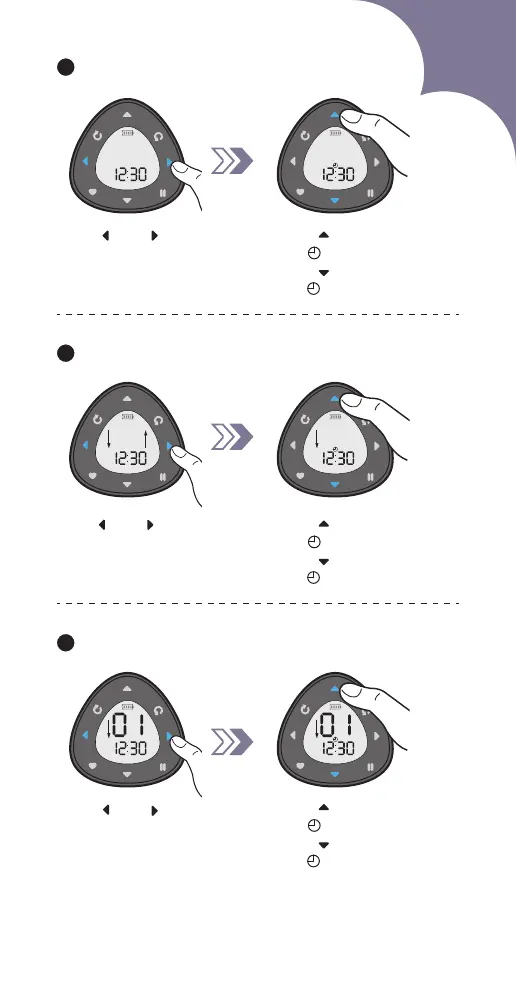
Set action of the blind. 6
7
Mo
Tu We Th Fi
PM
Mo
Tu We Th Fi
PM
Mo
Tu We Th Fi
PM
5
Mo
Tu We Th Fi Sa
Su
PM
Press " " or " " to select
the day of the week.
The selected one will be
flashing.
Press " " to save
and " " icon will show up.
Press " " to cancel
and " " icon will disappear.
Press " " to save
and " " icon will show up.
Press " " to cancel
and " " icon will disappear.
Press" " or " " to switch
between open and close,
the selected one will be
flashing.
Press " " to save
and " " icon will show up.
Press " " to cancel
and " " icon will disappear.
Press " " or " " to select
the channel number.
The selected one will be
flashing.
Set the day of the week (Multi-choice).
Set channels (Multi-choice).
35



 To Next Page