6
Maintenance
Inspect and clean all components and replace if necessary.
I. Electronic cartridge
The battery must be replaced 10 years after initial operation
of the fitting, at the latest.
Batteries which are almost discharged are indicated by
a flashing indicator lamp.
1. Activate cleaning mode, see section Cleaning mode.
2. Remove screw (C), see Fig. [3].
3. Lever out electronic cartridge (D) with battery (E)
and pull out.
4. Take out battery (E), check the contacts, clean and,
if necessary, replace the battery.
Assemble in reverse order.
Shut off water supply.
II. Solenoid valve
1. Remove screw (C), see Fig. [3].
2. Lever out cartridge (D) and pull out.
3. Remove screws (F) and detach solenoid valve (G)
with adapter (H), see Fig. [4].
4. Remove plate (J) and pull solenoid valve (G)
out of adapter (H).
5. Remove filter (K).
Assemble in reverse order.
When inserting into adapter (H), solenoid valve (G)
must be turned clockwise against the stop.
Ensure that seals (L) of adapter (H) engage in the grooves
on the housing. Install screws (F) and tighten evenly and
alternately.
Replacement parts, see fold-out page I
( * = special accessories).
Care
For directions on the care of this fitting,
refer to the accompanying Care Instructions.
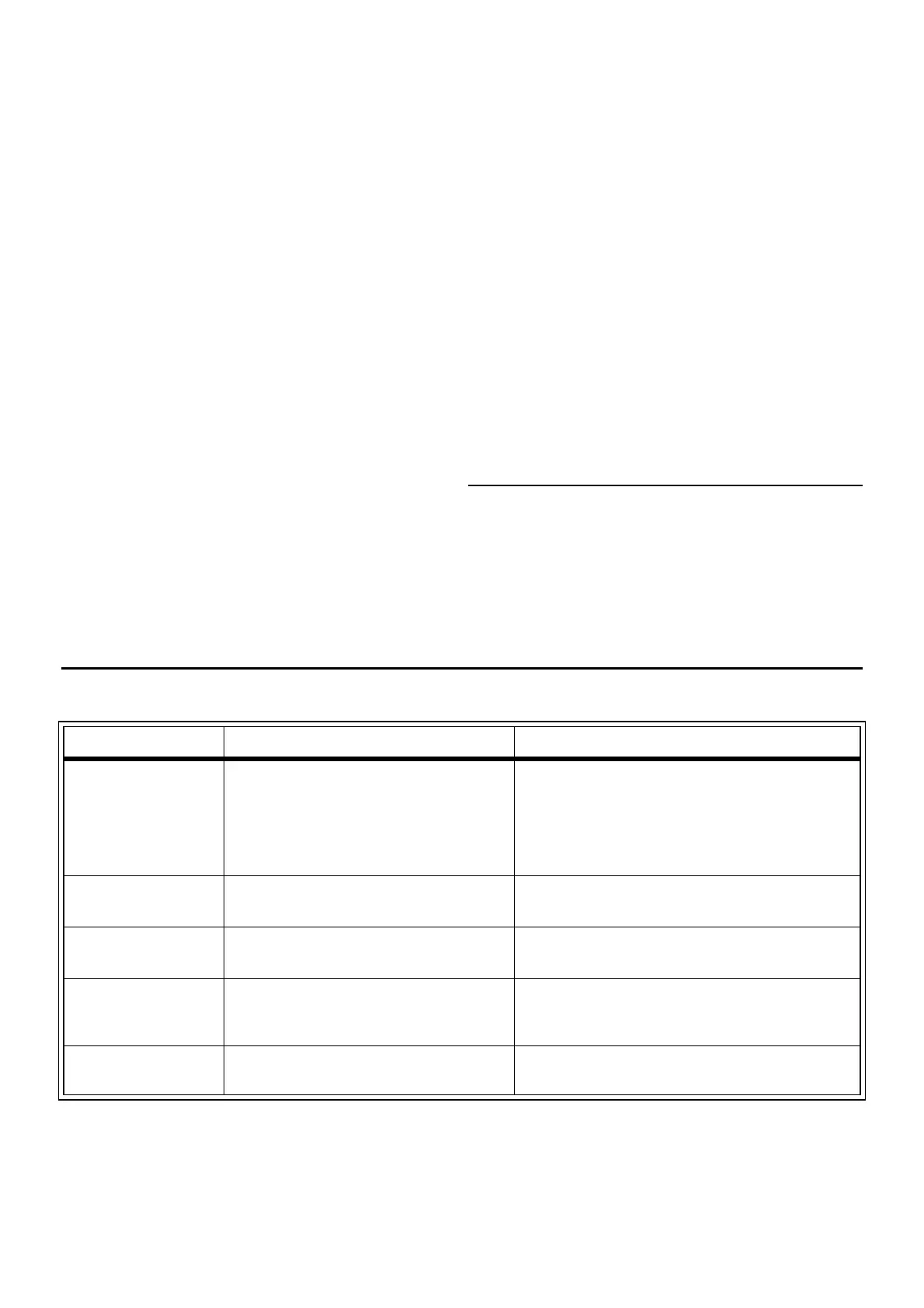
Fault/ cause/ remedy
Fault Cause Remedy
Water not flowing • Electronics faulty
• Battery without contact
• Water supply interrupted
• Filter upstream of solenoid valve blocked
• Solenoid valve defective
• Battery discharged
- Replace, see Cartridge maintenance
- Clean contacts, see Cartridge maintenance
- Open shut-off valves
- Clean, see Solenoid valve maintenance
- Replace, see Solenoid valve maintenance
- Replace, see Cartridge maintenance
Indicator lamp
flashes
• Battery almost discharged
• Cleaning mode active
- Replace, see Maintenance of electrical cartridge
- Quitting cleaning mode, see description
Water flowing
continuously
• Electronics faulty
• Solenoid valve defective
- Replace, see Cartridge maintenance
- Replace, see Solenoid valve maintenance
Undesired /
excessively long
water flow
• Detection range of sensor system set too
high for local conditions (undesirable
reflection)
- Change detection zone or type of detection with
remote control (Special accessories, Prod.
no.: 36 206)
Flow rate too low • Water supply restricted
• Filter upstream of solenoid valve dirty
- Check supply lines
- Replace, see Solenoid valve maintenance



 To Next Page
 Loading...