06
Instructions
Using USB
Insert a USB driInsert a USB drive to Play Music Automatically. Select and press the MODE button
repeatedly on the remote control until in USB mode or press the Mode button
repeatedly on the sound bar to enter USB mode. To Play/Pause the track or Skip
Forwards/Backwards to a selected track, use the remote control. Audio played
through the connected USB device will now be heard.
Using the RCA IN Cable
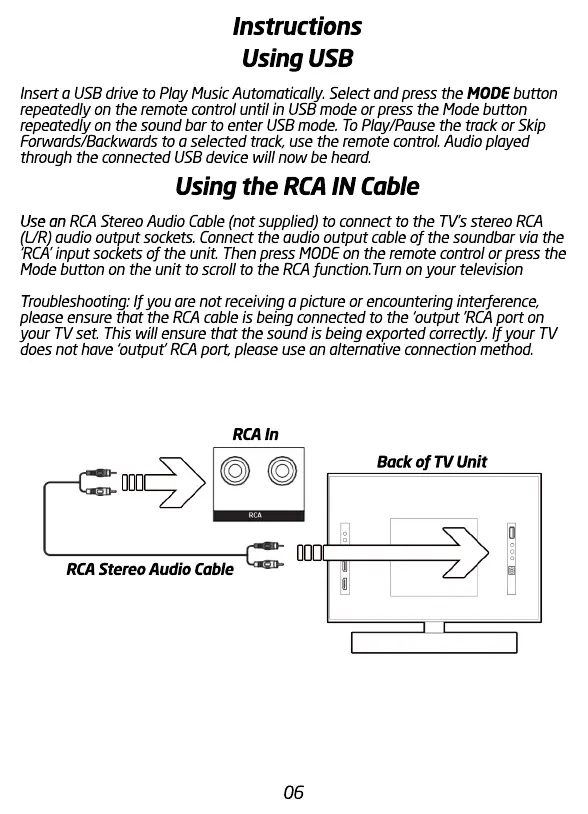
Use an Use an RCA Stereo Audio Cable (not supplied) to connect to the TV’s stereo RCA
(L/R) audio output sockets. Connect the audio output cable of the soundbar via the
‘RCA’ input sockets of the unit. Then press MODE on the remote control or press the
Mode button on the unit to scroll to the RCA function.Turn on your television
T
Troubleshooting: If you are not receiving a picture or encountering interference,
please ensure that the RCA cable is being connected to the ‘output ’RCA port on
your TV set. This will ensure that the sound is being exported correctly. If your TV
does not have ‘output’ RCA port, please use an alternative connection method.
RCA Stereo Audio Cable
RCA In
Back of TV Unit


 To Next Page
 Loading...