EasyManua.ls Logo

Grundig DKR 2000 - Page 39

Grundig DKR 2000
Print Icon
To Next Page IconTo Next Page
To Previous Page IconTo Previous Page
Loading...
39
ENGLISH
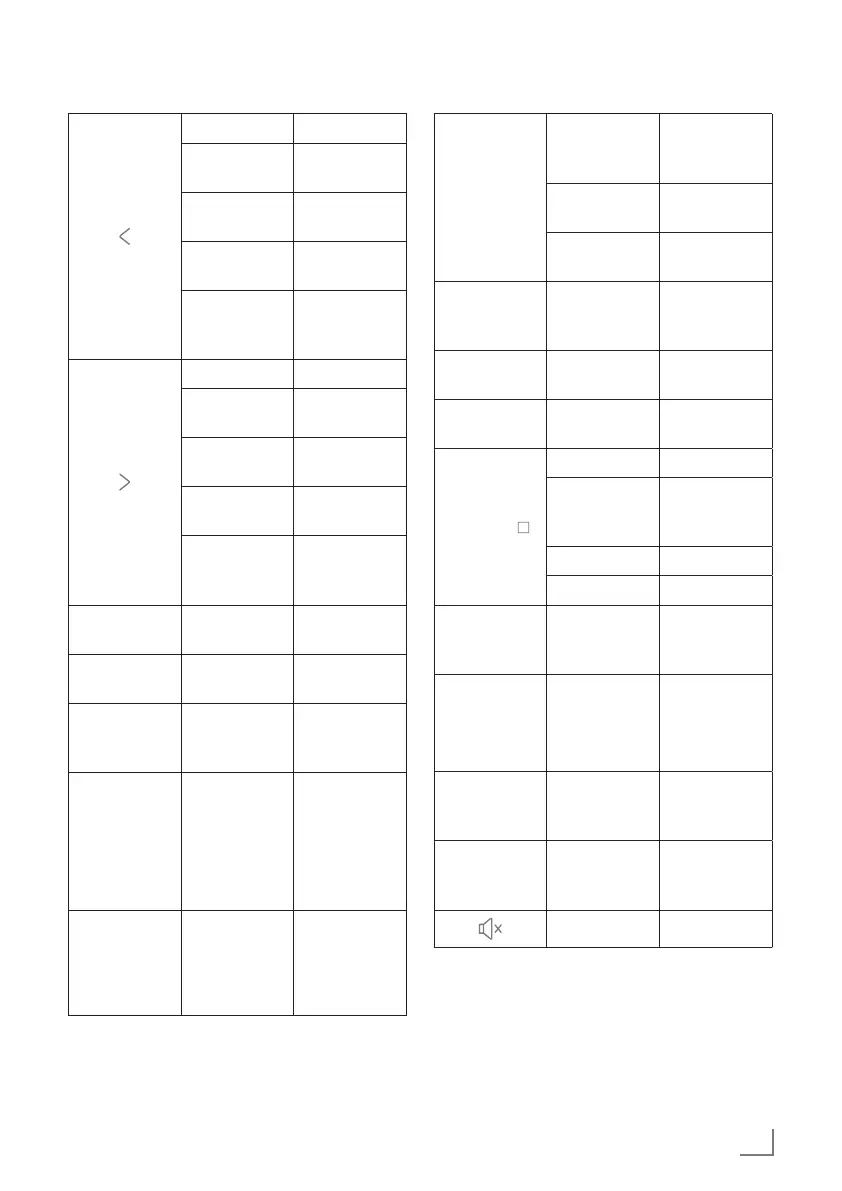
OVERVIEW - REMOTE CONTROL
---------------------------------------------------
DAB: nil -
Radio: Man-
ual tune+
Auto tune a
station (high)
BT: Next
track
-
CD: Next
track
Fast forward
Menu/Op-
tion: Enter/
Move right
-
DAB: nil -
Radio: Man-
ual tune+
Auto tune a
station (high)
BT: Next
track
-
CD: Next
track
Fast forward
Menu/Op-
tion: Enter/
Move right
-
VOL -
Volume level
step decrease
Volume level
decrease
VOL +
Volume level
step increase
Volume level
increase
EQ
Switch Equal-
ize to next
option
-
MEM/
PROG
DAB/FM:
Recall preset
list
CD: Save
program
tracks
Recall save to
preset list
Open pro-
gram tracks
MENU
DAB/FM/
BT/CD:
Call/Exit
mode menu
-
INFO
DAB/FM:
Information
switch
-
BT: Status/
Date switch
-
CD: Informa-
tion switch
-
FOLD -
CD: select
Previous
folder
-
FOLD +
CD: select
Next folder
-
REP
CD: Switch
Repeat mode
-
AUTO /
DAB: nil DAB: ATS
FM: Auto
tune next sta-
tion
FM: AMS
BT: nil -
CD: Stop -
INTRO
CD: Introduc-
tion/Cancel
play
-
DISPLAY
DIMMER
Display back-
light level set
(low/Mid/
High)
-
CLOCK
Call option:
Time/Date
set
-
ALARM
Call Alarm
menu/Alarm
Stop
-
Volume mute -