EasyManua.ls Logo

Grundig STR 310 - Page 37

Grundig STR 310
39 pages
Print Icon
To Next Page IconTo Next Page
To Previous Page IconTo Previous Page
Loading...
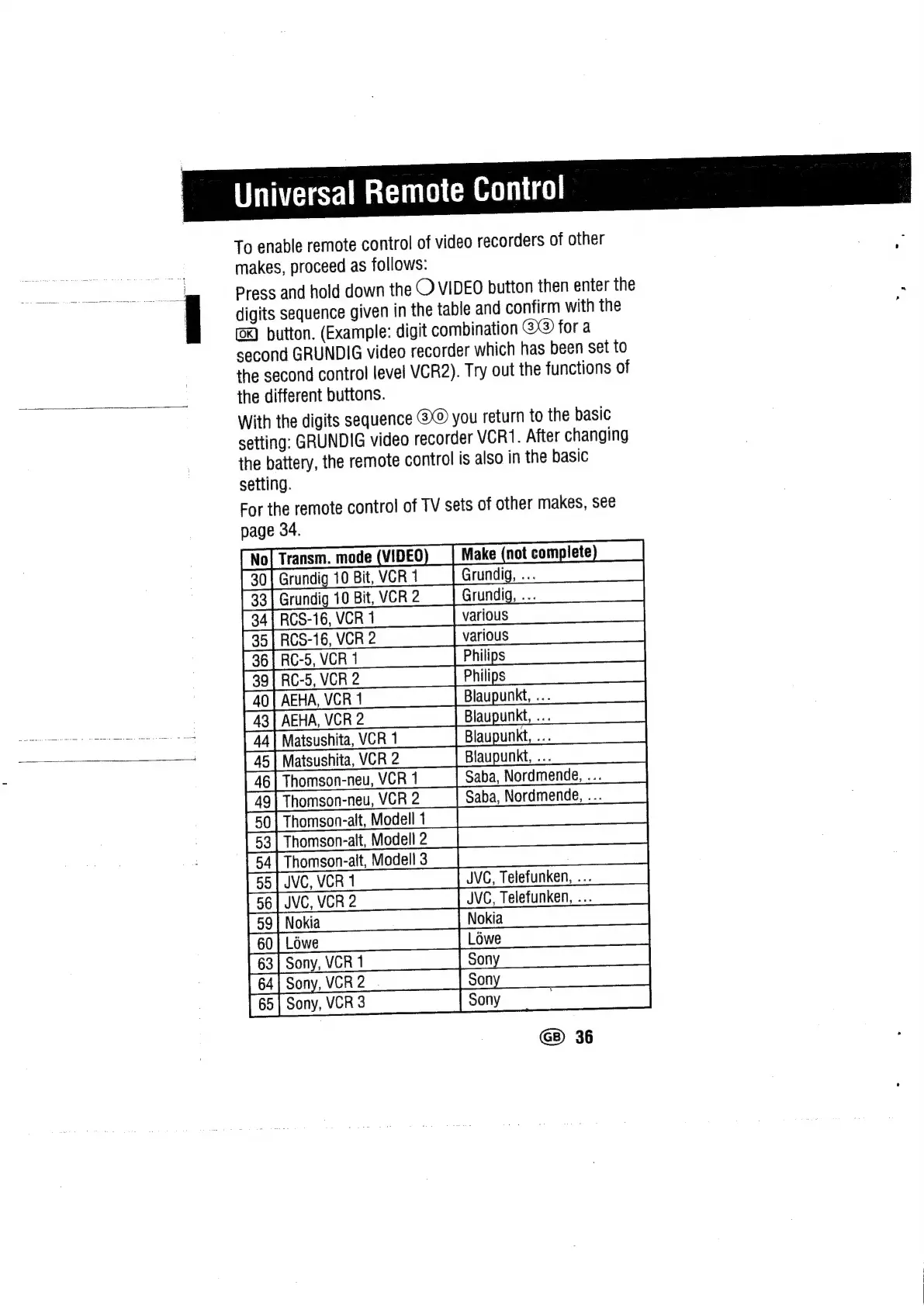
Universal
Remote
Control
To
enable
remote
control
of
video
recorders
of
other
makes,
proceed
as
follows:
Press
and
hold
down
the
O
VIDEO
button
then
enter
the
digits
sequence
given
in
the
table
and
confirm
with
the
button.
(Example:
digit
combination
@@)
for
a
second
GRUNDIG
video
recorder
which
has
been
set
to
the
second
control
level
VCR2).
Try
out
the
functions
of
the
different
buttons.
With
the
digits
sequence
you
return
to
the
basic
setting:
GRUNDIG
video
recorder
VCR1.
After
changing
the
battery,
the
remote
control
is
also
in
the
basic
setting.
For
the
remote
control
of
TV
sets
of
other
makes,
see
page
34.
Transm.
mode
(VIDEO
rundig
10
Bit,
VCR
1
vindig
10
Bi
VCR2—
|
Grundig...
Go1}Oo}G2
any)
&lao)}o
ic
(1
rs
iets
t
t)
4
p
5
D
6
aba,
Nordmende,
...
aba,
Nordmende,
...
0
3
4
S|
RI
|cCo}c
Wwlo|wolam
Min
oy
b/
|)
ite)
VC,
Telefunken,
...
VC,
Telefunken,
...
or}
o1j or} oO.
fora
tS.)
forater)
oi
tr}
Co
co
A
an
GB)
36

Related product manuals