1 2 1 2 5
4
3 6
STATUS
The Bluetooth function is on and waiting for
connection.
The Bluetooth connection is established.
BLUETOOTH INDICATOR
Flashing indicator
Solid indicator
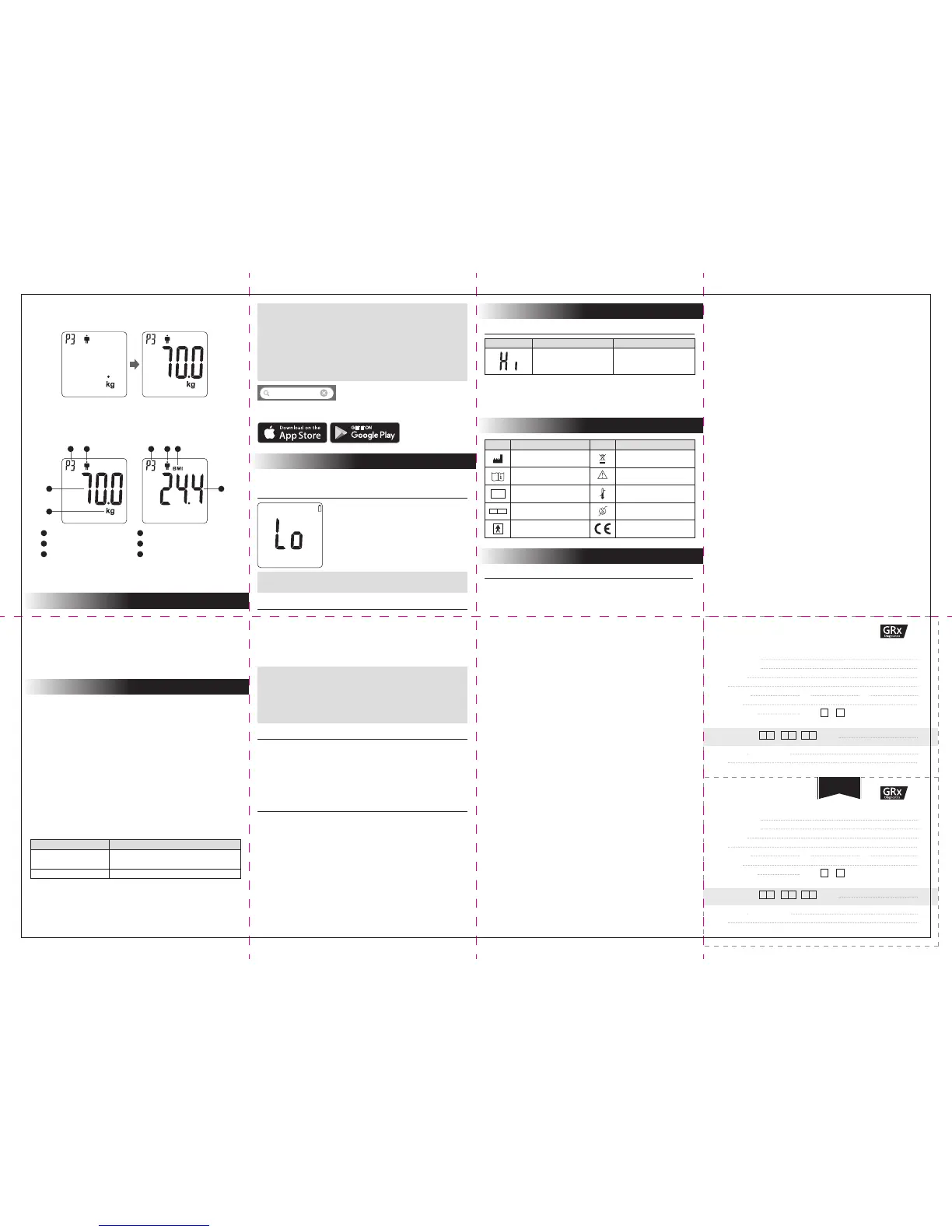
3. Step onto the weighing platform.
Stand still and distribute your weight evenly while the scale is measuring your
weight.
4. Displaying the result.
The scale shows your measurement results as follows:
5. Step off the weighing platform.
The result is saved in the scale memory and can enter Bluetooth mode.
When the value is stabilised, it will flash three times and the scale will then
calculate your BMI.
Personal Profile Number
Gender: Male or Female
Your Weight
Weight Unit
BMI Indicator
Your BMI
5
6
1
2
3
4
Your scale stores measurement results with the corresponding personal
profile number in its memory.
Results in memory can be transmitted to a mobile device by wireless
connection.
This allows you to transmit and review up to 135 sets of measurement results
on a mobile device.
SCALE MEMORY
You can transmit data from the scale to your devices via Bluetooth. Please
note that you must complete the pairing between the scale and Bluetooth
receiver before transmitting data.
You can use the GRx Weight Scale with the GRx HC APP. GRx HC APP is
available on the App Store/Google Play for free download. Connect your
mobile device to the internet to search and download the GRx HC APP.
Pairing with your mobile device
1. Turn on the Bluetooth function on your mobile device.
2. With the scale off, press and hold the SET button until the Bluetooth
indicator is displayed on the screen.
3. Follow the instruction of the GRx HC APP to pair the device. (Search to
find the scale and then add it into app)
4. After successfully pairing the GRx HC APP with the device, your Bluetooth
function of the scale shall be on before transmitting data to your APP.
Bluetooth indicator on the weight scale
BLUETOOTH PAIRING
Low Battery Signal
Replacing the Battery
When replacing the battery, make sure that the scale is turned off.
1. Press the edge of the battery cover and lift it up.
2. Remove the old batteries and replace them with four 1.5V AAA alkaline
batteries
3. Close the battery cover.
Cleaning
1. To clean the outside of the scale, wipe it with a cloth slightly dampened
with water or or a mild cleaning agent, then dry with a soft dry cloth. Do
NOT immerse the scale in water.
2. Do NOT use chemicals or organic solvents to clean the scale.
3. Wipe the scale clean at once if any grease, sauce, vinegar, juice or other
substances that may cause damage are spilt on it.
Scale Storage
1. Storage condition: -25°C to 70°C (-13°F to 158°F), below 93% relative
humidity.
2. Avoid dropping the scale or heavy impact.
3. Avoid direct sunlight and high levels of humidity.
The scale will display the message shown to alert
you when the power is running low. This means it
is time to replace the battery.
WARNING!
If the incorrect type of battery is used, it may cause damage to the scale.
NOTE
• While the scale is in transmission mode, it is unable to measure your
weight.
• Make sure your device supports Bluetooth Smart Technology and has
Bluetooth actually turned on with the scale, within the receiving range,
before transmitting the data. For iOS and Android devices, please find
the GRx HC APP on the App Store and Google Play respectively.
• The Bluetooth functionality is implemented in different ways by the
various mobile device manufacturers; incompatibility issues between
your mobile device and the scale may occur.
NOTE
• Replacing the batteries does not affect the results stored in memory.
• Properly dispose of the batteries according to your local environmental
regulations.
• Batteries may leak chemicals if left unused for a long time. Remove the
batteries if you are not going to use the scale for an extended period (i.e.
3 months or more).
Your scale takes four 1.5V AAA alkaline batteries.
MAINTENANCE
General Information
Model no.: TD-2555
Power source: Four 1.5V AAA alkaline batteries
Dimensions & Weight: 340 (L) x 400 mm (W) x 26 mm (H), 3200 g without
batteries
Size of LCD: 98 (L) x 92 (W) (mm)
LCD: Backlight LCD
Range:
Gender: Male / Female
Height: 100 to 220 cm / 3' 3.5" to 7' 2.5"
Age: 6 to 99
Weight: 4 to 250 kg / 8.8 to 550 lb
Memory capacity: 135 sets
Accuracy: ±0.3kg for the range of 4.0kg to 60.0kg / ±0.5% for the range of
60.1kg to 250.0kg
Operating conditions: 5 °C to 40 °C (41°F to 104°F), below 85% R.H.
Storage conditions: -25°C to 70°C (-13°F to 158°F), below 93% R.H.
Battery life: At least 180 measurements (3 minutes each time) or at least 3
months on standby.
User profile: 5 individuals
Weight unit: lb / kg
Transmission: Bluetooth
Auto switch-off: (1) If the scale is left idle for 30 seconds during the
measuring mode, it will switch off automatically.
(2) If the scale is left idle for 3 minutes during the Bluetooth
mode, it will switch off automatically.
This device has been tested to meet the electrical and safety requirements of:
IEC/EN 61010-1, IEC/EN 61326-1, EN 301 489-1, EN 301 489-17, EN 300 328.
SYMBOL INFORMATION
SPECIFICATIONS
WHAT IT MEANS WHAT TO DO
The weighing subject
exceeds the maximum
capacity of the scale.
Remove the weighing
subject from the platform to
avoid damage.
MESSAGE
Error Messages
SYSTEM TROUBLESHOOTING
If you follow the recommended action but the problem persists, please
contact GRx Diagnostics. Do not attempt to repair or dissemble the scale by
yourself.
Referent
Manufacturer
Consult instructions for use
Serial number
Type BF Equipment
Authorised representative in
the European Community
Symbol Referent
Temperature limitation
Humidity limitation
CE mark
Symbol
Collection for electrical and
electronic equipment
Caution, consult
accompanying documents
SN
EC REP
Date obtained: / / Serial No:
Date obtained: / / Serial No:
WARRANTY REGISTRATION CARD
WARRANTY CERTIFICATE
[ Dealer’s Portion ]
[ Owner’s Portion ]
Product Name:
Owner’s Name:
Address:
Tel No: (M)
(H)
(W)
Email:
Date of Birth:
Gender:
M
F
Day
Day
Month
Month
Year
Year
*IMPORTANT: To qualify for the warranty, please fill in this card and mail to us within 6 months from date product obtained.
*NOTE: Please produce this card for warranty service.
Product Name:
Owner’s Name:
Address:
Tel No: (M)
(H)
(W)
Email:
Date of Birth:
Gender:
M
F
GP Surgery name and Address:
GP Surgery name and Address:
YEAR WARRANTY
Support Mobile:
iOS or Android and Bluetooth 4.0
GRx HC


 To Previous Page
 Loading...