Hexylon High-performance portable meter
32
stored
- SCR (only satellite band): Selects the SCR
parameters (multiswitch, standard and
slots) When a slot is enabled (for example
slot 3, freq. 1210MHz), the meter will tune
into the slot frequency (1210MHz) and
will set the slot with the meter parameters:
frequency, band (powering), and DiSEqC.
In addition, a SCR icon will be shown in the
bar at the top (SCR3) to indicate that the
slot is enabled. While the slot is enabled,
all the setting changes of the meter, will
be applied to the currently slot (SCR3).
6.4.- Features
This section explains all the features available to
visualize in the widgets of the Mosaic 3+1 and
Mosaic 6 modes.
Note: If the ASI input is selected, only Television
and Services features will be available.
6.4.1.- Television
This feature allows to visualize the selected service
image of the tuned channel.
Note: When the image is not available, one of these
icons will be shown:
• Only audio service
• Encrypted channel
• Data service
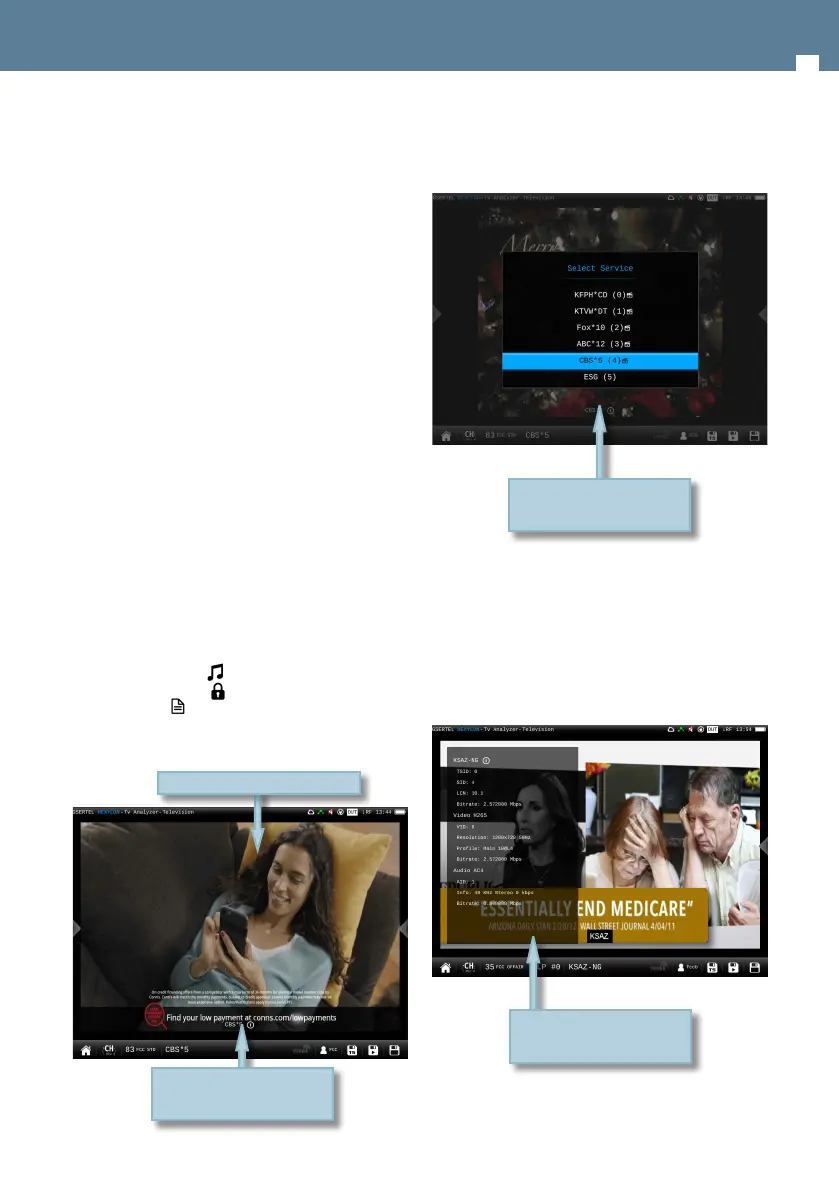
6.4.1.1.- Main window
Tap on the service name to see
all the information about it
Tap to see the list of services
Tapping on the screen, it appears a popup window
with the list of the channel services:
Next to the name of the service, the icons
indicating the transports are shown (image, one or
more audio transports). To change the audio, tap
again on the screen and select the same service
in the list, then a new pop-up window will appear
showing the available audios.
Tapping on the service name, it appears a popup
window with the information about it:
Tap on the service to select it
Tap to close the popup
window


 To Next Page
 Loading...